
Welcome back to Upgrade or Skip.
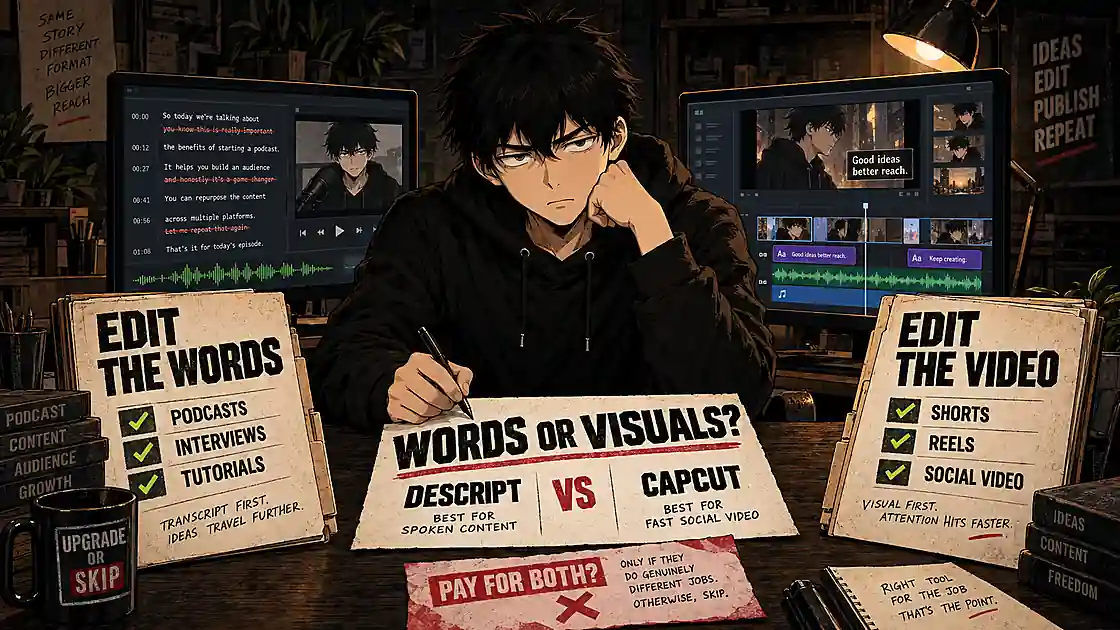
Descript and CapCut can both edit video, generate captions, use AI, and turn long recordings into shorter clips. But they are built around different ideas.
CapCut is a visual editor first. It is designed for quickly assembling footage, text, music, effects, and social-ready formats.
Descript is a transcript editor first. It turns spoken audio and video into text, then lets you edit the recording by editing the words.
That difference matters more than the length of either feature list.
If you make TikToks, Reels, Shorts, promotional clips, or template-heavy videos—especially on mobile—CapCut is usually the better choice. If you edit podcasts, interviews, tutorials, screen recordings, or talking-head videos, Descript can remove more tedious work.
For occasional creators, the best answer may be neither paid plan. Start free, complete real projects, and upgrade only after one workflow proves that it saves time every week.
Quick Verdict
Choose CapCut for short-form, social-first, visually active content and mobile editing.
Choose Descript for speech-heavy videos, podcasts, interviews, tutorials, and transcript-based editing.
Stay free if basic editing, captions, and exports already cover your real projects.
Skip paying for both unless each tool has a separate, repeated job.
| You mainly create… | Better choice |
|---|---|
| TikToks, Reels, or Shorts | CapCut |
| Mobile-first social content | CapCut |
| Template- and effects-heavy videos | CapCut |
| Podcasts or interviews | Descript |
| Talking-head YouTube videos | Descript |
| Tutorials and screen recordings | Descript |
| Occasional personal videos | Stay free |
| Complex cinematic or multicamera work | Consider another editor |
CapCut helps you edit the picture. Descript is strongest when you need to edit what people said.
Descript vs CapCut at a Glance
| Category | Descript | CapCut | Winner |
|---|---|---|---|
| Transcript-based editing | Core workflow | Available, but not the main experience | Descript |
| Podcasts and interviews | Excellent fit | Capable | Descript |
| Audio cleanup | Strong | Useful | Descript |
| Short-form social video | Good | Excellent | CapCut |
| Mobile editing | Not its main strength | Strong | CapCut |
| Templates and visual effects | Useful | Extensive | CapCut |
| Automatic captions | Strong | Strong | Tie |
| Traditional timeline editing | Capable | More natural | CapCut |
| Free starting point | Useful but limited | Generous for basic editing | CapCut |
| Predictable plan limits | Clear media-hour and credit allowances | Varies by plan, region, and platform | Descript |
Upgrade or Skip in 10 Seconds
- Upgrade to Descript: You edit speech-heavy content every week and text-based editing saves measurable hours.
- Upgrade to CapCut: You publish social video frequently and repeatedly use paid captions, effects, assets, background removal, or export tools.
- Stay free: You edit occasionally or cannot name the paid feature that solves a recurring problem.
- Skip both: You need professional color, advanced audio mixing, complex motion graphics, or a mature multicamera workflow.
What We Checked
This comparison focuses on the buying decision rather than a feature-count contest. We reviewed the companies’ current plan pages and support documentation, compared the core workflows, and examined recurring patterns in public user feedback.
Pricing and plan details can change. Descript publishes defined monthly and annual plan allowances. CapCut says its price can vary by region, device, platform, and promotion, so the checkout screen for your own account is the number that matters.
The Main Difference: Edit by Transcript or Edit by Timeline?
Descript: Edit Spoken Content Through Text
Descript transcribes a recording and connects the transcript to the media. Delete a sentence from the transcript and the corresponding audio or video disappears. Move a passage and the media moves with it.
This is especially useful when the hard part of editing is deciding:
- Which answer should stay in an interview
- Where a speaker repeated a point
- Which pause or filler word should be removed
- How to turn a long conversation into a tighter story
- Which moments should become short clips
Traditional editors can do all of this, but they make you find every moment on a timeline. Descript makes the spoken content searchable and editable as text.
That is its clearest advantage—and the reason our separate Descript review focuses on saved editing time rather than AI novelty.
CapCut: Edit Visual Content Directly
CapCut feels more like a conventional video editor. You import clips, place them on a timeline, trim them, add text and music, apply effects, generate captions, and export in a format suited to the destination.
Its strength is speed without requiring much technical knowledge. A beginner can usually find common tools quickly, especially for:
- Shorts, Reels, and TikToks
- Product and promotional clips
- Videos built around music, movement, and text
- Templates, transitions, animated captions, and effects
- Mobile-first capture-to-publish workflows
If this is your primary work, Descript’s transcript-first approach may feel like an unnecessary detour. CapCut is more direct because the picture—not the conversation—is the center of the project.
For a deeper look at its paid tier, read our CapCut Pro review.
Which Is Easier for Beginners?
CapCut is easier for most first-time video editors. Its tools usually describe the visible result: captions, background removal, transitions, filters, audio, and export. A beginner can experiment without first understanding an unusual editing model.
Descript is easier for a narrower group: people who already think in documents. Writers, podcasters, educators, and interview editors may understand transcript editing immediately. Someone trying to create a fast, effect-heavy montage may find it less intuitive.
So “easy” depends on the material:
- Visual sequence and social polish: CapCut is easier.
- Spoken narrative and removing unwanted dialogue: Descript is easier.
- Advanced color, sound, and multicamera production: Neither is the obvious long-term winner.
AI Features: Useful Work or Another Credit Meter?
Both products market AI heavily. That does not make every AI feature equally valuable.
Descript’s Practical AI Advantage
Descript’s most useful automation is attached to common editing work: transcription, filler-word removal, audio cleanup, clip creation, eye-contact correction, backgrounds, and generative assistance through Underlord.
The problem is metering. According to Descript’s current plan page, the Free plan includes 100 AI credits as a one-time allowance, while paid plans receive monthly credits. Descript also says unused monthly AI credits do not roll over.
That means a paid plan is not unlimited AI. The value comes from using the included tools to save repeatable working time—not from having an AI label on the subscription.
CapCut’s Practical AI Advantage
CapCut combines AI with a broader visual workflow. Depending on the plan and market, tools may include automatic captions, background removal, translation, noise reduction, generative effects, or other assisted features.
CapCut has also changed its membership structure in some markets. Its pricing-change documentation describes Standard and upgraded Pro options, with higher AI-point and cloud-storage allowances for Pro. Availability and exact allowances can differ by account.
Before paying, check:
- Which tools consume credits or points
- How much the selected plan includes
- Whether unused allowances expire
- What happens when a generation fails
- The price of additional usage
Do not buy “AI video editing.” Buy a specific feature that removes a specific repeated task.
Free Plans: Which One Lets You Do More?
Descript Free
Descript Free is best treated as a serious workflow test. It currently includes one media hour per month, 720p watermark-free export, and 100 one-time AI credits. That is enough to learn how transcript editing feels and complete a small project, but it is easy to outgrow if you upload long recordings every week.
The important limitation is not only export quality. Descript measures uploaded or recorded media against monthly media hours, and unused media minutes do not roll over.
CapCut Free
CapCut Free is usually the stronger general-purpose starting point. It can handle basic cutting, text, music, transitions, filters, captions, and common exports. Some assets and advanced tools are restricted, and a project containing a paid element can create an upgrade prompt at export.
The safest approach is simple: finish a complete project and make a short test export before committing hours to a deadline-sensitive video.
Free-Plan Winner
CapCut wins for general video editing. Descript Free wins only if transcript editing is the workflow you specifically need to test.
Descript Pricing: What Are You Actually Paying For?
At the time of this update, Descript lists:
| Plan | Monthly billing | Annual equivalent | Media hours | AI credits | Export |
|---|---|---|---|---|---|
| Free | $0 | $0 | 1/month | 100 one-time | 720p |
| Hobbyist | $24/month | $16/month | 10/month | 400/month | 1080p |
| Creator | $35/month | $24/month | 30/month | 800/month | 4K |
| Business | $65/month | $50/month | 40/month | 1,500/month | 4K |
The Hobbyist plan makes sense when a small weekly workload has already outgrown Free. Creator becomes more defensible for frequent long-form work, 4K delivery, and heavier AI use. Business is difficult to justify for an individual unless its extra allowance and collaboration features have a real job.
Do not choose a plan by aspiration. Use your previous month’s actual media volume.
CapCut Pricing: Check Your Checkout
CapCut does not offer one globally reliable price. Its official pricing help page says the amount varies by country, currency, platform, device, and promotion.
Before subscribing, confirm:
- The amount charged today
- The renewal price and billing interval
- Trial eligibility and end date
- Included AI points or credits
- Cloud-storage allowance
- Whether needed assets are part of this exact plan
- The cancellation route
An old review, screenshot, or search snippet cannot replace the offer shown inside your own account.
The Purchase Math
The useful question is not “Which app has more features?” It is “Which app removes more paid or frustrating work?”
Use two calculations:
Annual cost ÷ finished videos per year = software cost per video
Minutes saved per video × videos per month = monthly time recovered
Suppose transcript editing saves 35 minutes on each of eight monthly videos. That returns more than four and a half hours per month. Descript may be easy to justify.
Suppose CapCut’s captions, templates, and background removal save 20 minutes on 16 short videos. That returns more than five hours. CapCut Pro may be the better purchase.
But if you finish three videos a year, even an impressive tool can become an expensive icon you rarely open.
Which Is Better by Use Case?
Podcasts and Interviews: Descript
Long conversations create transcript problems more than visual problems. Searching, rearranging, and removing spoken passages is where Descript earns its place.
Talking-Head YouTube: Descript, With One Exception
Choose Descript when the content depends on explanation and dialogue. Choose CapCut when rapid captions, punchy effects, B-roll, and social pacing matter more than restructuring the script.
Shorts, Reels, and TikTok: CapCut
CapCut’s mobile workflow, templates, effects, animated text, music tools, and familiar vertical-video process make it the clearer fit.
Tutorials and Screen Recordings: Descript
Descript works well when the tutorial begins with a screen recording and spoken explanation that needs tightening. It also keeps the transcript useful for show notes, articles, or captions.
Visual Montages and Promotional Clips: CapCut
When timing, movement, music, transitions, and visual polish carry the message, CapCut is more natural.
Traditional Beginner Desktop Editing: CapCut—or Filmora
CapCut is easier for quick results. Creators who want a more traditional desktop editor with room to grow should also compare CapCut vs Filmora and our Movavi Video Editor review.
What Users Like—and What They Complain About
Public reviews are not controlled tests, but repeated patterns are useful when evaluating subscriptions.
Descript users commonly praise its transcript workflow, fast rough cuts, transcription, podcast tools, and ability to simplify speech-heavy editing. Recurring complaints include transcription errors, performance on larger projects, export problems, AI-credit limits, and a learning curve when the workflow behaves differently from a traditional editor. You can inspect current patterns in Descript reviews on G2.
CapCut users commonly praise its accessibility, fast social editing, templates, captions, and mobile convenience. Complaints often focus on shifting paywalls, plan confusion, credit limits, billing, support, performance, and discovering paid elements late in a project.
Neither set of complaints proves that every user will encounter the same problem. They do justify testing one complete project—including export—before paying annually.
Do You Need Both?
Usually, no.
Paying for both can make sense when the workflows are genuinely separate. For example, you might use Descript to clean and structure a 45-minute interview, then move selected clips into CapCut for vertical formatting, animated captions, and social effects.
That is a real production chain. “Both have interesting AI tools” is not.
Before adding a second subscription, ask:
- Which repeated task does it perform better?
- How many times will I use it each month?
- Does it replace another paid tool?
- Is the time saved greater than the transfer and learning overhead?
- Can my current editor already do the job well enough?
Subscription overlap is one of the easiest ways to fall into the AI subscription trap: every tool looks affordable alone, while the combined bill quietly becomes the largest feature.
Descript Pros and Cons
Pros
- Excellent transcript-based editing
- Strong fit for podcasts, interviews, tutorials, and talking-head content
- Useful transcription and audio-cleanup tools
- Fast way to find and remove spoken material
- Clear published media-hour and AI-credit allowances
Cons
- Free media allowance is small
- Paid AI credits and media minutes do not roll over
- Less natural for effect-heavy or mobile-first social editing
- Large projects can expose performance and workflow friction
- Not a replacement for a high-end editor in complex productions
CapCut Pros and Cons
Pros
- Very approachable for beginners
- Strong mobile and short-form workflow
- Large selection of captions, templates, effects, and visual tools
- Capable free version for ordinary projects
- Fast route from raw footage to social-ready video
Cons
- Pricing and plan details vary by account and market
- Paid assets can create export-time surprises
- AI points and feature access require careful checking
- Less efficient than Descript for restructuring long conversations
- Advanced editors may outgrow its color, audio, and project controls
The Upgrade or Skip Test
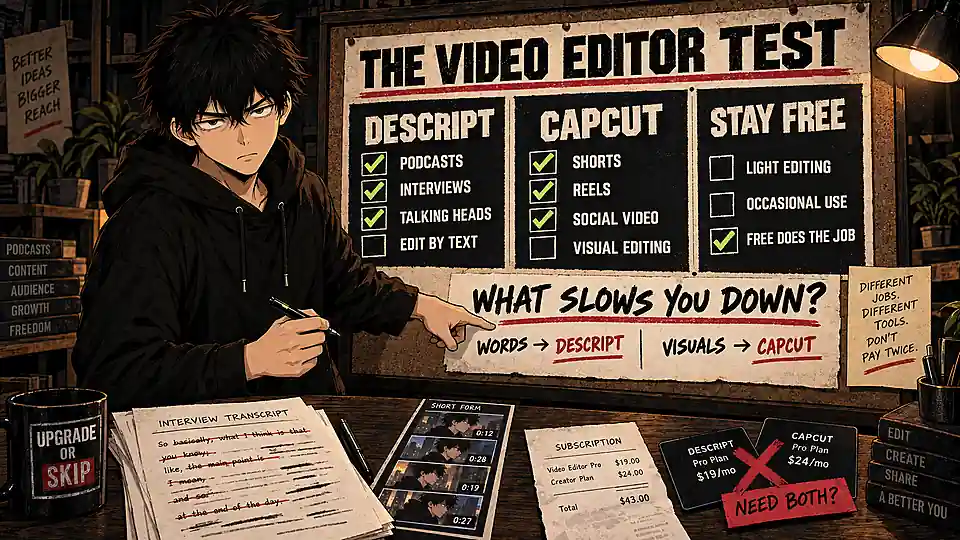
Use the free version of the better-matched tool for three real projects. Then record:
- Which paid feature stopped or slowed the work?
- How many minutes would the upgrade save per project?
- How often will that project type repeat?
- Does the work support income, clients, or consistent publishing?
- Can a free tool or existing subscription do the same job?
Upgrade only when the answer is specific.
“Descript removes 40 minutes of dialogue cleanup from every weekly interview” is specific.
“CapCut Pro looks more creative” is not.
Final Verdict
Descript and CapCut are not direct substitutes for every creator.
CapCut is the better AI video editor for short-form, mobile-first, and visually driven content. It offers the easier general starting point and the stronger free plan for ordinary video editing.
Descript is the better editor for podcasts, interviews, tutorials, screen recordings, and talking-head videos. Its transcript workflow can turn hours of timeline hunting into a document-editing task.
The paid decision is narrower:
- Upgrade to Descript when transcript editing saves time every week.
- Upgrade to CapCut when paid social-production tools remove repeated friction.
- Stay free while the limitations remain theoretical.
- Skip both if you need advanced production depth or only edit occasionally.
The best software is not the one with the most AI. It is the one that removes the most repeated work without creating a second problem on the credit card statement.
Frequently Asked Questions
Is Descript Better Than CapCut?
Descript is better for speech-heavy editing, including podcasts, interviews, tutorials, and talking-head video. CapCut is better for mobile editing, short-form social content, templates, effects, and visually driven projects.
Is CapCut Free Better Than Descript Free?
For general video editing, usually yes. CapCut Free can complete more ordinary visual projects. Descript Free is more useful as a focused test of transcript-based editing.
Can Descript Make Shorts and Social Clips?
Yes. It can identify clips, reframe content, add captions, and help repurpose long recordings. CapCut still offers a more natural workflow when the project depends heavily on visual effects, templates, music, and mobile publishing.
Can CapCut Edit Podcasts?
It can edit podcast video and audio, but Descript is usually faster when the difficult work involves searching, restructuring, and cutting a long conversation.
Does a Descript Subscription Include Unlimited AI?
No. Paid plans include monthly AI-credit allowances, and Descript says unused credits do not roll over. The Free plan currently includes 100 one-time AI credits.
Should I Pay for Both Descript and CapCut?
Only if they perform separate recurring jobs—for example, Descript for long-form dialogue editing and CapCut for final social-video packaging. Otherwise, choose the one that matches most of your work.
Sources
- Descript plans and pricing
- Descript media minutes and AI credits
- CapCut Pro pricing guidance
- CapCut membership and pricing changes
- Current Descript user reviews on G2
Next Up
NordVPN vs Surfshark: Which VPN Is Actually Worth Paying For in 2026?
Upgrade smarter. Skip louder.