
Welcome back to Upgrade or Skip.
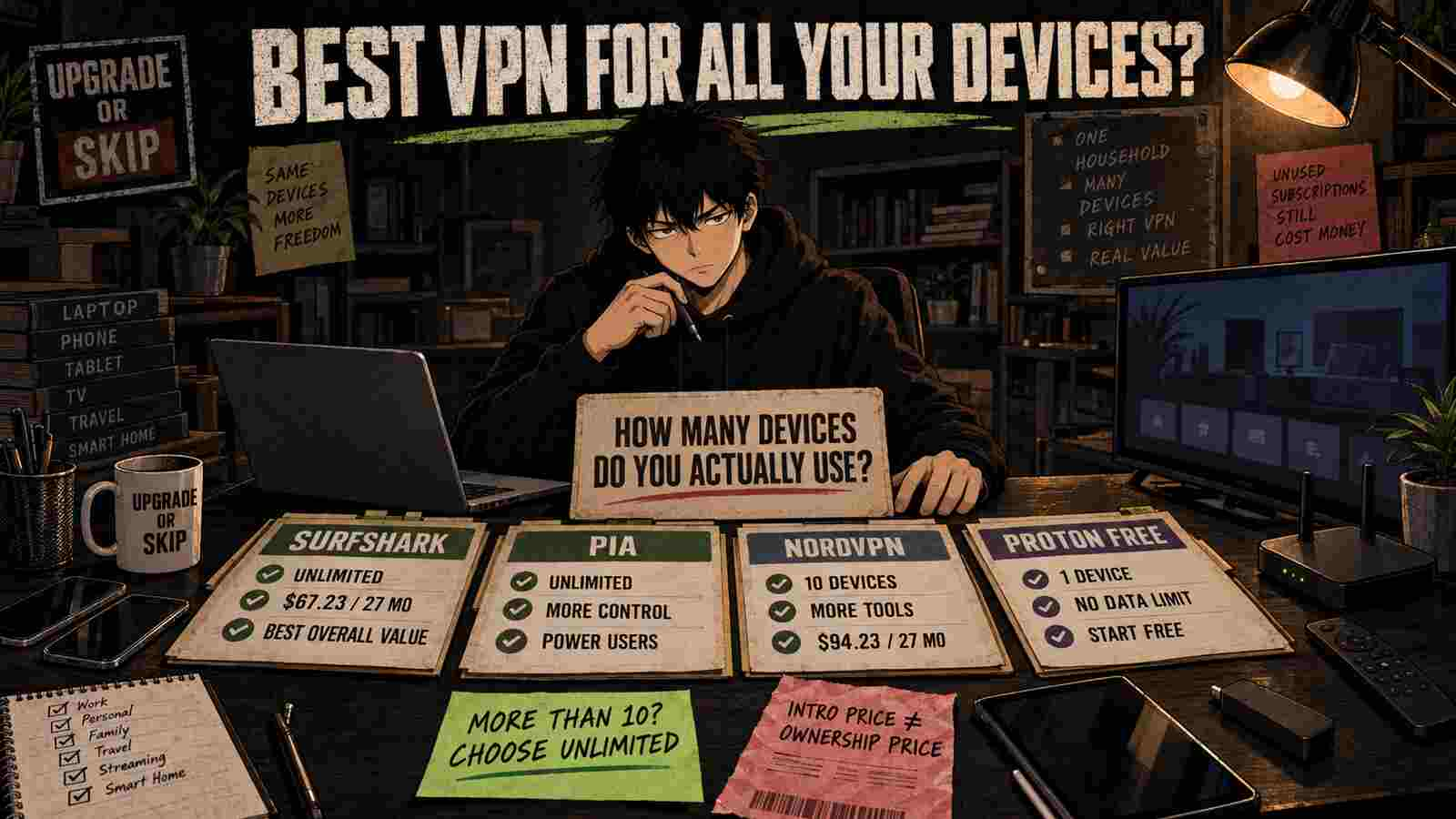
If one VPN subscription needs to cover your phone, laptop, tablet, smart TV, work computer, travel device, and the mysterious old phone that still receives verification codes, the device limit matters.
But unlimited connections do not automatically make a VPN the best purchase.
For most households, Surfshark is the best overall value because its Starter plan supports unlimited simultaneous devices and currently costs $67.23 upfront for the first 27 months.
Private Internet Access is the better alternative for users who also want unlimited connections but prefer more configuration options.
NordVPN is the stronger choice when ten devices are enough and you value its performance, server coverage, or specialist tools more than the lower price.
Proton VPN Free is the best place to start if you only need to protect one device and are not yet sure a paid VPN solves a repeated problem.
The best VPN is not the one that technically supports the most devices. It is the one your household can use reliably without paying for features, connections, or renewal surprises it does not need.
Prices and plan details were checked on September 5, 2026. VPN promotions, taxes, extra months, device limits, and renewal terms can change.
Quick Verdict
| Best for | Recommendation |
|---|---|
| Best overall multi-device value | Surfshark Starter |
| Best for advanced users with unlimited devices | Private Internet Access |
| Best when ten devices are enough | NordVPN Basic |
| Best free option for one device | Proton VPN Free |
| Best simple monthly pricing | Mullvad |
| Best for occasional use | Stay free |
Our Overall Winner: Surfshark
Choose Surfshark if:
- You regularly use a VPN on several devices.
- Your household would exceed a ten-device limit.
- You want a relatively low introductory cost.
- You need mainstream VPN features without buying a larger security bundle.
- You will check the renewal price before paying.
Read our complete Surfshark Review 2026 for its pricing, privacy tools, limitations, and renewal risks.
Choose NordVPN Instead If:
- Ten simultaneous devices are enough.
- You have tested both services and NordVPN performs better on your connection.
- You need one of NordVPN’s specialist features.
- You accept the higher initial and renewal cost.
Our NordVPN Review 2026 examines its Basic, Complete, and Prime plans in more detail.
Stay Free If:
- You only need a VPN on one device.
- You use it occasionally.
- You do not need to select from many server locations.
- You have not yet identified a repeated reason to pay.
Proton VPN Free is the most sensible starting point for this group.
The Shortlist at a Glance
| VPN | Simultaneous devices | Current starting price | Initial commitment | Refund policy | Best for |
|---|---|---|---|---|---|
| Surfshark Starter | Unlimited | $2.49/month equivalent | $67.23 for 27 months | 30 days | Overall household value |
| Private Internet Access | Unlimited | Around $2.03/month on current long plan | Long prepaid term | 30 days | Advanced multi-device users |
| NordVPN Basic | 10 | $3.49/month equivalent | $94.23 for 27 months | 30 days | Speed, locations, specialist tools |
| Proton VPN Free | 1 | Free | None | Not applicable | One-device occasional use |
| Proton VPN Plus | 10 | $3.49/month equivalent | $83.76 for 24 months | 30 days | Privacy-focused paid use |
| Mullvad | 5 | €5/month | One month | 14 days | Simple pricing and privacy |
The advertised monthly equivalents for long subscriptions are not monthly installments. You normally pay the full introductory term upfront.
So what? A $2.49 monthly label can still mean paying $67.23 today.
How We Chose
This guide focuses on purchase decisions rather than producing a ten-provider list where everyone somehow receives an award.
We checked:
- Simultaneous device limits.
- Upfront cost.
- Renewal pricing where clearly published.
- Refund terms.
- Free-plan restrictions.
- Supported platforms.
- Core privacy and security features.
- Whether the extra features justify paying more.
- Whether a router installation can cover devices that do not support VPN apps.
- The type of user each service actually suits.
We prioritized official pricing, product, support, and policy pages. Real performance still depends on your country, internet provider, device, protocol, chosen server, and intended service.
Before keeping a long subscription, test your real household devices during the refund period.
What “Multiple Devices” Actually Means
A simultaneous-device allowance tells you how many devices can be actively connected to the VPN at the same time.
It is not always the same as the number of devices on which you can install the application.
For example, one household might have:
- Two phones.
- Two laptops.
- One desktop.
- Two tablets.
- Two smart TVs.
- One streaming stick.
- One travel router.
- One old device still used occasionally.
That is twelve devices before anyone admits to owning a second tablet.
A ten-device limit is sufficient for many individuals and couples. It can become restrictive for families or users with several streaming and work devices.
Unlimited connections remove that accounting problem, but they do not permit reselling the account, sharing it publicly, or using the service in ways that violate the provider’s terms.
1. Surfshark — Best Overall VPN for Multiple Devices
Why It Wins
Surfshark Starter currently offers the most convincing combination of:
- Unlimited simultaneous device connections.
- Low introductory pricing.
- Applications for major platforms.
- WireGuard and OpenVPN support.
- Kill switch.
- Split tunneling through Bypasser.
- Ad and tracker blocking.
- Rotating IP.
- MultiHop.
- Alternative ID.
- A 30-day money-back guarantee.
According to the official Surfshark pricing page, Starter currently costs $2.49 per month for the first 27 months, billed as $67.23 upfront before applicable tax.
That is $27 less upfront than NordVPN Basic’s current 27-month offer.
More importantly for this article, Surfshark does not impose a ten-device ceiling.
Surfshark Purchase Math
| Detail | Amount |
|---|---|
| Advertised monthly equivalent | $2.49 |
| Introductory period | 27 months |
| Initial total | $67.23 |
| Simultaneous connections | Unlimited |
| Money-back guarantee | 30 days |
The low introductory rate is Surfshark’s biggest attraction and its biggest potential distraction.
Surfshark states that the applicable renewal price will be charged when the initial term ends. Confirm that amount during checkout and save it somewhere you will actually see again.
An 85% discount is not a lifetime personality trait.
Who Should Choose Surfshark?
Choose Surfshark if:
- Your household has more than ten active devices.
- You regularly switch between phones, computers, TVs, and tablets.
- You travel with several devices.
- You want to install the VPN without managing connection slots.
- You want a mainstream VPN at a lower initial cost.
- Starter contains all the security tools you need.
Who Should Skip Surfshark?
Skip it if:
- You only use a VPN occasionally.
- You are buying mainly because the introductory discount looks large.
- You dislike long prepaid subscriptions.
- You already have a reliable VPN.
- The specific websites or services you need do not work during testing.
- You are likely to ignore the renewal price.
Do You Need Surfshark One?
Surfshark One adds antivirus, breach alerts, private search, and other security features.
It may be worth considering when those tools replace another paid subscription. It is unnecessary when you already have suitable antivirus and monitoring tools.
For multi-device VPN use alone, Starter is enough.
More bundled software does not create more devices. It creates more things to forget you paid for.
Verdict: Upgrade to Surfshark Starter if unlimited connections solve a real weekly problem.
2. Private Internet Access — Best for Advanced Multi-Device Users
Private Internet Access, usually shortened to PIA, also supports unlimited simultaneous connections.
Its official website currently advertises pricing from approximately $2.03 per month on a long-term plan, although the exact price, currency, term, and promotional extras may vary by location.
PIA provides:
- Unlimited connections.
- Applications for major desktop and mobile platforms.
- WireGuard and OpenVPN.
- Split tunneling.
- A kill switch.
- Configurable encryption and connection settings.
- Ad, tracker, and malicious-domain blocking through MACE.
- A 30-day money-back guarantee for eligible new customers.
Why Choose PIA Over Surfshark?
PIA is better suited to users who want more control over how the VPN behaves.
That can include:
- Protocol selection.
- Connection settings.
- Split-tunneling rules.
- Automation preferences.
- More control over performance and privacy tradeoffs.
- Router configuration.
Surfshark is generally easier to recommend to a typical household. PIA is more attractive when someone in the household knows what the advanced settings do and intends to use them.
The PIA Buying Risk
PIA’s lowest advertised rate requires a long prepaid commitment.
That creates the same central risk as Surfshark:
A low monthly equivalent can hide a large commitment and a future renewal charge.
Check the exact checkout total, subscription duration, extra months, renewal amount, and refund conditions before paying.
Do not compare Surfshark’s US dollar price with a PIA price displayed in euros or another currency without checking the final checkout.
Who Should Choose PIA?
Choose PIA if:
- You need unlimited device connections.
- You want more configuration options.
- You use split tunneling or customized VPN settings.
- You intend to install the VPN on a router.
- Its real performance is good on your network.
- The final checkout and renewal terms beat the alternatives.
Who Should Skip PIA?
Skip it if:
- You want the simplest possible application.
- Advanced settings make the product feel like homework.
- You cannot justify a long subscription.
- Surfshark performs better on the services you use.
- You only need one occasional connection.
Verdict: Compare with Surfshark. Choose PIA when control matters as much as device count.
3. NordVPN — Best When Ten Devices Are Enough
NordVPN is not the device-count winner, but it remains a strong alternative.
The official NordVPN pricing page currently lists Basic at:
- $3.49 per month for the first 27 months
- $94.23 paid upfront
- $139.08 per year at the displayed renewal rate
- Up to ten simultaneous devices
- 30-day money-back guarantee
Surfshark is cheaper during the current initial term and allows unlimited connections.
NordVPN becomes the better purchase when its performance or specific capabilities matter more than those differences.
What NordVPN Offers
NordVPN Basic includes:
- NordLynx.
- OpenVPN.
- Kill switch.
- Automatic connection.
- Split tunneling on supported platforms.
- Specialty server options.
- Scam, phishing, ad, and tracker blocking.
- A large selection of server locations.
- Ten simultaneous connections.
Higher plans add various protection, monitoring, password-management, and cloud-storage features.
Most buyers looking for a VPN should begin with Basic.
NordVPN vs Surfshark Purchase Math
| Detail | Surfshark Starter | NordVPN Basic |
|---|---|---|
| First-term monthly equivalent | $2.49 | $3.49 |
| First-term length | 27 months | 27 months |
| Upfront total | $67.23 | $94.23 |
| Difference | — | $27 more |
| Device allowance | Unlimited | 10 |
| Money-back guarantee | 30 days | 30 days |
| Displayed annual renewal | Check checkout | $139.08 |
Surfshark has the clearer value advantage.
However, ten devices may already be more than enough. Paying for unlimited connections provides no practical benefit if you only own four relevant devices.
Test both services instead of assuming that one benchmark applies to your location.
Who Should Choose NordVPN?
Choose NordVPN if:
- Ten devices are sufficient.
- It performs better on your connection.
- You need its specialty server options.
- You prefer its applications.
- Its available server locations better match your needs.
- You will use it regularly enough to justify the higher cost.
Who Should Skip NordVPN?
Skip it if:
- You need more than ten simultaneous connections.
- Surfshark performs equally well for less.
- You will not use NordVPN’s differentiating features.
- You are uncomfortable with its renewal cost.
- Your VPN use is too occasional to justify $94.23 upfront.
Read our complete NordVPN review before choosing a higher plan.
Verdict: Upgrade to Basic only when NordVPN’s tested performance or specialist features justify paying more.
4. Proton VPN Free — Best Free Option for One Device
Proton VPN Free is not a true multi-device plan. It supports one active device at a time.
It is included because many readers searching for a household VPN have not yet established that they need a paid household VPN.
According to the official Proton VPN Free page, the free plan includes:
- One connected device.
- No data limit.
- No advertisements.
- A no-logs policy.
- Applications for major platforms.
- Free access without a credit card.
- Servers in a limited selection of countries.
- Random rather than unrestricted server selection.
This is one of the strongest ways to test whether a VPN becomes part of your normal routine.
When Proton VPN Free Is Enough
Stay free if:
- You primarily use one laptop.
- You want protection on occasional public Wi-Fi.
- You do not need to choose from many countries.
- You do not need paid streaming support.
- Medium speed is sufficient.
- You are still evaluating whether a VPN has a regular job.
When to Upgrade to Proton VPN Plus
Proton VPN Plus supports up to ten simultaneous devices and adds:
- Higher speeds.
- More server countries.
- Streaming support.
- P2P support.
- NetShield.
- Secure Core.
- More server control.
The current official pricing page shows a promotional equivalent of $3.49 per month, billed as $83.76 for the first 24 months, followed by a displayed renewal of $83.88 every 12 months.
That annual renewal is clearer and lower than NordVPN Basic’s currently displayed $139.08 annual renewal, although offers can change.
Upgrade when the free plan’s one-device restriction, random server selection, or missing paid features repeatedly interfere with your use.
Do not upgrade because the application contains locked buttons. Locked buttons are not a workflow.
Verdict: Stay free until one device or limited server choice becomes a repeated problem.
5. Mullvad — Best for Simple Pricing, Not Large Households
Mullvad takes a different approach.
Its official pricing page charges a flat €5 per month, including VAT, whether you buy one month or a much longer period.
There is:
- No introductory discount.
- No dramatic countdown.
- No cheaper two-year monthly equivalent.
- No large renewal jump.
- No need to prepay for several years.
Its terms permit up to five devices per account and provide a 14-day money-back guarantee, subject to the payment and refund conditions.
Why Mullvad Is Included
Five devices will not cover every large household, but Mullvad is useful for buyers who value:
- Simple pricing.
- Short commitments.
- Privacy-focused account design.
- No promotional renewal game.
- Paying only for the time they need.
Mullvad can be cheaper in the short term because you do not need to buy 24 or 27 months.
For example:
- Three months of Mullvad costs €15.
- Surfshark Starter currently requires $67.23 upfront.
- NordVPN Basic currently requires $94.23 upfront.
Surfshark may deliver a lower long-term monthly cost. Mullvad requires less faith in your future habits.
Who Should Choose Mullvad?
Choose Mullvad if:
- Five devices are enough.
- You prefer a monthly commitment.
- You care more about straightforward pricing than bundles.
- You do not want to monitor a large renewal increase.
- Its server locations and features match your needs.
Who Should Skip Mullvad?
Skip it if:
- You need more than five simultaneous connections.
- Your household wants applications on many TVs and devices.
- Streaming access is your main reason for buying.
- You want bundled antivirus or identity tools.
- A cheaper long-term plan better fits stable, frequent use.
Verdict: Upgrade for privacy-focused short-term use, not for a device-heavy household.
Do You Really Need Unlimited Devices?
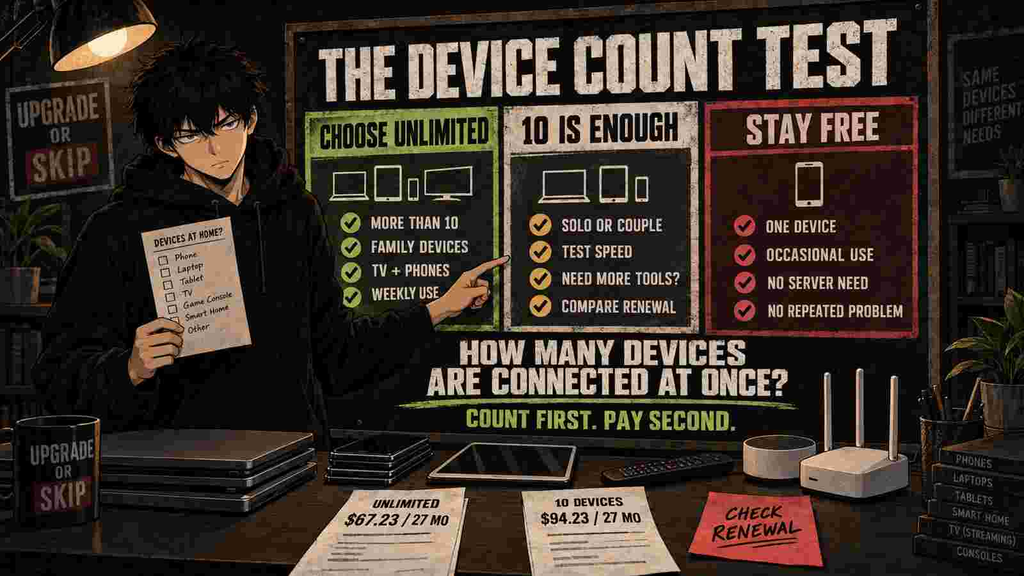
Unlimited connections matter when several devices are actively protected at the same time.
They matter less when:
- Only one person uses the VPN.
- Your router already provides household-wide coverage.
- Most devices never leave a trusted home network.
- You only connect during occasional travel.
- Ten connections already cover everything.
- The VPN application is incompatible with some of your devices.
Count the devices you will actually connect:
| Device type | Your number |
|---|---|
| Phones | |
| Laptops | |
| Desktops | |
| Tablets | |
| Smart TVs | |
| Streaming devices | |
| Gaming devices | |
| Travel routers | |
| Other devices | |
| Total |
If the total is six, both NordVPN and Proton VPN Plus already provide enough capacity.
If the total is fifteen, Surfshark or PIA becomes easier to justify.
Buying unlimited connections for four devices is like renting a parking garage for a bicycle. Spacious, certainly.
Can a Router Replace Unlimited Connections?
Installing a VPN on a compatible router can protect devices connected through that router, including devices without native VPN applications.
Depending on the provider’s connection-count rules, the router may count as one VPN connection even though several home devices use it.
Router installation can be useful for:
- Smart TVs.
- Streaming boxes.
- Game consoles.
- Devices without VPN applications.
- A household that wants automatic protection.
- Travelers using a compatible travel router.
But router-level VPN use has drawbacks:
- Setup can be more technical.
- Not every router is compatible.
- Changing server locations is less convenient.
- Some applications may reject VPN traffic.
- All routed devices may share the same VPN location.
- Troubleshooting becomes a household event.
If you want simple individual control, native applications plus unlimited connections may be easier.
Free vs Paid for Multiple Devices
| Need | Free VPN | Paid VPN |
|---|---|---|
| One occasional device | Usually enough | Often unnecessary |
| Several active devices | Commonly restricted | Better fit |
| Unlimited data | Available from Proton VPN Free | Common |
| Choose many locations | Limited | Better |
| Streaming support | Limited or unavailable | Better, never guaranteed |
| Router installation | Often restricted | Commonly supported |
| Advanced features | Limited | More available |
| Lowest commitment | Free | Monthly plan |
| Lowest long-term equivalent | Free or discounted long plan | Depends on actual use |
Start free when you are uncertain.
Upgrade when a specific limitation repeats:
- The wrong device is connected.
- You need more locations.
- A speed limit affects work.
- You cannot protect the household simultaneously.
- Router support is missing.
- A necessary feature remains unavailable.
The upgrade reason should be a recurring problem, not a pricing-page animation.
Features That Matter Across Several Devices
Automatic Connection
A multi-device VPN is less useful when everyone must remember to activate it manually.
Check whether applications can connect automatically on:
- Untrusted Wi-Fi.
- Mobile data.
- Device startup.
- Selected networks.
- All networks.
Kill Switch
A kill switch can block internet access if the VPN disconnects unexpectedly.
Test it on every important operating system. Features can behave differently across Windows, macOS, Android, iOS, and Linux.
Split Tunneling
Split tunneling lets selected applications or websites bypass the VPN.
This is useful when:
- Banking applications reject VPN traffic.
- Local printers or devices stop working.
- A work service requires the normal connection.
- Only certain applications need VPN routing.
Router Support
Router support can cover devices without native applications, but installation quality and compatibility matter more than the word “supported.”
Account Management
For households, check whether the service provides a manageable way to:
- Install applications.
- Recover access.
- remove old devices.
- control renewal.
- obtain support.
- understand usage restrictions.
Unlimited devices with confusing account controls can still produce unlimited family messages asking why the television stopped working.
The Renewal Test
The biggest VPN buying mistake is comparing introductory monthly equivalents while ignoring renewal.
Before subscribing, record:
- Initial total.
- Initial term length.
- Tax.
- Extra promotional months.
- Renewal amount.
- Renewal billing period.
- Refund deadline.
- Cancellation process.
- Whether app-store billing has different rules.
- The date you need to review the subscription.
The current examples show why this matters:
| VPN | Introductory payment | Renewal information |
|---|---|---|
| Surfshark Starter | $67.23 for 27 months | Applicable renewal price shown at checkout |
| NordVPN Basic | $94.23 for 27 months | Currently displayed as $139.08/year |
| Proton VPN Plus | $83.76 for 24 months | Currently displayed as $83.88/year |
| Mullvad | €5 for one month | Same flat monthly rate |
| Proton VPN Free | $0 | No renewal |
A cheap acquisition price and an expensive ownership price can both be true.
What to Test During the Refund Window
Do not use the first 30 days merely to confirm that the Connect button works.
Test:
- Every important household device.
- Your nearest VPN server.
- The distant locations you need.
- Video calls.
- Large downloads.
- Mobile data.
- Public Wi-Fi.
- Smart TVs and streaming devices.
- Banking and payment websites.
- Work or school applications.
- Sleep and wake behavior.
- Automatic reconnection.
- Kill-switch behavior.
- Battery and processor impact.
- The exact streaming services you use.
- Customer support.
- Cancellation controls.
Streaming access can change, and no VPN can guarantee that every platform will work permanently. Follow applicable laws and the terms of the services you access.
If the VPN repeatedly creates more problems than it removes, request the refund before the deadline.
Day 31 is an expensive time to begin testing.
Which VPN Should You Choose?
Choose Surfshark If:
- You need unlimited simultaneous connections.
- You want the best current balance of price and simplicity.
- You have a large household.
- Starter includes everything you need.
- You accept the long prepaid term.
- You have checked the renewal price.
Choose Private Internet Access If:
- You need unlimited connections.
- You want deeper configuration.
- You plan to use split tunneling or router settings extensively.
- Its checkout and renewal terms are competitive.
- You are comfortable managing more technical options.
Choose NordVPN If:
- Ten devices are enough.
- Its tested performance is better for you.
- You need its server coverage or specialist features.
- You prefer its applications.
- The higher cost is justified by a measurable advantage.
Choose Proton VPN Free If:
- You need one active device.
- You are an occasional user.
- You do not need broad server selection.
- You want to establish a real use case before paying.
Choose Proton VPN Plus If:
- You prefer Proton’s privacy ecosystem.
- You need ten devices.
- The free plan’s limits repeatedly interfere.
- You want its paid server, streaming, P2P, and Secure Core features.
- Its renewal economics work for you.
Choose Mullvad If:
- Five devices are enough.
- You want transparent monthly pricing.
- You dislike long commitments and renewal games.
- Privacy and account simplicity matter more than bundles.
Final Verdict
Surfshark Starter is the best overall VPN for multiple devices in 2026.
Its unlimited simultaneous connections, $67.23 introductory total, mainstream applications, and useful core features make it the easiest recommendation for device-heavy households.
Private Internet Access is the better alternative for technically confident users who want unlimited connections with more configuration.
NordVPN Basic remains a strong choice when ten devices are sufficient and its performance or specialist capabilities justify paying $27 more during the current introductory term.
Proton VPN Free is the smartest starting point for occasional one-device users. It lets you determine whether a VPN solves a real problem before committing to two years of anything.
Mullvad is the cleanest short-commitment option, but its five-device limit prevents it from winning for larger households.
The decision is not complicated:
- More than ten active devices: start with Surfshark or PIA.
- Ten or fewer devices: compare real performance and renewal cost.
- One occasional device: stay free.
- No repeated VPN use: skip the subscription.
Unlimited connections are useful.
Unlimited reasons to buy are not included.
Upgrade or Skip Verdict
UPGRADE TO SURFSHARK STARTER if unlimited device connections solve a real weekly household problem.
COMPARE PIA if you need unlimited connections and more technical control.
CHOOSE NORDVPN BASIC if ten devices are enough and its tested performance or specialist features justify the higher cost.
STAY WITH PROTON VPN FREE if you only need one occasional connection.
CHOOSE MULLVAD if you prefer simple monthly pricing and five devices are sufficient.
SKIP EVERY PAID OPTION if you cannot identify a repeated privacy, travel, public Wi-Fi, work, or access problem.
FAQ
What VPN allows unlimited devices?
Surfshark and Private Internet Access currently advertise unlimited simultaneous device connections on compatible devices.
Unlimited use remains subject to each provider’s account and acceptable-use terms.
Is Surfshark better than NordVPN for multiple devices?
Surfshark is the better value when you need more than ten connections. NordVPN supports ten simultaneous devices and may be preferable when its performance, server locations, or specialist tools matter more.
Compare our Surfshark review and NordVPN review before purchasing.
Is ten VPN connections enough?
Ten connections are enough for many individuals and couples. Families with multiple phones, computers, tablets, TVs, and streaming devices may exceed the limit.
Count actively connected devices rather than every device you have ever owned.
What is the best free VPN for multiple devices?
Most reputable free plans impose device restrictions. Proton VPN Free supports one active device but provides unlimited data without ads.
If you need several simultaneous connections, a paid plan or router installation may be necessary.
Can I share one VPN subscription with my family?
Many consumer VPNs permit household or personal device use, but the exact sharing and acceptable-use rules vary. Do not publicly share, resell, or use an account outside the provider’s terms.
Does installing a VPN on a router cover all devices?
A compatible router can route connected household devices through the VPN, including devices without native applications. Setup, performance, server switching, and provider rules vary.
Does a VPN make every device anonymous?
No. A VPN can encrypt traffic to the VPN server and hide your normal public IP address from websites. Account logins, cookies, browser fingerprinting, malware, and personal information can still identify you.
Should I buy the longest VPN plan?
Only when you have tested the service, expect to use it regularly, understand the refund policy, and accept the renewal terms.
A lower monthly equivalent does not justify a longer commitment by itself.
Sources
- Surfshark Plans and Pricing
- Surfshark Features
- Private Internet Access Official Website
- PIA VPN Features
- NordVPN Plans and Pricing
- Proton VPN Plans and Pricing
- Proton VPN Free
- Mullvad Pricing
- Mullvad Terms of Service
- Upgrade or Skip Surfshark Review
- Upgrade or Skip NordVPN Review
Pricing, plan limits, promotional terms, device allowances, ratings, refund rules, and renewal prices may change. Confirm the final checkout terms before purchasing.
Next Up
Best Surfshark Alternatives: Which VPN Should You Switch To?
Upgrade smarter. Skip louder.