
Disclosure: This post may contain affiliate links. If you buy through them, we may earn a small commission at no extra cost to you.
Welcome back to Upgrade or Skip.
In the last post, we talked about AI tool overload, and why too many AI apps can quietly become another thing to manage.
So today, we are doing the opposite.
Not:
“47 AI tools that will completely change your life.”
Please no.
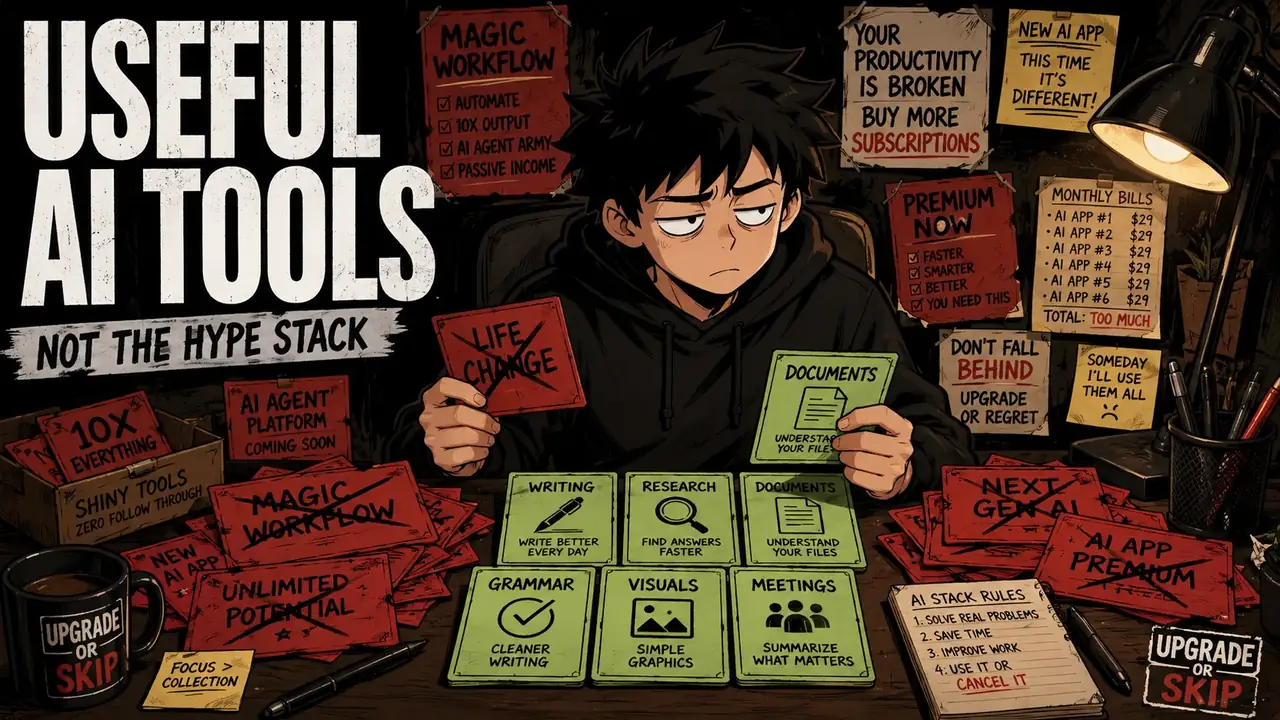
Most people do not need an AI command center.
They need a small number of tools that solve real problems.
Writing better emails.
Understanding complicated documents.
Researching purchases.
Summarizing meetings.
Creating simple visuals.
Cleaning up messy ideas.
Getting unstuck when your brain is running at 8% battery and powered entirely by caffeine.
That is where AI actually makes sense.
This is not a list of the most impressive AI tools.
It is a list of AI tools that can earn a place in your daily life.
Because a tool should not exist because it is impressive.
A tool should exist because it helps.
The Short Answer
If you only try a few AI tools, start here:
- ChatGPT for general everyday help
- Claude for long writing and document editing
- Perplexity for research with sources
- NotebookLM for learning from your own files
- Grammarly for everyday writing cleanup
- Canva for simple visuals and design
- Otter or another meeting assistant if your schedule is full of calls
That is already enough for most people.
The mistake is not using AI.
The mistake is thinking every AI tool deserves a permanent subscription.
It does not.
A tool needs to earn its place.
What Makes an AI Tool Actually Useful?
An AI tool is useful when it does at least one of three things:
It saves time on something you already do.
It improves the quality of work you already care about.
It helps you complete something you would normally avoid.
That last one matters.
A tool that helps you finally write the email you have been ignoring for three days is useful.
A tool that creates a complicated productivity system for a future version of yourself who does not exist yet?
Less useful.
Very organized.
Very imaginary.
The best AI tools are usually not the ones with the longest feature lists.
They are the ones that fit into normal behavior.
You already write.
You already search.
You already read documents.
You already make decisions.
You already sit through meetings.
You already create simple content.
The right AI tool helps with those things.
It should not create a new hobby called:
“Optimizing my AI stack.”
ChatGPT: Best All-Purpose AI Assistant
ChatGPT is still the easiest starting point for most everyday users.
Not because it is perfect.
No AI tool is.
It is useful because it covers a huge range of normal tasks in one place.
You can use it to:
- Rewrite emails
- Explain confusing topics
- Brainstorm ideas
- Summarize documents
- Analyze images
- Plan trips
- Compare products
- Create checklists
- Draft content
- Think through decisions
- Generate images
- Use voice conversations
That range is what makes it practical.
Most people do not wake up thinking:
“Today I need a specialized AI workflow.”
They think:
“How do I write this message?”
“What does this document mean?”
“Which product should I buy?”
“How do I explain this idea?”
“How do I organize this mess?”
That is where general AI assistants are useful.
The free version is already enough for many people.https://chatgpt.com/pricing
Paying only makes sense when the free version starts blocking something important.
The question is not:
“Is ChatGPT impressive?”
Of course it is.
The question is:
“Does paying for it change what I actually finish?”
That is the Upgrade or Skip question.
Upgrade If:
Upgrade to ChatGPT Plus if you use ChatGPT almost every day and free limits interrupt real work.
Upgrade if you regularly use file analysis, image generation, voice, deeper research, projects, or advanced reasoning features.
Upgrade if ChatGPT has become your daily assistant for writing, planning, research, and problem-solving.
Upgrade if saving time is worth more than the monthly cost.
Skip If:
Skip paying if you only use ChatGPT occasionally.
Skip if the free version already handles your normal questions.
Skip if you mostly ask simple questions that a regular search can answer.
Skip if you cannot name what problem the paid version solves.
The goal is not to own the most powerful AI.
The goal is to remove friction.
Claude: Best for Long Writing and Serious Documents
Claude is one of the easiest AI tools to recommend for people who work with words.
Not just short words.
Long, messy, annoying words.
Reports.
Drafts.
Articles.
Policies.
Essays.
Research notes.
Client documents.
The kind of documents where you do not want:
“Make this sound professional.”
You want:
Keep my structure.
Keep my tone.
Fix the weak parts.
Tell me what is unclear.
Do not turn this into corporate oatmeal.
Claude has become popular among writers and professionals because many users find it strong at handling long documents, editing, and detailed instructions.
The important part:
It is not magic.
Claude can still make mistakes.
It can still smooth out personality.
It can still make writing slightly too polished.
Sometimes the human version was better.
Shocking.
But for long-form editing and document work, Claude often feels less like a chatbot and more like a patient editor.
That is a useful job.
Upgrade If:
Upgrade to Claude Pro if you regularly work with long documents, detailed writing, editing, analysis, or structured instructions.
Upgrade if Claude consistently produces better results for your actual writing tasks.
Upgrade if your work depends on handling large amounts of text efficiently.
Skip If:
Skip paying if you only need short rewrites or casual brainstorming.
Skip if you already pay for another AI assistant and cannot explain what Claude does better.
Skip if you are subscribing because someone online said:
“Claude is the writer AI.”
Test it on your own work.
That is the only comparison that matters.
Perplexity: Best for Research With Sources
Perplexity is useful when you do not just want an answer.
You want to know:
“Where did this come from?”
That is the difference.
Traditional search gives you a list of places to look.
Perplexity tries to summarize the information first and show where the information came from.
That makes it useful for:
- Researching products
- Comparing software tools
- Understanding fast-changing topics
- Checking different opinions
- Finding starting points for deeper research
- Avoiding the classic “I opened 37 tabs and forgot why” situation
For everyday users, this is where AI search starts making sense.
Need to compare laptops?
Research a camera?
Understand a complicated topic?
Figure out what people are saying about a new product?
Perplexity can save time.
But remember:
Citations do not make AI automatically correct.
A source can still be outdated.
A source can still be biased.
A source can still be misunderstood.
AI can show you the map.
You still need to check the road.
That is the difference between using AI as a shortcut and using it as a tool.
For many people, the free version is enough.
Perplexity Pro makes more sense for people who research regularly, compare information often, work with documents, or need higher limits and more advanced models.
Upgrade If:
Upgrade to Perplexity Pro if research is part of your weekly workflow.
Upgrade if you regularly compare products, study complex topics, write reports, or need faster research starting points.
Upgrade if the free version is useful but you constantly hit limits.
Upgrade if it saves you hours of searching and sorting information.
Skip If:
Skip paying if you mostly search for simple facts.
Skip if you mainly need official websites, prices, locations, or basic information.
Skip if you are not willing to open and check the sources yourself.
Perplexity can help you find information faster.
It cannot replace judgment.
NotebookLM: Best for Learning From Your Own Files
NotebookLM is one of the more interesting AI tools because it solves a very specific problem.
Your own information is usually a mess.
PDFs.
Notes.
Documents.
Slides.
Research papers.
Training materials.
Articles you saved six months ago and never opened again.
Everyone has a digital pile.
NotebookLM helps you work through that pile.
Instead of asking:
“What does the internet know?”
You ask:
“What can I understand from these materials I already have?”
That makes it different from a normal chatbot.
A normal AI assistant helps you search the world.
NotebookLM helps you understand your own information.
You can upload:
- PDFs
- Documents
- Slides
- Websites
- Research materials
- Class notes
- Meeting records
Then ask questions, create summaries, organize ideas, or turn complicated information into something easier to understand.
For students, it can turn confusing readings into study guides.
For professionals, it can help digest long documents.
For creators, it can organize research.
For normal users, it can finally make those saved files useful.
You know those documents you keep saying:
“I should read this later.”
NotebookLM is basically built for that folder.
Upgrade If:
Upgrade if NotebookLM becomes part of your regular study, research, writing, or document workflow.
Upgrade if you work with large amounts of personal information and need higher limits or extra features.
Upgrade if it saves significant time understanding documents.
Skip If:
Skip paying if you only use it occasionally.
Skip if you rarely work with your own documents.
Skip if you mainly need general questions answered.
NotebookLM is not a universal AI assistant.
It has a narrower purpose.
That is exactly why it can be useful.
A tool with a clear job is usually better than a tool trying to do everything.
Grammarly: Best for Everyday Writing Cleanup
Grammarly is not the most exciting AI tool.
And that is exactly why it works.
It does not ask you to open a chat window.
It does not require a perfect prompt.
It does not make you decide which model understands your email philosophy.
It simply appears where you already write.
Emails.
Documents.
Messages.
Forms.
Browser text boxes.
That matters because most writing problems are not dramatic.
They are small.
A sentence sounds too harsh.
A paragraph is confusing.
A typo ruins a message.
A professional email accidentally sounds like it was written by someone who has not slept for two days.
These small problems happen constantly.
That is where Grammarly fits.
Grammarly is not replacing ChatGPT or Claude.
It is not a deep thinking partner.
It is a writing assistant that sits quietly in the background.
Sometimes that is exactly what people need.
Upgrade If:
Upgrade to Grammarly Pro if you write constantly for work, school, clients, or online content.
Upgrade if tone adjustments, rewrites, and writing suggestions save you time every week.
Upgrade if writing quality directly affects your work.
Skip If:
Skip paying if you already use ChatGPT or Claude for writing help.
Skip if the free version catches enough mistakes.
Skip if you mostly write casual messages.
Grammarly is useful because it reduces small friction.
Not because it is the smartest AI in the room.
Canva: Best for Simple Visuals Without Becoming a Designer
Canva is one of those tools that solves a very normal problem:
“I need something that looks decent, but I am not a designer.”
That describes a lot of people.
Social posts.
Blog graphics.
Presentations.
Simple thumbnails.
Flyers.
Infographics.
Resumes.
Business materials.
Random projects that somehow become urgent at midnight.
Canva’s advantage is not only AI.
It is the combination of:
Templates.
Drag-and-drop editing.
Design assets.
Background removal.
Brand tools.
Resize features.
AI-assisted creation.
The free version is already powerful enough for many users.
Canva Pro becomes interesting when you create visuals frequently.
If you make one image every six months?
Stay free.
If you publish content every week, manage a business, run social media, or constantly need graphics?
The subscription starts making more sense.
The important question:
Does Canva save you time?
Not:
“Does Canva have cool AI features?”
Every app has cool AI features now.
That is not enough.
Upgrade If:
Upgrade to Canva Pro if visual content is part of your regular work.
Upgrade if premium templates, assets, resizing, background removal, and brand tools save you time.
Upgrade if Canva replaces multiple smaller design tools.
Skip If:
Skip paying if you rarely create visuals.
Skip if free templates already solve your needs.
Skip if your current design workflow works fine.
Canva Pro is not valuable because it has more buttons.
It is valuable when it prevents design work from becoming a time sink.
Otter or Meeting Note Tools: Best If Meetings Eat Your Life
Not everyone needs an AI meeting assistant.
Some people absolutely do.
If your week is full of:
- Zoom calls
- Microsoft Teams meetings
- Google Meet sessions
- Client conversations
- Interviews
- Lectures
- Team updates
then an AI transcription tool can actually solve a real problem.
Because meetings have a strange ability:
Everyone talks.
Everyone agrees.
Everyone says:
“Let’s circle back.”
Then 48 hours later, nobody remembers what was actually decided.
A good meeting assistant can help capture:
- Important points
- Decisions
- Action items
- Follow-up tasks
- Key discussions
That is useful.
But here is the catch:
More notes do not automatically mean more productivity.
Sometimes an AI transcript is just a 45-page document nobody opens.
Congratulations.
You successfully created a searchable archive of things you still forgot.
The tool only becomes valuable if you actually use the output.
Read the summary.
Extract the action items.
Follow up.
Otherwise, you are paying to store digital dust.
Very advanced.
Very organized.
Completely ignored.
Upgrade If:
Upgrade to Otter or another meeting assistant if meetings are a major part of your work or study.
Upgrade if transcripts and summaries save you from forgetting important details.
Upgrade if it replaces manual note-taking and lets you focus better during conversations.
Upgrade if meeting information actually turns into action afterward.
Skip If:
Skip paying if you rarely attend meetings.
Skip if you never review summaries after calls.
Skip if recording meetings creates privacy or workplace concerns.
Skip if the tool simply creates more information you never use.
A meeting assistant should create decisions.
Not just documents.
The Best AI Tool Stack for Most People
Here is the uncomfortable truth:
Most people do not need an AI stack.
They need a few useful tools.
The internet loves showing impressive workflows:
“Here is my 14-tool AI system.”
Great.
You now need a spreadsheet to manage your productivity tools.
That is the opposite of productivity.
For most people, a realistic AI setup looks more like this:
One general assistant.
One research tool.
One writing tool.
One creative tool if you actually create.
One meeting tool if meetings are part of your life.
That is enough.
A practical example:
- ChatGPT for everyday help
- Perplexity for research
- Grammarly for writing cleanup
- Canva for visuals
- NotebookLM for your own documents
- Otter only if meetings matter
Notice something:
Not everything needs to be paid.
That is the part AI marketing does not love.
Free versions are often good enough.
Pay when a tool repeatedly proves its value.
Do not pay because a YouTuber showed a beautiful dashboard with twelve AI logos.
That is not a workflow.
That is a collection.
The Free-First Rule
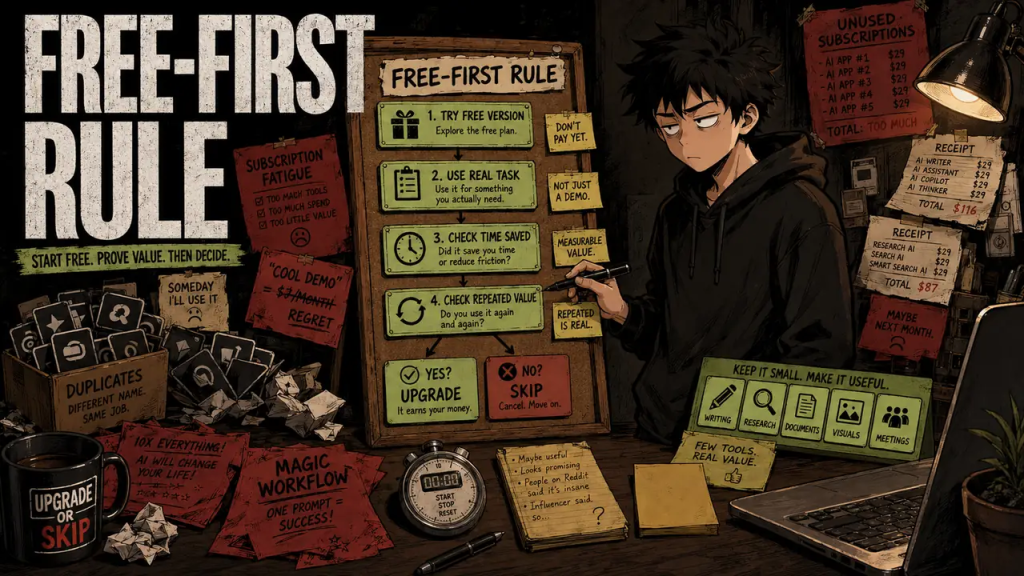
Before paying for any AI tool:
Use the free version properly.
Not:
One funny prompt.
One image generation.
One five-minute demo.
Actually use it.
Use it for:
The email you need to write.
The document you need to understand.
The product you need to research.
The image you need to create.
The meeting you need to remember.
Then ask:
Did this save me time?
Did this improve the result?
Did I use it repeatedly?
Did it remove a real problem?
Did I miss it when I stopped?
Would I pay for it again today?
That last question is brutal.
Good.
Subscriptions survive because people keep paying for old intentions.
“I might use it.”
“I should learn it.”
“It could be useful someday.”
Someday is where subscriptions go to hide.
If the tool earns its place, keep it.
If not:
Cancel.
Your bank account will survive.
Upgrade If:
Upgrade if a tool solves a repeated problem in your actual life.
Upgrade if it saves measurable time after you review and correct the output.
Upgrade if it improves work you already do.
Upgrade if it replaces another subscription or removes friction.
Upgrade if you can explain its purpose in one sentence.
For example:
“ChatGPT helps me solve everyday problems.”
“Claude helps me edit long documents.”
“Perplexity helps me research faster.”
“NotebookLM helps me understand my own files.”
“Grammarly helps me write cleaner messages.”
“Canva helps me create visuals faster.”
“Otter helps me remember meetings.”
That is a real reason.
Not:
“Everyone says I need it.”
Skip If:
Skip if you are paying because AI feels unavoidable.
Skip if you only used the tool for a demo.
Skip if another subscription already does the same job.
Skip if you forgot you were paying for it.
Skip if managing AI tools takes more time than using them.
Skip if you cannot remember the last useful thing it helped you finish.
That is not an upgrade.
That is subscription clutter.
The Upgrade or Skip Take
The best AI tools for everyday people are not the ones with the biggest feature lists.
They are the ones that quietly solve boring problems.
ChatGPT is the easiest general assistant for most users.
Claude is excellent for long writing and document work.
Perplexity is useful when you need research with visible sources.
NotebookLM helps you understand your own information.
Grammarly improves everyday writing where writing actually happens.
Canva helps normal people create visuals without becoming designers.
Meeting assistants help when conversations become impossible to remember.
But none of these tools deserve automatic payment.
That is the mistake.
AI companies are very good at selling possibilities.
The smarter question is:
What problem does this solve today?
Not:
What might this help me do someday?
Start free.
Use real tasks.
Find your bottleneck.
Upgrade only when the value is obvious.
The smartest AI setup is not the biggest one.
It is the smallest one that actually helps.
Do not build an AI collection.
Build a useful workflow.
Upgrade for repeated value.
Skip the impressive clutter.
Next Up:
I Tried Using AI For Everything. It Was A Mistake.
AI can write.
AI can research.
AI can summarize.
AI can create.
AI can code.
But what happens when every single thing in your life becomes an AI task?
Sometimes the biggest productivity mistake is not using too little AI.
It is forgetting how to think without it.
Upgrade smarter. Skip louder.