
Disclosure: This post may contain affiliate links. If you buy through them, we may earn a small commission at no extra cost to you.
Welcome back to Upgrade or Skip.
This is the start of a short closing series for our PC upgrade chapter:
PC Upgrade Reality Check.
Not another round of:
“Buy this GPU.”
Not another benchmark panic ritual.
Not another attempt to convince your perfectly usable PC that it should feel embarrassed because a new product launched.
We have already talked about:
- Upgrade anxiety
- Used GPUs
- Benchmark charts
- VRAM
- CPU panic
- The strange internet belief that lowering settings is somehow a personal failure
Now we need to answer the question underneath all of that:
How long should a gaming PC actually last?
If you are wondering how long a gaming PC lasts in 2026, the answer is not a fixed number of years.
A few years ago, this was mostly a performance question.
In 2026, it is also a money question.
RAM prices are weird.
SSD prices are weird.
GPU prices are still doing GPU things.
AI hardware demand has made normal PC buyers feel like they accidentally walked into a data center auction.
So maybe the better question is not:
“Is my PC old?”
It is:
“Can I afford to replace a PC that still does its job?”
That is a very different question.
And honestly?
A much better one.
Your PC Does Not Have An Expiration Date
A gaming PC is not milk.
It does not expire because a new graphics card launched.
It does not become useless because a YouTube thumbnail made a shocked face next to a benchmark chart.
It does not die on its third birthday because someone on Reddit said:
“Bro, just build new.”
A gaming PC lasts as long as it still does the job you bought it for.
That is the boring answer.
It is also the answer most marketing avoids.
Because:
“Your PC is probably fine for another year.”
does not sell many launch-day upgrades.
Very tragic.
Very bad for the RGB economy.
The internet loves simple rules:
- Replace your GPU every two years.
- Build a new PC every four years.
- 8GB is dead.
- 16GB is dead.
- Everything is dead.
- Please buy something.
Real life is less dramatic.
Some PCs feel tired after three years.
Some are still perfectly useful after six.
Some old office machines become surprisingly capable gaming PCs with a simple SSD upgrade and a reasonable GPU.
Some expensive “future-proof” builds age badly because the owner’s needs changed.
Age matters.
But age is not the whole story.
The Internet Measures PC Age Wrong
Across Reddit upgrade threads, YouTube comments, and PC forums, the same question appears constantly:
“My PC is five years old. Is it time to upgrade?”
Maybe.
Maybe not.
The age of your PC is only one clue.
The real questions are:
- What games do you play?
- What resolution do you use?
- What settings are you comfortable lowering?
- Are you chasing high refresh rates?
- Is your PC actually slow, or just old on paper?
- Are parts failing?
- Is the system unstable?
- Are you comparing your machine to benchmarks you do not even need?
A five-year-old PC used for:
- 1080p gaming
- Esports titles
- Older games
- Schoolwork
- Browsing
- Everyday tasks
may still be completely fine.
A two-year-old PC trying to run:
- 4K gaming
- Ultra settings
- Ray tracing
- New AAA releases
may already feel stressed.
Same age.
Different job.
That is the part people forget.
Upgrade anxiety gets expensive because people do not always upgrade when their PC stops working.
They upgrade when their PC stops feeling impressive.
Those are not the same problem.
One is performance.
The other is benchmark brain wearing a hoodie.
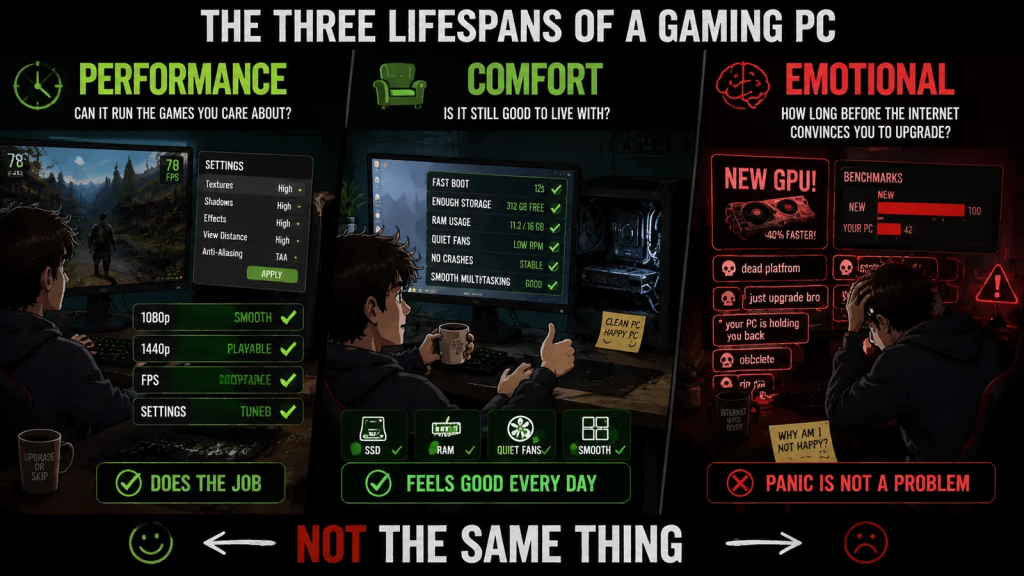
A Gaming PC Has Three Lifespans
I think a gaming PC has three different lifespans.
Not one.
Three.
Because a PC can be perfectly alive in one way and completely outdated in another.
1. The Performance Lifespan
This is the obvious one.
Can the PC still run the games and applications you care about at acceptable settings?
Not fantasy settings.
Not:
“Every slider maxed because I paid for the entire settings menu.”
Acceptable settings.
For one person, that means:
- 1080p
- Medium settings
- 60 FPS
For another, it means:
- 1440p
- High settings
- 120 FPS
For someone else, it means:
- 4K
- Ray tracing
- Frame generation
- The emotional need to see reflections in puddles
Those are not the same target.
The more demanding your expectations are, the shorter your performance lifespan becomes.
That is not your PC failing.
That is physics with a price tag.
2. The Comfort Lifespan
This is how long the PC feels good to use.
Not just whether it technically runs.
Does it:
- Boot quickly?
- Stay quiet?
- Avoid random crashes?
- Have enough storage?
- Avoid constant stutters?
- Handle your normal multitasking?
A PC can still run games while slowly becoming annoying.
That is where smaller upgrades can matter:
- More RAM
- A larger SSD
- Cleaning dust
- Better airflow
- Replacing old thermal paste
- Removing unnecessary startup programs
- Reinstalling Windows when things have become truly cursed
These upgrades are not exciting.
They will not create a dramatic thumbnail:
“THIS $50 CHANGE DESTROYED MY OLD PC”
But they work.
And sometimes boring fixes are exactly what an old PC needs.
Very inconvenient for people who wanted an excuse to buy a new GPU.
3. The Emotional Lifespan
This is the dangerous one.
This is how long your PC feels good before the internet convinces you it is embarrassing.
Your games still run.
Your work still gets done.
Your PC still turns on every morning.
Then:
- A new GPU launches.
- A reviewer says “last generation.”
- A comment says “dead platform.”
- A benchmark chart makes your system look smaller than it felt yesterday.
Suddenly your PC did not get slower.
Your expectations got louder.
This is where many bad upgrades happen.
The emotional lifespan ends before the actual useful lifespan.
And that gap is where upgrade anxiety lives.
What Usually Gets Old First?
Not every component ages the same way.
Some parts age because games demand more.
Some age because they physically wear out.
Some age because your expectations changed.
The GPU
The GPU usually feels old first for gaming.
Especially when you increase resolution.
Moving from 1080p to 1440p is not just buying a better monitor.
It is a bigger workload wearing a nicer screen.
Modern games also put more pressure on GPUs through:
- Ray tracing
- Higher texture quality
- Larger worlds
- More complex lighting
- Frame generation expectations
- VRAM limitations
But a GPU is not obsolete because it lost a benchmark chart.
It becomes outdated when it cannot deliver the experience you actually want, even after reasonable settings adjustments.
That is the line.
Not the launch date.
Not the comment section.
VRAM
VRAM is one of the messiest lifespan issues in 2026.
Not because every lower-memory GPU instantly became useless.
That is too simple.
The real problem is that VRAM limitations often appear in annoying ways:
- Texture pop-in
- Stuttering
- Poor 1% lows
- Settings you can no longer use comfortably
- Higher resolutions feeling worse than the average FPS suggests
A lower-VRAM card may still be perfectly fine for many 1080p players.
The same card may feel limited in newer games with heavier textures.
Both can be true.
Hardware discussions hate this.
Reality does not care.
RAM
RAM ages quietly.
Nobody wakes up excited to buy memory.
Especially when memory prices decide to behave like they discovered confidence.
But RAM affects comfort.
16GB can still be enough for many gaming PCs.
But modern games combined with:
- Browser tabs
- Discord
- Game launchers
- Recording software
- Background apps
- Windows doing Windows things
can make 32GB feel less like luxury and more like breathing room.
That does not mean everyone should panic-buy RAM.
Check usage first.
If you are not regularly hitting the limit, more RAM will not magically solve your problems.
Reality remains annoyingly specific.
Storage
Storage gets old quietly.
Then one day:
Everything is full.
Games are huge.
Updates are huge.
Launchers multiply.
And suddenly your SSD has 12GB free and a dream.
A storage upgrade is one of the easiest ways to extend a PC’s useful life.
You can:
- Add another SSD
- Replace a small drive
- Remove old games
- Move archives
- Back up important files
Not exciting.
Not flashy.
Extremely useful.
The kind of upgrade that rarely gets a dramatic YouTube thumbnail because it is actually practical.
Cooling And Dust
Dust is not a benchmark category.
Maybe it should be.
A dusty PC can run:
- Hotter
- Louder
- Slower
Thermal throttling can make old hardware feel older than it really is.
Sometimes your PC does not need:
- A new CPU
- A new GPU
- A new motherboard
Sometimes it needs:
- Cleaning
- Better airflow
- A better fan curve
- Fresh thermal paste
Or simply to stop collecting carpet fibers under the desk like a performance experiment.
The Power Supply
A good PSU can last a long time.
A questionable or aging one can create problems.
Especially if you plan a major GPU upgrade.
The power supply is not exciting.
Nobody buys a PSU because they want higher FPS.
But a reliable PSU is the thing standing between:
“Nice upgrade.”
and:
“Why did my expensive graphics card suddenly become a paperweight?”
Do not ignore the boring parts.
They are often the parts preventing expensive mistakes.
When An Old Gaming PC Is Still Fine
Here is the part the internet usually skips.
Sometimes your old PC is not a problem.
Sometimes the problem is that you are constantly being reminded that newer things exist.
A new GPU is faster.
A new CPU is faster.
A new platform has more features.
Breaking news:
New hardware is better than old hardware.
Science survives another day.
But “better exists” does not automatically mean “you need better.”
A PC is still doing its job if:
- Your games run the way you want.
- Your work gets done.
- Your system feels responsive.
- You are not constantly fighting problems.
- You are happy with the experience.
That last one matters more than people admit.
Because the goal of a gaming PC is not to win benchmark charts.
The goal is to play games.
1080p Is Still Fine
There is a strange internet belief that if you are not playing at the highest possible resolution, you are somehow missing the point.
You are not.
1080p is still a perfectly reasonable target for millions of players.
Especially if you value:
- Higher frame rates
- Lower cost
- Longer hardware lifespan
- Less heat and power consumption
A system that delivers a smooth 1080p experience is not “behind.”
It is doing exactly what it was built to do.
The problem starts when people compare:
A 1080p player with reasonable settings
against
A benchmark system running:
- Expensive hardware
- Maximum settings
- Ray tracing enabled
- A high-refresh monitor
- A carefully controlled test environment
Those are different worlds.
Comparing them without context is how upgrade anxiety starts.
High Settings Are Not A Failure
One of the strangest habits in PC gaming is treating anything below Ultra like losing.
Somehow:
- High = acceptable
- Ultra = success
- Medium = defeat
That makes no sense.
Ultra settings are often designed for future hardware.
They are not a required quality setting.
Many Ultra options are expensive because they exist to make screenshots slightly prettier.
Not because they transform the entire experience.
A few examples:
- Shadows
- Volumetric effects
- Ray tracing
- Crowd density
- Reflections
These settings can consume huge amounts of performance for relatively small visual gains.
Lowering one setting is not your PC admitting defeat.
It is you making a smart trade-off.
A good PC owner adjusts settings.
A stressed PC owner buys hardware every time a slider moves.
You Do Not Need To Max Everything
This is where benchmark brain becomes dangerous.
Benchmark brain says:
“If my GPU cannot run everything maxed, it is outdated.”
Reality says:
“If the game looks good and feels smooth, why are we angry?”
Your GPU does not know whether the shadows are Ultra.
Your CPU does not care whether a reflection has 20% more detail.
Your monitor does not report:
“Congratulations, you enabled the most expensive settings.”
The game only needs to feel good.
That is the actual test.
When It Really Is Time To Upgrade
Upgrade anxiety is not always wrong.
Sometimes your PC really has reached the point where an upgrade makes sense.
The difference is evidence.
Not emotion.
A real upgrade usually starts with a consistent problem.
Your Performance Target Changed
Maybe your old PC was perfect for:
1080p 60 FPS.
Now you bought:
- A 1440p monitor
- A high refresh display
- A VR headset
Your hardware did not suddenly become worse.
Your target changed.
That is a valid reason to upgrade.
Your Workload Changed
A gaming PC can become a work machine.
Maybe now you do:
- Video editing
- 3D rendering
- Local AI workloads
- Streaming
- Heavy multitasking
A system that was excellent for gaming may not be ideal for a new workload.
That is not failure.
That is a new requirement.
Settings Are Already At The Floor
There is a difference between:
“I lowered one setting and everything is fine.”
and:
“I lowered everything and the experience is still bad.”
If you have already tried:
- Lower settings
- Updating drivers
- Checking temperatures
- Removing background apps
- Verifying game files
- Adjusting sensible settings
and the same problem keeps appearing?
Then hardware becomes the conversation.
Reliability Is Becoming A Problem
Performance is not the only reason to upgrade.
Sometimes the problem is trust.
Random crashes.
Storage failures.
Overheating.
Unstable power.
A PC that works only when it feels like cooperating is no longer a good tool.
At that point, upgrading is not chasing performance.
It is protecting your time.
Upgrade If:
- Your PC consistently struggles with things you actually do.
- Your performance target has changed.
- Your monitor resolution or refresh rate increased.
- Your workload became more demanding.
- The bottleneck is clearly identified.
- Settings adjustments no longer solve the problem.
- Reliability or stability is becoming an issue.
- The upgrade creates a noticeable improvement.
Skip If:
- Your PC still does everything you need.
- You are only worried because new hardware launched.
- A benchmark chart made your system feel old.
- You cannot explain what problem you are fixing.
- The upgrade mainly improves numbers, not experience.
- You are chasing Ultra settings you do not actually need.
- You have not tried basic troubleshooting first.
The Upgrade or Skip Take
A gaming PC does not become outdated because something newer exists.
That is not how technology works.
New hardware raises the ceiling.
It does not automatically lower the value of what you already own.
The best time to upgrade is not when the internet gets excited.
It is when your actual experience tells you:
“This is no longer enough.”
Until then?
Use your PC.
Play your games.
Stop apologizing for hardware that is still doing its job.
The goal was never to own the newest machine.
The goal was to have a machine that works for you.
Next up:
Your PC Is Slow, But You Probably Don’t Need New Hardware
Because sometimes the problem is not your hardware.
Sometimes the problem is everything running around it.
Upgrade smarter. Skip louder.