

Welcome back to Upgrade or Skip.
Testing note: I personally used Canva Free and Canva Pro across template-based designs, blog graphics, background removal, Magic Resize, Brand Kit, transparent image exports, premium assets, project organization, and Canva’s AI-assisted tools. I also checked Canva’s current US pricing and plan documentation and reviewed public feedback from G2 and Trustpilot. Prices, features, and ratings were last checked on August 21, 2026.
Quick Verdict
Canva Pro is worth paying for if you create visual content every week and its premium tools repeatedly save you time.
The strongest reasons to upgrade are still practical rather than glamorous:
- Background Remover
- Magic Resize and Translate
- Premium templates and stock assets
- Five Brand Kits
- Social content scheduling
- 100GB of cloud storage
- Higher AI usage limits
Canva Pro is especially useful for solo bloggers, affiliate marketers, YouTubers, freelancers, social media managers, small business owners, and digital product creators who need a steady supply of publishable visuals.
Canva Free is enough if you create occasionally, upload your own assets, and do not regularly hit paid-feature limits.
The price changes the decision. Canva’s current US pricing page lists Pro at $180 per year for one person, not $144. That works out to $15 per month when averaged across the year.
At $180, Canva Pro needs a real job.
It does not need to turn you into a designer. It needs to help you publish faster, maintain a consistent brand, or complete work that supports revenue.
Upgrade if Canva Pro saves time on work you produce every week.
Stay Free if Canva Free already handles your occasional designs.
Skip Pro if you are paying for premium possibilities rather than actual output.
Check Current Canva Pro Pricing
Canva Free vs Pro at a Glance
| Detail | Canva Free | Canva Pro |
|---|---|---|
| Current US annual price | $0 | $180 for one person |
| Effective monthly cost on annual billing | $0 | $15 |
| Templates | 1.6M+ | 3.6M+, including premium |
| Photos, videos, graphics, and audio | 4.7M+ | 141M+ premium assets |
| Brand Kits | 1 kit with 3 colors | 5 kits |
| Cloud storage | 5GB | 100GB |
| Background Remover and Magic Resize | Limited or unavailable as full premium tools | Included |
| Social content scheduling | No | Included |
| AI allowance | Up to 200 Standard or 20 Premium uses | Up to 2,000 Standard, 200 Premium, or 20 Ultra uses |
| Best for | Occasional design | Frequent solo content production |
The large numbers look impressive, but “141 million assets” is not automatically a reason to pay.
The useful questions are smaller:
- Do you regularly need a locked asset?
- Does Background Remover save meaningful time?
- Do you resize the same design for several platforms?
- Does Brand Kit prevent repetitive setup?
- Are you producing enough content to recover $180 a year?
That is the buying decision.
The asset count mostly gives the pricing page something muscular to flex.
Upgrade If
- You create blog graphics, thumbnails, pins, ads, documents, or social posts every week.
- Background Remover regularly replaces a separate editing step.
- You resize one design for several platforms.
- You repeatedly use premium templates, photos, videos, fonts, or graphics.
- You need consistent colors, fonts, and logos across a real brand.
- You schedule social content from Canva.
- Canva helps you publish client work or revenue-related content faster.
- You can name a recurring task worth at least $15 per month to simplify.
Skip If
- You make only occasional personal designs.
- Canva Free already provides enough templates and assets.
- You upload your own images and do not need premium stock content.
- You are comfortable using Affinity, Photoshop, Figma, or another design tool.
- You mainly want Pro because the best-looking template has a crown icon.
- You need advanced professional design control rather than fast template-based production.
- You cannot identify what you will create with Pro this month.
Do not subscribe for the future version of yourself who publishes on every platform twice a day.
That person can pay when they arrive.
What Changed in 2026?
Canva’s current plan structure is meaningfully different from older Canva Pro reviews.
First, the US annual price for one Pro account is now $180. Older reviews that quote $120 or $144 may no longer reflect the current checkout price.
Second, Canva Pro is now positioned primarily as a plan for one solo creator. Canva Business sits above it at $250 per year per person and adds stronger collaboration, marketing, approval, storage, Brand Kit, and AI allowances. Canva says its older Teams plan is no longer available to new sign-ups or upgrades.
Third, Canva Free is more capable than many comparison tables suggest. The current Free plan includes 1.6 million-plus templates, 4.7 million-plus assets, 5GB of storage, limited AI usage, and one small Brand Kit restricted to three colors.
Pro currently expands that to 3.6 million-plus templates, 141 million-plus premium assets, five Brand Kits, 100GB of storage, social scheduling, premium editing tools, and substantially more AI usage.
Canva also promotes Affinity access across its current plans. Pro adds Affinity AI features, but people who need deeper design control should compare the current Canva Pro feature set before assuming Pro is their only route to more serious tools.
Finally, Canva now sells an optional AI Pass add-on. More AI is available, but not everything AI-shaped is automatically included in the $180 Pro price.
Subscription pricing has discovered downloadable content.
What I Tested
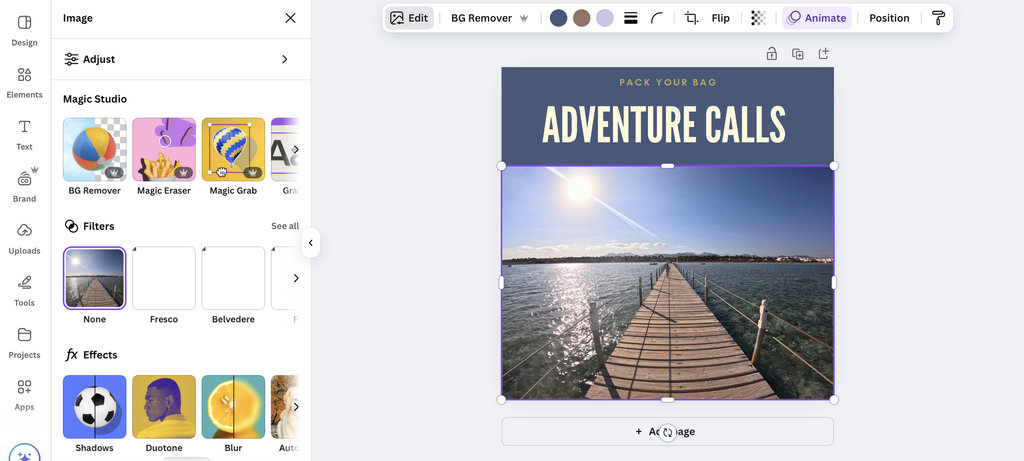
I used Canva as a practical production tool rather than judging it by how many features appear on the pricing page.
My use covered:
- Creating graphics from templates
- Editing layouts for blog and online content
- Removing image backgrounds
- Resizing designs for different formats
- Setting reusable brand colors, fonts, and visual assets
- Exporting images with transparent backgrounds
- Working with premium templates and stock assets
- Organizing repeated design projects
- Trying Canva’s AI-assisted creation and editing tools
- Comparing the points where Free remains sufficient and Pro removes friction
The question was not whether Canva Pro contains more features. It obviously does.
The question was whether those features created enough useful output to justify a recurring $180 charge.
Because “more software” and “better workflow” are not the same product.
What Are You Actually Paying For?
Canva Free is not a fake plan.
It can create social graphics, presentations, posters, documents, resumes, thumbnails, simple videos, and a wide range of personal or school projects without payment.
For occasional users, that is enough.
The upgrade becomes more tempting when Canva turns into a weekly workspace.
You find a suitable template, but it is premium. You find the right image, but it is locked. You need to remove a background, export transparency, resize the design, apply your brand, and prepare three social versions.
None of those tasks is impossible without Pro.
They are simply slower.
That is what Canva Pro mostly sells: fewer interruptions between an idea and a finished piece of content.
It is not paying to become more creative.
It is paying to perform less repetitive work.
The $180 Purchase Math
Canva Pro costs $180 a year on the current US annual plan, or an effective $15 per month before tax.
Whether that is expensive depends on usage.

(This checkout screenshot shows an earlier Canva Pro price; current pricing may vary by region, billing cycle, taxes, and promotional offers.)
If you create:
- 4 designs per year, Pro costs about $45 per design.
- 12 designs per year, Pro costs about $15 per design.
- 30 designs per year, Pro costs about $6 per design.
- 100 designs per year, Pro costs about $1.80 per design.
The cost becomes easier to justify as Canva moves from occasional convenience to production infrastructure.
There is another way to calculate it.
At $15 per month, Canva Pro needs to save one hour per month for someone who values their working time at $15 per hour. If Background Remover, Magic Resize, Brand Kit, premium assets, and social scheduling save more than that, the subscription can earn its place.
If you open Canva three times a year, the math becomes less poetic.
Annual billing is not a discount if the product spends eleven months resting.
The Pro Features That Matter Most
1. Background Remover
Background Remover remains one of Canva Pro’s easiest features to justify.
It can turn product photos, portraits, and object images into cleaner thumbnails, comparison graphics, social posts, and promotional visuals without opening a separate photo editor.
In my use, it was fast and often good enough for normal content production. Complicated hair, soft shadows, transparent objects, and messy edges can still require cleanup, so it is not a perfect cutout tool.
But “good enough in seconds” is useful when the final destination is a blog graphic rather than a billboard.
2. Magic Resize and Translate
Magic Resize becomes valuable when one design needs to appear in several formats.
A blog image may need a Pinterest version. A square social graphic may need to become a Story. A YouTube thumbnail may need a related promotional post.
The resized result still needs checking. Text can move awkwardly and some layouts need manual adjustment. Magic Resize is a shortcut, not an unpaid junior designer.
But it removes enough repetitive setup to matter for multi-platform publishing.
Translate follows the same logic. It is useful for adapting repeated content, but the output still needs review before publication.
3. Premium Templates and Assets
The current Pro plan lists more than 3.6 million templates and 141 million premium photos, videos, graphics, and audio assets.
That breadth is useful when you create frequently and do not want to source every image, icon, clip, or design component separately.
Premium does not automatically mean distinctive.
Some Pro templates are excellent. Some look like a productivity coach discovered beige.
Canva gives you options. It does not give you taste.
You still need to change the typography, spacing, imagery, and hierarchy enough to make the design belong to your brand.
4. Brand Kit
Brand Kit is one of Pro’s strongest workflow features for solo businesses and content brands.
The current Free plan includes one limited kit with three colors. Pro expands that to five Brand Kits and adds stronger access to reusable colors, fonts, logos, and branded design workflows.
That matters for:
- Blogs and affiliate sites
- YouTube channels
- Online stores
- Client work
- Newsletters
- Digital products
- Small businesses
Brand Kit does not create a brand strategy. It stops you from rebuilding the same settings every Tuesday.
That is less exciting than “AI design revolution.”
It is also more useful.
5. Social Scheduling and Storage
Pro includes Canva’s Social Content Planner and 100GB of cloud storage.
Scheduling is valuable if Canva is already where you create social graphics. It reduces the need to download, rename, move, and upload every asset into another publishing tool.
The storage increase from 5GB to 100GB also matters once Canva becomes a long-term workspace containing video, product images, PDFs, templates, and repeated campaign assets.
Storage alone is not a reason to subscribe.
But running out of space inside a production tool is an excellent way to discover that boring features are sometimes important.
6. Canva AI
Canva now divides AI usage across Standard, Premium, and Ultra tools.
The current Free allowance is listed as up to 200 Standard uses or 20 Premium uses. Pro raises that to as many as 2,000 Standard, 200 Premium, or 20 Ultra uses, depending on which tools you use. The allowance is shared, and more complex or higher-tier features consume it differently.
Canva’s AI features can help generate ideas, create or edit images, write text, adapt layouts, and speed up repetitive tasks.
Some are useful. Some produce generic results. Some are visited once and later remembered only by the pricing page.
I would not buy Canva Pro solely for AI unless a specific Canva AI feature already improves your real workflow. General AI tools may overlap, and Canva sells additional AI capacity separately through AI Pass.
AI is a possible benefit.
Workflow remains the better purchase reason.
What I Liked
- Fast production: Canva Pro reduces the number of small obstacles between opening a design and publishing it.
- Approachable editing: It is much easier for non-designers to use than traditional professional software.
- Useful premium tools: Background Remover, Magic Resize, Brand Kit, and premium assets solve common content-production problems.
- Strong repeatability: Reusable branding, templates, scheduling, and storage make more sense as output volume increases.
- One workspace for many formats: Blog graphics, social posts, presentations, PDFs, thumbnails, and simple video assets can live in the same system.
What I Did Not Like
- The price is harder to ignore: $180 per year is no longer a tiny creative subscription for occasional users.
- Designs can look generic: Templates make publishing easier, but overused templates also make brands look interchangeable.
- Advanced control remains limited: Complex typography, vector work, precision layouts, and detailed photo editing are better handled elsewhere.
- AI limits are complicated: “10x more AI” sounds simple until different tools consume different shared allowances.
- Subscription creep is real: Canva may overlap with stock libraries, social schedulers, AI tools, image editors, and other services you already pay for.
Canva Pro deserves a defined job.
Do not leave it on the bill because you may need a flyer someday.
What Real Users Say
When checked on August 21, 2026, Canva had approximately:
- 4.7/5 on G2 from more than 7,600 reviews
- 4.0/5 on Trustpilot from more than 6,600 reviews
G2 users frequently praise Canva’s ease of use, template library, quick content creation, and accessibility for non-designers. Common limitations include reduced control compared with professional software, performance problems in larger projects, and frustration with features locked behind paid plans.
Trustpilot feedback is more mixed. Positive reviews often focus on ease of use, creative flexibility, and support outcomes. Negative reviews frequently mention billing, cancellation, unexpected plan choices, AI results, technical problems, and customer-service friction.
The pattern is useful:
People generally like creating with Canva more than they like dealing with every part of the subscription experience.
Before starting a trial or annual plan, confirm which plan you selected, the full renewal amount, whether tax applies, and when the trial ends.
Creative freedom remains surprisingly interested in your credit card.
Canva Pro vs Affinity, Photoshop, Figma, and Adobe Express
Canva Pro is best understood as a fast content-production platform, not the most powerful design application.
- Affinity is better for deeper vector, photo, and publishing work. Canva’s current plans advertise Affinity access, so compare what your account already includes before buying Pro for “professional tools.”
- Photoshop is stronger for detailed photo editing, compositing, masking, and precision control.
- Figma is better for interface design, product collaboration, components, and design systems.
- Adobe Express offers a similar quick-design workflow and may fit people already paying for Adobe services.
- CapCut is a better choice when short-form video editing matters more than static visual design.
Canva wins when speed, accessibility, templates, and repeated multi-format output matter more than deep control.
That is not a smaller achievement.
It is a different job.
Who Gets the Most Value?
| User | Likely decision | Why |
| Blogger or affiliate marketer publishing weekly | Upgrade | Repeated featured images, pins, product graphics, and brand assets |
| YouTuber or social creator publishing weekly | Upgrade | Thumbnails, resizing, premium assets, scheduling, and background removal |
| Solo small business owner | Upgrade if used weekly | Brand consistency and recurring marketing materials can recover the cost |
| Freelancer creating client visuals | Upgrade | Time savings and premium assets can support paid work |
| Occasional personal user | Stay Free | Free already handles basic invitations, presentations, and social graphics |
| Professional designer needing precision | Consider alternatives | Canva prioritizes speed over deep control |
| Multi-person marketing team | Compare Canva Business | Pro is positioned for one person; Business adds team features |
The key word is not “creator.”
It is “weekly.”
The $180 Test

Before paying, ask:
What will I create this month because I have Canva Pro?
Good answers include:
- Weekly blog featured images
- Four YouTube thumbnails
- Ten Pinterest pins
- Product graphics for affiliate reviews
- Client visual packages
- Social posts for a business
- Branded lead magnets
- Repeated ad creative
- A real content design system
Weak answers include:
- “The templates look better.”
- “Everyone uses Canva.”
- “I might start posting more.”
- “The crown icons are annoying.”
- “It is only $15 a month when divided by twelve.”
Annoyance is not a business case.
It is just software flirting with your wallet.
The Upgrade or Skip Take
Canva Pro remains one of the easier creative subscriptions to recommend for frequent solo creators—but the new $180 annual price raises the standard.
If you publish visual content every week, Pro can save time, improve consistency, and reduce production friction. Background Remover, Magic Resize, Brand Kit, premium assets, social scheduling, and additional storage are practical tools with clear jobs.
If you create only occasionally, Canva Free is already unusually capable. It includes a large template and asset library, limited AI usage, 5GB of storage, and basic brand functionality without another annual charge.
Canva Pro does not make you a designer.
It makes repetitive visual production easier.
That is valuable when visual production is part of your work.
It is expensive convenience when it is not.
Upgrade if Canva helps you publish, promote, sell, or serve clients every week.
Stay Free if you only need occasional designs.
Skip Pro if it duplicates tools you already own or supports plans you have not started.
FAQ
Is Canva Pro worth it in 2026?
Yes, for frequent solo creators who repeatedly use Background Remover, Magic Resize, Brand Kit, premium assets, social scheduling, additional storage, or higher AI limits. Canva Free is usually enough for occasional designs.
How much does Canva Pro cost?
Canva’s US pricing page currently lists Pro at $180 per year for one person, equivalent to $15 per month when averaged across annual billing. Pricing, taxes, regional offers, and trials can change.
Is Canva Free enough?
Yes. Canva Free currently includes more than 1.6 million templates, 4.7 million assets, 5GB of cloud storage, limited AI usage, and one Brand Kit restricted to three colors. Upgrade when paid tools repeatedly remove real workflow friction.
Is Canva Pro for teams?
Canva currently positions Pro as a one-person plan. Teams that need shared workspaces, approvals, advanced brand management, and team administration should compare Canva Business.
Does Canva Pro include unlimited AI?
No. Pro provides higher shared allowances across Standard, Premium, and Ultra AI tools, but usage varies by feature. Canva also offers AI Pass as a separate recurring add-on.
Is Canva Pro better than Photoshop?
Not for advanced photo editing or detailed design control. Canva Pro is easier and faster for templates, social graphics, thumbnails, presentations, and routine marketing content.
Can Canva Pro replace a designer?
No. It can make production faster, but it does not replace design judgment, brand strategy, visual hierarchy, or advanced technical skill.
Prices, plan details, AI allowances, offers, ratings, and review counts can change. Check the current terms before subscribing.
Check Current Canva Pro Pricing
Next Up:
CapCut Pro Review 2026: Best Video Editing Tool for Beginners?
Upgrade smarter. Skip louder.