
Disclosure: This post may contain affiliate links. If you buy through them, we may earn a small commission at no extra cost to you.
Welcome back to Upgrade or Skip.
In the last post, we talked about the best AI tools for everyday people, and why a small useful stack beats a giant collection of subscriptions.
Now let’s talk about what happens when you take that idea too far.
Because AI is useful.
That is exactly how it gets you.
A useless tool is easy to ignore.
A useful tool slowly becomes the button you press before thinking.
Need to write an email?
Ask AI.
Need to make a decision?
Ask AI.
Need to summarize something?
Ask AI.
Need to understand a confusing topic?
Ask AI.
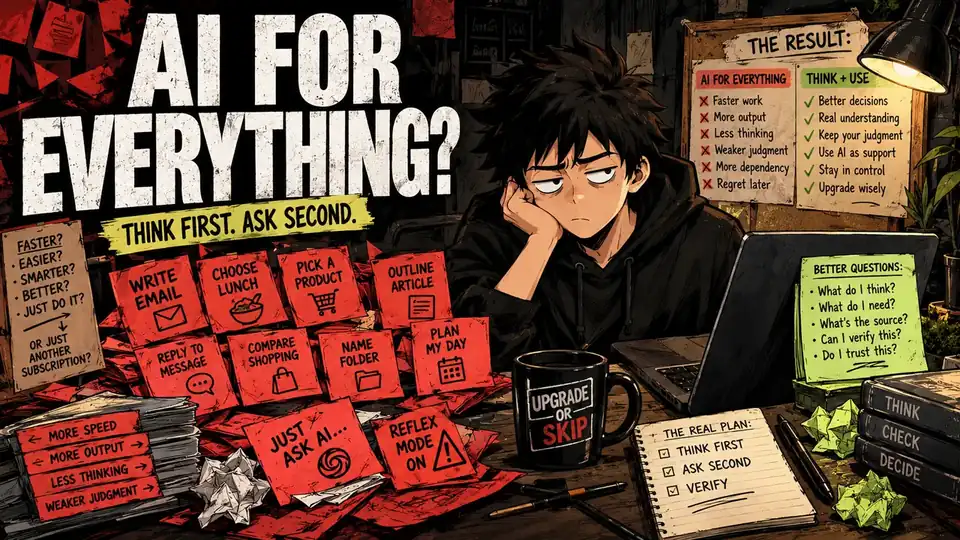
Need to plan your day, compare products, outline an article, rewrite a sentence, reply to a message, name a folder, or decide whether your own idea makes sense?
Ask AI.
At first, this feels amazing.
Then something gets weird.
The work gets faster.
But your confidence gets softer.
You produce more, but trust yourself less.
You get answers faster, but lose some of the friction where your own judgment used to form.
That is the mistake.
Not using AI.
Using AI before you know what you think.
The Short Answer
AI is useful when it supports your thinking.
It becomes a problem when it replaces the first version of your thinking.
The danger is not that one afternoon with a chatbot suddenly turns your brain into mashed potatoes.
The danger is quieter.
You stop drafting rough ideas yourself.
You ask for options before forming a preference.
You let the tool choose the structure.
You accept polished answers too quickly.
You avoid the uncomfortable part where a messy problem has to sit in your own head for a while.
Eventually, you can become faster at producing work while getting worse at judging it.
That is not the productivity upgrade it looks like.
That is outsourcing the part of the work that was supposed to make you better.
Very convenient.
Very expensive.
Just not in dollars.
The First Day Feels Amazing
Using AI for everything feels like discovering a cheat code.
Emails become easier.
Research becomes faster.
Blank pages stop looking hostile.
Messy notes turn into outlines.
A confusing topic becomes a clean summary.
A product comparison becomes a neat table.
A long document becomes six bullet points before your coffee gets cold.
You start wondering why you ever did any of this manually.
And no, the answer is not because manual work is noble.
Please.
Nobody needs to romanticize staring at a blank document like it owes you money.
The problem is that some friction is useful.
Friction forces you to choose.
It shows you what you actually understand.
It exposes the part of the problem you were avoiding.
It makes you develop an opinion before someone hands you one.
AI removes friction beautifully.
Sometimes too beautifully.
Everything Becomes a Prompt
Once AI becomes your default, every task starts looking like a prompt.
A message to a friend becomes:
“Make this warmer but not too needy.”
A work email becomes:
“Make this professional but firm.”
A personal decision becomes:
“Compare the pros and cons.”
A creative idea becomes:
“Give me ten better versions.”
A purchase becomes:
“Tell me which one to buy.”
A thought becomes:
“Is this a good idea?”
Are those useful prompts?
Sure.
The problem is not any one of them.
The problem is when this becomes the default way you interact with your own thoughts.
After a while, you are not just using AI to finish tasks.
You are using it to avoid the ugly first draft of your own mind.
That first draft is messy.
It is incomplete.
It may be wrong.
It is also yours.
And if you skip it every time, eventually you stop getting much practice making one.
AI Makes You Feel Productive Fast
AI is extremely good at making progress visible.
Confusion becomes structure.
Uncertainty becomes paragraphs.
Hesitation becomes options.
Messy thoughts become bullet points.
That feels like movement.
Sometimes it is.
Sometimes it is just procrastination with excellent formatting.
You were supposed to make a decision.
Instead, you asked AI for a comparison.
Then a better comparison.
Then a framework.
Then a checklist.
Then a shorter checklist.
Then a more practical version of the shorter checklist.
Forty minutes later, you have a beautiful decision document.
Still no decision.
Congratulations.
You did not eliminate procrastination.
You gave it an API.
Very advanced.
The Hidden Cost Is Confidence
One of the quieter costs of using AI for everything is not accuracy.
It is confidence.
When you ask AI before every task, you can slowly teach yourself that your first thought is never enough.
Your email needs checking.
Your idea needs validation.
Your plan needs optimizing.
Your wording needs polishing.
Your decision needs another opinion.
Your taste needs a second opinion.
Then maybe a third model, just to be safe.
At first, this can improve the work.
Then it starts changing how willing you are to work without approval.
You become less comfortable writing a bad first sentence.
Less comfortable making a rough call.
Less comfortable trusting your own preference.
Less comfortable sitting with uncertainty.
That matters.
Real work often begins before the answer is clean.
It begins in the awkward middle where you are not completely sure yet.
AI can help there.
It just should not own the room.
The Research Is More Complicated Than “AI Makes You Dumb”
There is a growing body of research around cognitive offloading, automation bias, over-reliance, memory, and how people behave when AI becomes part of the task.
The interesting part is that the story is not:
AI bad.
Human good.
Throw laptop into lake.
Generative AI can reduce mental effort, speed up work, and help people perform tasks they might otherwise struggle with.
That is real.
But the way you use it matters.
When people stay mentally involved, question outputs, compare evidence, and use AI as support, the tool can be extremely useful.
When the tool becomes a substitute for reasoning, scrutiny, or remembering anything yourself, the trade-off gets uglier.
That is the part that does not fit nicely on the pricing page.
The useful question is not:
“Does AI make people smarter or dumber?”
It is:
“What part of the task am I handing over?”
Because there is a big difference between outsourcing typing and outsourcing judgment.
The Verification Problem Gets Worse
When you use AI occasionally, checking the output is manageable.
When you use AI for everything, checking becomes another job.
Now you need to verify:
- Facts
- Sources
- Dates
- Names
- Prices
- Features
- Quotes
- Tone
- Hidden assumptions
- Whether the answer actually answered the question
For important work, that is normal.
For everything?
It gets exhausting.
Congratulations.
Your time-saving assistant has created a new position.
AI Output Inspector.
And if you stop checking because checking everything defeats the point, the risk moves into the final work.
Wrong product details.
Weak sources.
Outdated information.
Fake precision.
Generic advice.
Confident nonsense wearing a clean paragraph.
That is how AI mistakes get through.
Not because users are stupid.
Because finished-looking work is persuasive.
And AI is very good at looking finished.
Your Taste Starts to Drift
There is another quiet problem.
Taste.
If AI touches every draft, title, idea, paragraph, image concept, and edit, your work can slowly drift toward the model’s idea of “good.”
Clear.
Balanced.
Polite.
Smooth.
Structured.
Fine.
So very fine.
And “fine” is where memorable writing goes to die.
Fine does not always build trust.
Fine does not always sound like a person.
Fine does not make someone stop scrolling and think:
“Okay, this person actually gets it.”
AI is very good at cleaning up messy work.
It can also sand down the strange little edges that made the work yours.
The blunt opinion.
The oddly specific complaint.
The sentence that breaks the rhythm on purpose.
The joke that works because it is slightly too true.
The human part.
Use AI to sharpen your voice?
Absolutely.
Use it until every sentence sounds like it came from the same polite productivity newsletter?
Maybe stop.
Airport oatmeal is also technically food.
That does not mean anyone remembers it.
The Tool Becomes a Reflex
The turning point is when AI stops being a choice.
It becomes a reflex.
You no longer ask:
“Would AI help here?”
You just open it.
Subject line?
AI.
Simple summary?
AI.
Normal message?
AI.
Choose between two products?
AI.
Plan tomorrow?
AI.
None of those uses are bad by themselves.
The pattern is the problem.
If every tiny act of judgment gets outsourced, your judgment gets less practice.
And skills do not stay sharp because you once had them.
They need reps too.
Use AI to remove boring work.
Just be careful when the “boring work” starts including every moment where you have to decide what you actually think.
AI Is Better as a Second Brain Than a First Brain
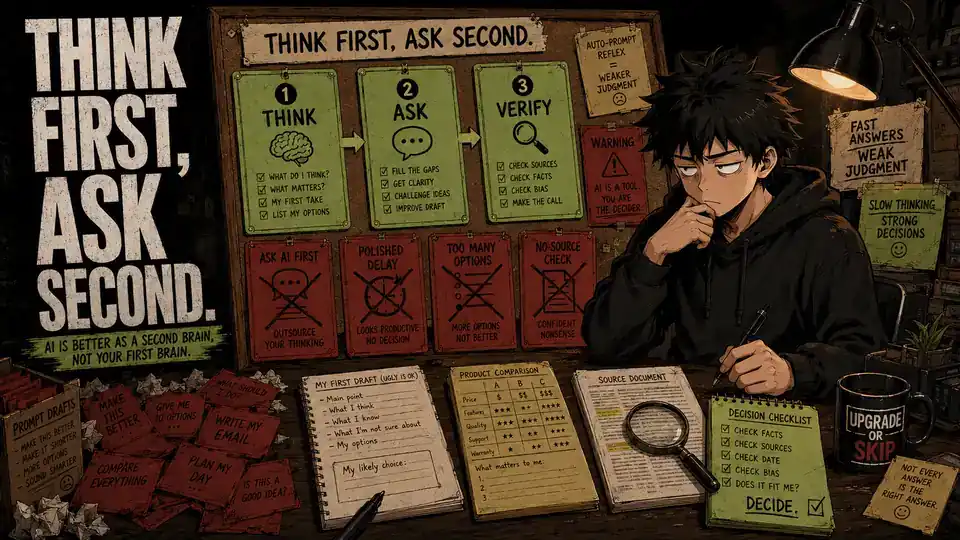
This is the rule that fixes most of the problem.
AI works better as your second brain.
Not your first.
First brain:
What do I think?
What do I want?
What do I already know?
What matters here?
What feels wrong?
What would I choose without help?
Then bring in the second brain:
What am I missing?
Can you organize this?
Can you challenge my reasoning?
Can you compare these options?
Can you summarize these sources?
Can you make this clearer?
Can you find the weak spots?
That order matters.
When AI goes first, it frames the problem for you.
When you go first, AI helps improve your frame.
That is the difference between assistance and substitution.
Think First, Then Ask
Try one simple rule:
Before asking AI, make your own ugly version.
It does not need to be good.
Actually, it probably should not be.
Write the rough email.
List the product features that matter to you.
Make your first guess.
Choose your likely answer.
Write the terrible opening paragraph.
Sketch the plan.
Then use AI.
Now you have something to compare against.
You can say:
“This is what I think. What am I missing?”
That is much more useful than:
“Tell me what to think.”
For example:
Before asking AI to write an email, write the ugly version.
Before asking AI to compare products, decide what matters to you.
Before asking AI to summarize an article, see what you understood first.
Before asking AI to make a decision, choose your likely answer.
Before asking AI to improve a draft, give it an actual draft.
Your brain enters the conversation first.
The model joins second.
That is a healthier division of labor.
Use AI for Friction, Not Avoidance
There is a difference between removing friction and avoiding thought.
Good AI use:
“I know what I want to say. Help me make it clearer.”
Bad AI use:
“I do not want to figure out what I want to say.”
Good AI use:
“I have three options. Help me compare the trade-offs.”
Bad AI use:
“Tell me what I want.”
Good AI use:
“Summarize these sources so I can inspect them faster.”
Bad AI use:
“Give me a confident answer so I do not have to read anything.”
Good AI use:
“Find weak spots in my plan.”
Bad AI use:
“Make me feel like I have a plan.”
AI is excellent at reducing friction.
But not all friction is waste.
Sometimes the friction is the work.
Try a 24-Hour AI Reset
If AI has become automatic, try one day without using it first.
Not an AI detox.
No need to move into a cabin and start writing letters with a feather.
Just 24 hours.
For small tasks, do the first pass yourself.
Write the email.
Make the list.
Read the source.
Choose the product criteria.
Draft the paragraph.
Make the decision.
Then, if the task still needs help, bring AI in second.
This reveals two things very quickly.
Where AI genuinely saves you time.
And where you were using AI because thinking for five minutes felt mildly annoying.
That distinction is valuable.
It can also save you money.
Because once you know what AI actually helps with, half your “essential” AI stack may suddenly look a lot less essential.
When Heavy AI Use Actually Makes Sense
There is an important exception to all of this.
For some people, heavy AI use is not productivity theater.
It is accessibility.
Language barriers.
Disabilities.
High cognitive load.
Repetitive administrative work.
Massive professional workloads.
Tasks that would otherwise be difficult or exhausting.
In those cases, AI can be more than convenience.
It can reduce barriers.
It can help people communicate.
It can make work more manageable.
It can make certain tasks possible.
That matters.
So the point is not:
“Everyone should use less AI.”
The point is:
Know what role AI is playing.
Support is good.
Leverage is good.
Removing pointless friction is good.
Dependency you never consciously chose deserves a second look.
The Real Upgrade Is Control
The best AI setup is not the one where AI touches everything.
It is the one where you know when to use it.
Use AI for things like:
- Breaking through a blank page
- Summarizing long material
- Checking blind spots
- Comparing options
- Explaining confusing topics
- Cleaning up rough writing
- Finding patterns across sources
- Turning messy notes into structure
Be more careful when AI is involved in:
- Personal judgment
- Final factual claims
- Sensitive messages
- Medical, legal, tax, or financial decisions
- Creative taste
- Decisions you cannot explain yourself
That second list is not banned.
It just deserves more attention.
AI can help with serious decisions.
It should not quietly become the person making them.
Upgrade If:
Upgrade to a paid AI tool if it helps you do important work better while keeping you involved.
Upgrade if it saves measurable time after you include review and verification.
Upgrade if it improves your drafts without flattening your voice.
Upgrade if it helps you understand sources instead of avoiding them.
Upgrade if it supports repeated tasks that matter in your real life.
Upgrade if you can still explain your own decision after using it.
That last one matters.
If your explanation is:
“Well, the AI said…”
You probably are not done thinking yet.
Skip If:
Skip using AI for everything if it is making you less confident in your own first thoughts.
Skip if you ask AI before every tiny decision.
Skip if you use it to avoid reading the actual source.
Skip if you keep generating options instead of choosing one.
Skip if the output looks polished but you do not actually trust it.
Skip if managing AI has become another layer of work.
Skip if thinking without AI now feels strangely uncomfortable.
That discomfort is not always a problem.
Sometimes it is just your brain asking for its shift back.
The Upgrade or Skip Take
Using AI for everything sounds efficient.
Sometimes it is.
But efficiency is not the same thing as control.
AI is at its best when it helps you think, create, check, organize, and finish.
It becomes a problem when it replaces the beginning of your own judgment.
The goal is not to use less AI because doing things the hard way builds character.
Nobody gets a medal for manually summarizing a 70-page PDF.
The goal is to use AI deliberately.
Think first.
Ask second.
Verify before trusting.
Keep your taste.
Protect your judgment.
Let AI remove the boring friction.
Keep the friction that makes you better.
Use AI as leverage.
Not life support.
Upgrade when it sharpens your thinking.
Skip when it starts doing the thinking for you.
Next Up:
AI Coding Tools: Productivity Boost or Expensive Autocomplete?
AI coding tools can feel magical when they work.
They can also generate bugs, fake confidence, and 200 lines of code nobody in the room fully understands.
Next, we will look at when AI coding tools genuinely save developers time, and when you are basically paying monthly for autocomplete with a very good marketing department.
Upgrade smarter. Skip louder.