
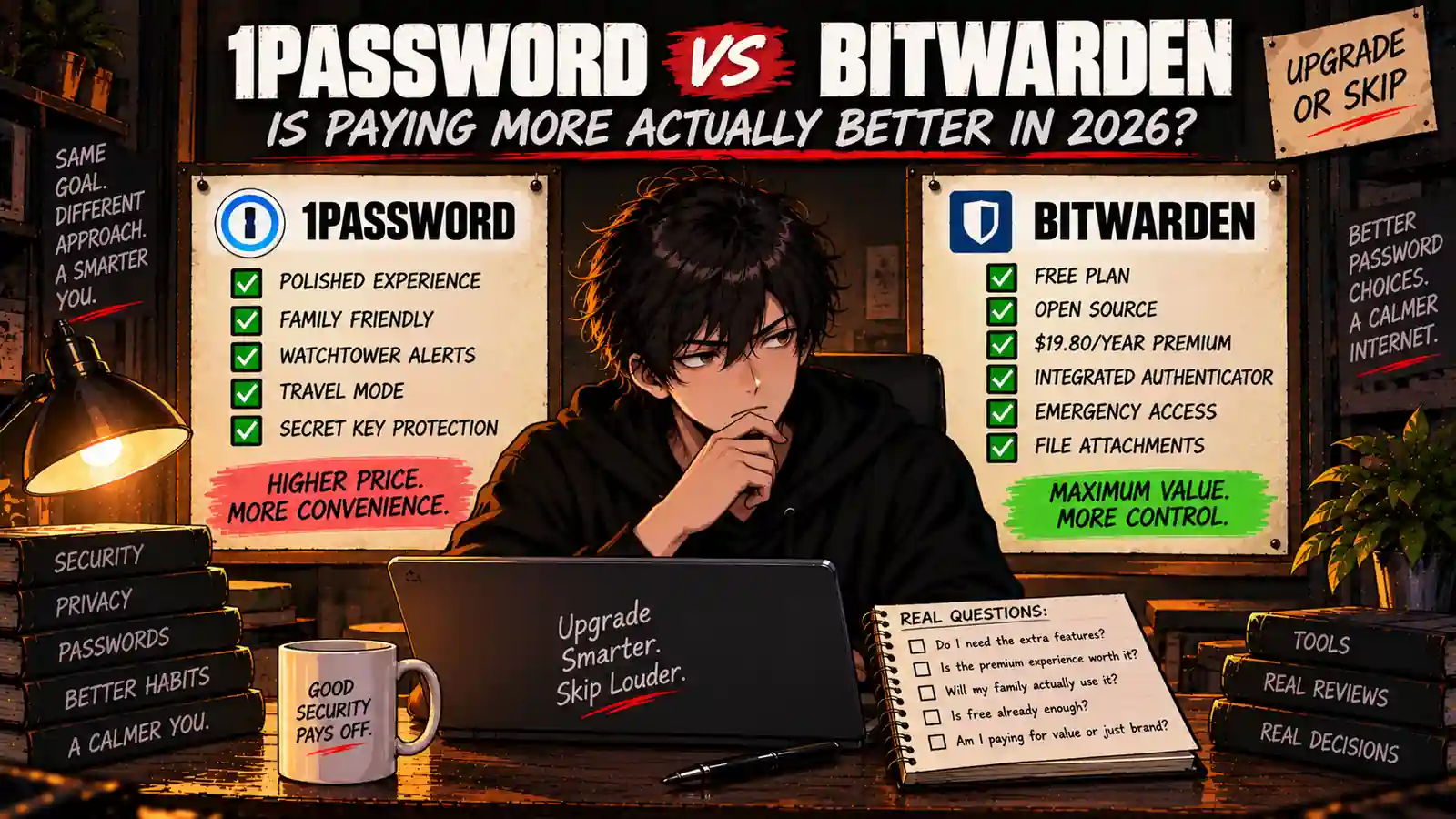
Welcome back to Upgrade or Skip.
1Password and Bitwarden solve the same basic problem.
They remember your passwords so you do not have to.
But their purchase arguments are very different.
1Password is built as a premium subscription from the start. It emphasizes a polished experience, family management, security guidance, and convenience.
Bitwarden takes almost the opposite approach: give individuals a surprisingly capable password manager for free, then charge a relatively small amount for advanced features.
That creates a more useful question than simply asking which password manager is “better.”
Does paying more for 1Password actually solve a problem that Bitwarden cannot already solve for less — or even for free?
That is what we are deciding.
Quick Verdict
1Password makes the most sense if you specifically value its polished workflow, household management, and guided premium experience enough to pay for them every year.
Bitwarden is the stronger value proposition if you want capable password management at the lowest possible cost.
And there is a third answer that matters even more:
If Bitwarden Free already handles your passwords, devices, autofill, and passkeys, stay free.
Do not turn password security into a subscription-collecting hobby.
Key Numbers at a Glance
| Item | 1Password | Bitwarden |
|---|---|---|
| Permanent Individual Free Plan | No | Yes |
| Individual Paid Price | $2.99/month billed annually* | $19.80/year |
| Approx. First-Year Individual Cost | $35.88* | $19.80 |
| Family Price | $4.49/month billed annually* | $47.88/year |
| Family Seats | 5 included | Up to 6 users |
| Free Trial | 14 days | Free plan available |
| Open Source | No | Yes |
| Best Fit | Premium convenience | Maximum value |
*1Password currently displays promotional pricing for new customers subscribing directly through 1Password.com with annual billing for the first year. Its regular displayed prices are higher. Check the current offer and renewal price before subscribing.
So what?
The difference between $19.80 and roughly $35.88 in the promotional first year is not enormous.
But Bitwarden is not starting its argument at $19.80.
It starts at $0.
That changes the comparison considerably.
Upgrade or Skip in 10 Seconds
| If You… | Decision |
|---|---|
| Just need passwords, autofill, sync, and passkeys | STAY FREE WITH BITWARDEN |
| Want premium features without spending much | BITWARDEN PREMIUM |
| Strongly prefer a polished premium workflow | CONSIDER 1PASSWORD |
| Need simple household password management | COMPARE BOTH FAMILY PLANS |
| Prefer open-source software | BITWARDEN |
| Already have a password manager that works | SKIP ANOTHER SUBSCRIPTION |
What We Checked
This is a research-based comparison.
For this article, we checked current official pricing, plan limits, password-management features, family options, security documentation, passkey support, sharing features, and the differences between Bitwarden Free, Bitwarden Premium, and 1Password’s paid plans.
The goal is not to count which company has the longest feature list.
It is to answer a purchase question:
What are you actually paying extra for?
What Is 1Password?
1Password is a paid password manager built around storing credentials, generating strong passwords, autofilling logins, managing passkeys, securely sharing information, and monitoring password health.
Its individual plan works across supported devices and includes security alerts for weak or compromised credentials.
Its Families plan adds household-oriented management, including shared vaults and administrative controls.
There is currently a 14-day free trial, but unlike Bitwarden, there is no comparable permanent free individual tier.
That means 1Password eventually has to prove that its paid experience is worth keeping.
What Is Bitwarden?
Bitwarden is an open-source password manager with Free, Premium, Families, and business plans.
The unusual part is how much of the core password-management experience remains available without paying.
Free users can handle the basic job of a password manager without treating the free tier like a temporary demo.
Premium currently costs $19.80 per year and adds features including an integrated authenticator, file attachments, Emergency Access, security reports, and additional premium functionality.
Families currently costs $47.88 per year for up to six users.
If you are specifically considering that upgrade, read our Bitwarden Premium Review 2026.
1Password vs Bitwarden: The Core Difference
Both products can manage passwords.
That is not where this decision gets interesting.
The real difference is:
1Password sells convenience.
Bitwarden sells value — and often gives the core value away for free.
1Password tries to make password security feel like a polished consumer service.
Bitwarden gives users a strong foundation and lets them decide how much more they actually need.
Neither philosophy is automatically superior.
But one may fit your buying habits much better.
1Password vs Bitwarden Pricing
1Password Individual
At the time of this review, 1Password displays Individual at $2.99 per month with annual billing for eligible new customers during the first-year promotion.
That works out to approximately:
$35.88 for the promotional first year.
The same official page currently displays a regular price of $3.99 per month.
That renewal difference matters.
A first-year discount should not be treated as the permanent cost of owning the software.
1Password Families
The current promotional Families price is $4.49 per month with annual billing, or approximately:
$53.88 for the first promotional year.
The plan includes five seats and adds unlimited shared vaults plus family administration controls.
The regular displayed price is currently $5.99 per month.
Bitwarden Premium
Bitwarden Premium currently costs:
$1.65 per month equivalent
or:
$19.80 billed annually.
Premium adds features such as:
- Integrated authenticator
- File attachments
- Emergency Access
- Security reports
- Additional premium security features
Bitwarden Families
Bitwarden Families currently costs:
$3.99 per month equivalent
or:
$47.88 billed annually.
It supports up to six users and includes Premium accounts, unlimited sharing, unlimited collections, and organization storage.
The Purchase Math
| Plan | Approx. Annual Cost |
|---|---|
| Bitwarden Free | $0 |
| Bitwarden Premium | $19.80 |
| 1Password Individual Promotional First Year | $35.88* |
| Bitwarden Families | $47.88 |
| 1Password Families Promotional First Year | $53.88* |
*Based on the promotional annual prices displayed when this article was researched. 1Password identifies these as first-year offers for eligible new direct customers.
For individuals, the current first-year difference between 1Password’s promotional price and Bitwarden Premium is about:
$16.08 per year.
That is not a dramatic difference.
But compare either paid plan with Bitwarden Free and the math changes again.
Saving 50% on software you do not need is still spending more than staying free.
Bitwarden Free vs Paying for 1Password
This is probably the most important comparison in the entire article.
Bitwarden Free already covers the core password-management workflow for many individuals.
If your routine looks like this:
- Save passwords
- Generate unique passwords
- Autofill logins
- Use the vault across devices
- Manage passkeys
- Occasionally share credentials
you need to ask what problem paying for 1Password would actually solve.
If the answer is:
“I prefer its experience enough to use it every day.”
That can be legitimate value.
If the answer is:
“It looks nicer.”
Keep your credit card in its wallet for another minute.
What You Actually Get With 1Password
1. A More Deliberately Premium Experience
1Password’s biggest selling point is not one isolated feature.
It is the overall workflow.
The product is designed around making password management approachable rather than asking users to think constantly about security configuration.
That matters more for some people than others.
A technical user may happily trade polish for control and lower cost.
A household trying to get several less-technical family members to use a password manager consistently may value simplicity much more.
2. Watchtower Security Alerts
1Password includes Watchtower, which surfaces security issues such as weak or reused passwords and breached websites.
This is useful because storing passwords is only half the job.
If you imported years of bad password habits, a vault full of credentials does not automatically make those credentials good.
3. Secret Key Protection
1Password uses an account password together with a Secret Key as part of its account-security design.
The additional secret is intended to strengthen protection of your encrypted account data.
This is a meaningful architectural difference, although it should not be reduced to a marketing claim that automatically makes every competing password manager unsafe.
4. Travel Mode
1Password also offers Travel Mode, which can temporarily remove selected vaults from devices while traveling and restore them later.
This is not something every user needs.
For frequent travelers carrying particularly sensitive information, however, it can be more than a checkbox on a comparison chart.
5. Family Management
1Password Families includes five seats, unlimited shared vaults, and administrative controls.
This is where the polished workflow can have practical value.
Managing your own passwords is one thing.
Convincing several relatives to manage theirs properly is another.
What You Actually Get With Bitwarden
1. A Real Free Plan
This remains Bitwarden’s strongest argument.
Its free password manager is designed to be usable as a long-term product rather than merely a short trial.
For ordinary password storage, device access, autofill, password generation, and passkeys, many individuals may never need to upgrade.
2. Open-Source Transparency
Bitwarden publishes its source code and describes its password manager as open source.
Open source does not magically eliminate vulnerabilities.
It does mean the implementation can be examined outside the company.
For users who specifically value software transparency, that can be an important differentiator.
3. A Very Cheap Premium Tier
If you outgrow Free, the next step is still relatively inexpensive.
At $19.80 per year, Bitwarden Premium adds advanced functionality without turning password management into a $50–$100 annual subscription.
That makes it especially attractive for users who need one or two Premium features but do not care much about a more polished consumer experience.
4. Integrated Authenticator
Premium includes TOTP code generation directly inside Bitwarden Password Manager.
This can remove the need to open a separate authenticator app for supported workflows.
Some users love that convenience.
Others intentionally keep passwords and authentication codes separate.
That is partly a convenience decision and partly a personal security-model decision.
5. Emergency Access
Premium also includes Emergency Access.
This becomes more important when your vault contains genuinely important digital information and another trusted person may need access if you cannot provide it yourself.
That is a much better reason to pay than:
“Premium is cheap.”
Security: 1Password vs Bitwarden
Both companies position their password managers around encrypted vaults and zero-knowledge designs.
The practical decision should therefore not be reduced to:
“Which one is secure and which one is unsafe?”
That is not a useful framing.
| Security Area | 1Password | Bitwarden |
|---|---|---|
| End-to-End Encrypted Vault | Yes | Yes |
| Zero-Knowledge Approach | Yes | Yes |
| Passkeys | Yes | Yes |
| Security / Vault Health Alerts | Watchtower | Premium Security Reports |
| Open Source | No | Yes |
| Additional Account Secret | Secret Key | No equivalent 1Password Secret Key |
The more useful question is which security model and workflow you are more likely to use correctly and consistently.
A sophisticated password manager you hate using is not automatically a better security decision than a simpler one you use every day.
Ease of Use
This is one of the strongest arguments for 1Password.
Password managers are security products.
Security products have a habit of becoming annoying.
1Password puts considerable emphasis on reducing that friction.
Bitwarden is also approachable, but its appeal leans more toward value, flexibility, transparency, and user control.
If you enjoy configuring software, Bitwarden’s approach may feel perfectly comfortable.
If you want the password manager to disappear into the background, the additional polish of 1Password may be worth something to you.
The word is may.
Convenience has value only when you notice the difference.
Family Plans: 1Password vs Bitwarden
| Feature | 1Password Families | Bitwarden Families |
|---|---|---|
| Current Promotional / Listed Annual Cost | Approx. $53.88 first year* | $47.88 |
| Included Users | 5 | Up to 6 |
| Shared Vaults / Sharing | Yes | Yes |
| Family Administration | Yes | Yes |
| Main Advantage | Polished household workflow | Lower cost per supported user |
*1Password promotional pricing applies only under the conditions described earlier.
The price difference between the two family plans is much smaller than the philosophical difference between the products.
If five or six people genuinely use the plan, either can be inexpensive per person.
The more important question becomes:
Which system will your family actually use?
A cheaper family password manager that half the household refuses to touch is not automatically better value.
1Password vs Bitwarden vs Other Alternatives
These are not your only choices.
If privacy features and email aliases matter, see our Proton Pass vs Bitwarden comparison.
If you are considering another paid password manager, we also compared Keeper vs Bitwarden.
And if your real question is whether you should pay anything at all, start with our Best Free Password Managers in 2026 guide.
That last comparison matters.
Do not compare three paid subscriptions before checking whether a free product already solves the problem.
Who Should Choose 1Password?
Consider 1Password if you:
- Strongly prefer its interface and workflow
- Want a polished paid experience
- Manage passwords for less-technical family members
- Value Watchtower and its security guidance
- Want features such as Travel Mode
- Prefer its Secret Key account-security model
- Have tested it and know the additional convenience matters to you
The last point matters most.
You should be able to explain what you are paying for without saying:
“It is the premium one.”
Who Should Choose Bitwarden?
Bitwarden makes sense if you:
- Want to spend as little as possible
- Want a permanent free option
- Prefer open-source software
- Want inexpensive Premium features
- Need Emergency Access
- Want integrated TOTP without paying much
- Prefer flexibility over additional polish
For many individual users, the Free plan may already be the correct purchase decision.
Which is convenient, because the purchase price is zero.
Who Should Stay Free?
Stay with Bitwarden Free if you mainly need:
- Password storage
- Multiple-device access
- Autofill
- Password generation
- Passkey management
- Basic password sharing
Do not upgrade simply because security feels like something you are supposed to spend money on.
Good security habits matter.
A larger subscription bill is not itself a security feature.
Pros and Cons
1Password Pros
- Polished user experience
- Strong family-oriented workflow
- Watchtower security alerts
- Secret Key account protection
- Travel Mode
- Unlimited use across your devices
- 14-day free trial
1Password Cons
- No comparable permanent free individual plan
- Costs more than Bitwarden Premium
- Current headline pricing includes a first-year promotion
- Some users may not benefit enough from the extra polish
Bitwarden Pros
- Strong permanent free plan
- $19.80/year Premium tier
- Open-source approach
- Integrated authenticator on Premium
- Emergency Access on Premium
- Security reports and file attachments on Premium
- Families supports up to six users
Bitwarden Cons
- Some users may prefer 1Password’s more polished workflow
- Several advanced tools require Premium
- Family experience may appeal more to users comfortable managing software themselves
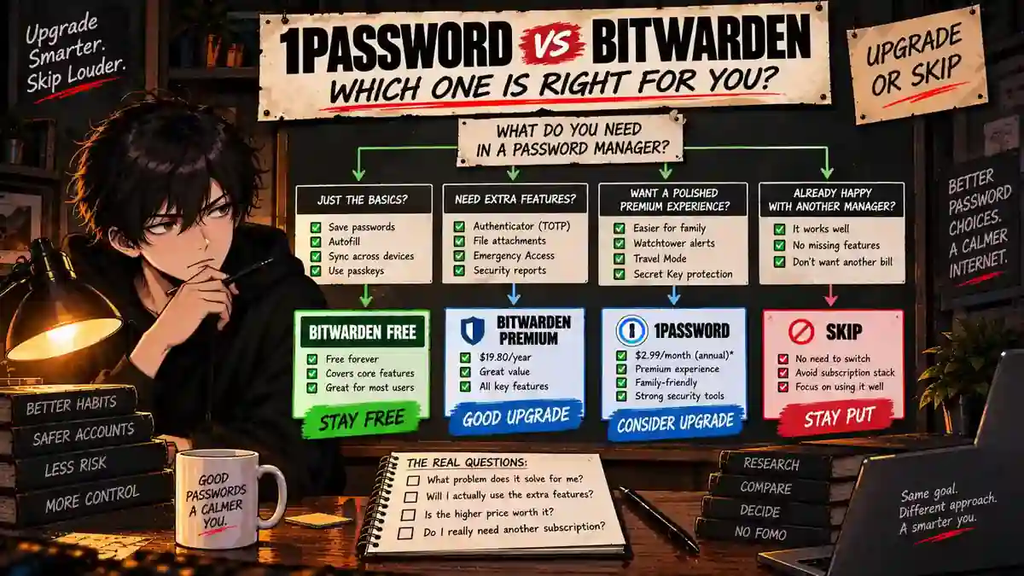
The Upgrade Test
Ask yourself:
What repeated problem does paying more for 1Password solve for me every week?
| Your Answer | Decision |
|---|---|
| “My family actually finds 1Password easier to use.” | CONSIDER 1PASSWORD |
| “I strongly prefer its workflow every day.” | CONSIDER 1PASSWORD |
| “I need Premium TOTP, Emergency Access, or reports.” | BITWARDEN PREMIUM MAY BE ENOUGH |
| “I just need passwords and autofill.” | STAY FREE |
| “1Password looks more premium.” | SKIP FOR NOW |
| “I already have a password manager that works.” | DO NOT STACK SUBSCRIPTIONS |
This is the entire purchase decision in one table.
Pay for a repeated advantage.
Not a prettier pricing page.
Final Verdict
1Password and Bitwarden are both serious password managers.
They simply make different purchase arguments.
1Password asks you to pay for a deliberately polished premium experience.
Bitwarden asks whether you need to pay at all.
For an individual who mainly needs password storage, multiple-device access, autofill, password generation, and passkeys, Bitwarden Free can already solve the problem.
If you need Bitwarden’s integrated authenticator, Emergency Access, file attachments, security reports, or other Premium features, Bitwarden Premium remains inexpensive at $19.80 per year.
1Password becomes more compelling when its smoother workflow, Watchtower tools, family management, Travel Mode, or overall experience creates value you notice repeatedly.
So:
STAY FREE if Bitwarden Free already does everything you need.
CHOOSE BITWARDEN PREMIUM if you need its paid tools but still want to minimize cost.
CONSIDER 1PASSWORD if its premium workflow genuinely makes password management easier for you or your household.
SKIP if you already have a password manager that solves the problem.
Subscription stacks do not need bench players.
Upgrade or Skip Verdict
| User Type | Verdict |
|---|---|
| Basic individual user | STAY FREE WITH BITWARDEN |
| Value-focused power user | BITWARDEN PREMIUM |
| User who strongly values premium convenience | CONSIDER 1PASSWORD |
| Household prioritizing ease of use | COMPARE BOTH FAMILY PLANS |
| Open-source-focused user | BITWARDEN |
| User already happy with another password manager | SKIP |
FAQ
Is 1Password better than Bitwarden in 2026?
They emphasize different things. 1Password focuses on a polished paid experience, security guidance, and household management. Bitwarden combines a permanent free tier, a $19.80/year Premium plan, and an open-source approach. Which one fits better depends on which differences you will actually use.
Is Bitwarden still free in 2026?
Yes. Bitwarden continues to offer a permanent Free plan intended for basic password management.
How much does Bitwarden Premium cost?
Bitwarden currently lists Premium at $19.80 per year, equivalent to $1.65 per month when billed annually. Taxes are not included in the displayed price.
How much does 1Password cost in 2026?
At the time of this review, 1Password displays an Individual promotional price of $2.99 per month with annual billing for eligible new direct customers during the first year. The same official page displays a regular price of $3.99 per month. Pricing and promotions can change, so check the current offer before subscribing.
Does 1Password have a free plan?
1Password currently offers a 14-day free trial for its personal plans, but it does not offer a comparable permanent individual free tier like Bitwarden.
Which is cheaper, 1Password or Bitwarden?
Bitwarden provides the lowest-cost route because Free costs nothing and Premium currently costs $19.80 per year. 1Password’s current promotional Individual price works out to about $35.88 for the first year with annual billing.
Is Bitwarden Free enough?
For many individual users, yes. If you mainly need core password management, device access, autofill, password generation, and passkeys, start with Free and upgrade only when you can identify a missing feature you repeatedly need.
Is Bitwarden open source?
Yes. Bitwarden describes its password manager as open source and makes its source code available for inspection.
Is 1Password worth paying more for?
It can be if its workflow, family-management features, Watchtower alerts, Travel Mode, or overall experience repeatedly make password management easier for you. If those differences do not change your workflow, Bitwarden may provide better purchase economics.
Should I use both 1Password and Bitwarden?
Most individual users do not need two paid password managers doing the same job. Pick one primary system unless you have a specific workflow that genuinely requires both.
Sources
- 1Password — Personal and Family Pricing
- 1Password — Password Manager Features
- Bitwarden — Password Manager Pricing
- Bitwarden — Personal Password Manager
- Bitwarden — Security and Compliance
Pricing, promotional offers, limits, and included features may change. Check the official pricing pages before purchasing.
Next Up
1Password Review 2026: Is It Worth Paying For?
Upgrade smarter. Skip louder.