
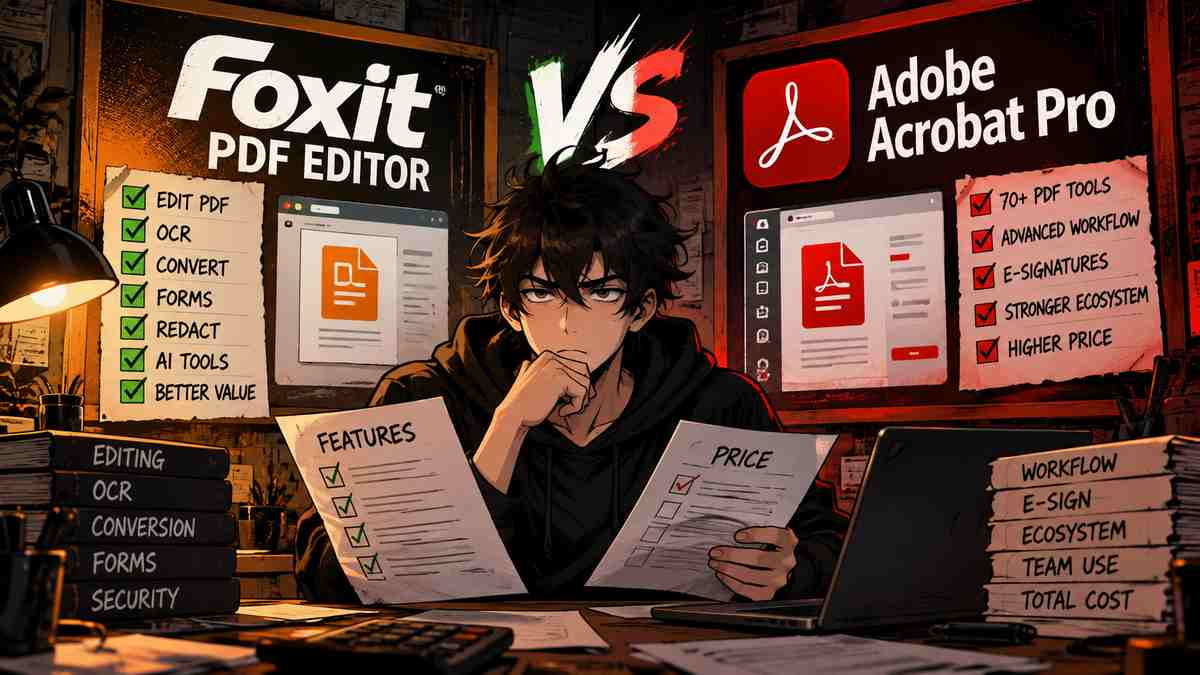
.Welcome back to Upgrade or Skip.
Adobe Acrobat Pro has been the default name in PDF software for decades.
For many users, PDF editing software simply means Acrobat.
But being the most famous option does not automatically mean it is the right purchase.
Foxit Software has spent years competing in the same market by offering many professional PDF features:
- PDF editing
- OCR
- Conversion
- Forms
- E-signatures
- Security tools
- Document collaboration
The comparison looks familiar:
The industry standard vs the lower-cost alternative.
But the real question is not:
“Which PDF editor has more features?”
The real question is:
Which one solves your PDF problems without charging you for a workflow you never use?
Before comparing them, read our related reviews:
Quick Verdict
Upgrade to Adobe Acrobat Pro if:
- PDFs are part of your daily professional workflow
- You manage contracts or sensitive documents
- You need advanced document comparison
- Your company already uses Adobe products
- Enterprise compatibility matters
Choose Foxit PDF Editor if:
- You need professional PDF tools
- You want to spend less than Adobe
- You need OCR, editing, and conversion
- You want a lighter alternative
- You do not need Adobe’s ecosystem
Stay Free if:
- You mostly read PDFs
- You sign documents occasionally
- You rarely edit files
The short version:
Adobe Acrobat Pro remains the more established professional solution.
Foxit PDF Editor is the value-focused alternative for users who need strong PDF features without paying Adobe pricing.
The mistake is not choosing the cheaper tool.
The mistake is paying for professional PDF software without having a professional PDF workflow.
Key Numbers at a Glance
| Adobe Acrobat Pro | Foxit PDF Editor | |
|---|---|---|
| Pricing model | Subscription | Subscription + business licensing options |
| Main audience | Professionals & enterprises | Individuals & businesses |
| PDF editing | ✓ | ✓ |
| OCR | ✓ | ✓ |
| Conversion | ✓ | ✓ |
| Redaction | ✓ | ✓ |
| Forms | ✓ | ✓ |
| E-signatures | Advanced workflow | Available |
| Document comparison | Advanced | Available |
| AI tools | Adobe AI features | Foxit AI features |
| Biggest advantage | Ecosystem | Value |
So what?
Most modern PDF editors can handle the basics.
The decision is not about whether both can edit a PDF.
They can.
The decision is whether Acrobat’s professional advantages justify the higher cost.
Adobe Acrobat Pro vs Foxit PDF Editor in 10 Seconds
| Your situation | Better fit |
|---|---|
| Large company workflow | Adobe Acrobat Pro |
| Adobe Creative Cloud user | Adobe Acrobat Pro |
| Advanced document management | Adobe Acrobat Pro |
| Need strong PDF tools for less money | Foxit PDF Editor |
| Want a lighter application | Foxit PDF Editor |
| Need OCR and conversion | Either |
| Edit PDFs occasionally | Stay Free |
What We Checked
This comparison is based on:
- Official product information
- Current pricing pages
- Feature comparisons
- User feedback patterns
- Professional PDF workflows
We checked:
- PDF editing
- OCR
- Conversion
- Redaction
- Forms
- E-signatures
- AI tools
- Platform support
- Pricing
- Complaints
We are not presenting this as hands-on personal testing.
Pricing and features may change.
What Is Adobe Acrobat Pro?
Adobe Acrobat Pro is Adobe’s professional PDF platform.
It is designed for users who work with documents regularly.
Common Acrobat Pro workflows include:
- Editing PDFs
- Converting documents
- Creating forms
- Comparing documents
- Protecting files
- Collecting signatures
- Managing business documents
Adobe’s biggest advantage is not simply its feature count.
It is the ecosystem.
Companies already using Adobe products often choose Acrobat because it fits existing workflows.
For example:
A legal team reviewing contracts.
A company collecting customer signatures.
A business managing confidential documents.
In these situations, workflow consistency can matter more than saving money.
Read our full:
What Is Foxit PDF Editor?
Foxit PDF Editor is a professional PDF application designed as an alternative to Adobe Acrobat.
Foxit’s feature set includes:
- PDF editing
- OCR
- Conversion
- Forms
- Digital signatures
- Redaction
- Document protection
- Collaboration tools
Foxit’s official product information highlights editing, conversion, OCR, and security features.
Official website:
https://www.foxit.com/pdf-editor
Foxit’s main argument is simple:
Most users need powerful PDF tools.
They do not necessarily need Adobe’s entire ecosystem.
For many individuals and smaller businesses, that difference matters.
Pricing Comparison
Adobe Acrobat Pro Pricing
Adobe Acrobat Pro is positioned as a premium subscription product.
Current pricing:
$19.99/month
Annual calculation:
$19.99 × 12
=
$239.88/year
Official pricing:
https://www.adobe.com/acrobat/pricing.html
The important detail:
The cheaper monthly number comes with an annual commitment.
A discount is only useful if you were already going to use the software.
Foxit PDF Editor Pricing
Foxit offers different plans depending on:
- Individual users
- Businesses
- Enterprise customers
Official pricing:
https://www.foxit.com/pdf-editor/pricing.html
Foxit’s pricing advantage is flexibility.
It competes by offering professional PDF features without requiring every user to enter Adobe’s ecosystem.
However, check the exact edition before buying.
Different versions may include different features.
Purchase Math
Adobe Acrobat Pro
Annual:
$239.88
Three years:
$719.64
Foxit PDF Editor
Pricing depends on the edition and licensing model.
The long-term question is:
How much are you paying for features you actually use?
The real comparison:
Adobe asks:
“Do you need a professional document ecosystem?”
Foxit asks:
“Do you need professional PDF features without the full Adobe cost?”
(继续下一条)
发我今天的文章
Foxit PDF Editor vs Adobe Acrobat Pro 2026: Which PDF Editor Is Better Value?
Disclosure: This article may contain affiliate links. If you buy through one of these links, Upgrade or Skip may earn a commission at no extra cost to you. That does not change our comparison.
Welcome back to Upgrade or Skip.
Adobe Acrobat Pro is still the name most people associate with serious PDF work.
Foxit PDF Editor has a different pitch: give users most of the professional PDF toolkit—editing, OCR, conversion, forms, redaction, signatures, document management, and increasingly AI—without automatically charging Adobe-level prices.
That makes this comparison more interesting in 2026.
Foxit is no longer just the “cheap Acrobat alternative.”
Its current PDF Editor plans include a document management system, AI credits, OCR, document comparison, security tools, and a 14-day trial. Foxit also still sells a perpetual desktop license. 福昕阅读器
Adobe, meanwhile, still has the stronger brand and a mature professional workflow. Acrobat Pro currently includes more than 70 advanced PDF tools and is priced at $19.99/month on an annual commitment for individuals. Adobe
So the question is not:
Can Foxit edit PDFs like Acrobat?
It can.
The better question is:
What are you actually paying Adobe extra for—and do you use it often enough to care?
If you are still comparing the broader PDF market, read our Adobe Acrobat Pro vs PDFelement 2026 comparison and PDFelement Review 2026 too.
Quick Verdict
Choose Adobe Acrobat Pro if PDF work is deeply embedded in your professional workflow, especially if your company already uses Adobe products or you value Acrobat’s established document ecosystem.
Choose Foxit PDF Editor if you want serious PDF editing, OCR, conversion, comparison, forms, security, and document-management tools while spending less.
Foxit’s current individual PDF Editor plan costs $129.99/year, while PDF Editor+ costs $159.99/year. The Plus version adds mobile apps, AI Smart Redact, and 150 Foxit eSign envelopes per year. Both subscriptions include 300 AI credits per month. 福昕阅读器
Adobe Acrobat Pro currently costs $19.99/month on an annual commitment, or $239.88/year. Adobe
That puts the standard Foxit PDF Editor roughly $110/year below Acrobat Pro at current individual US list pricing.
That is enough of a difference to matter.
But cheaper does not automatically mean better.
Acrobat has to justify its premium through workflow, not its logo.
Key Numbers at a Glance
| Foxit PDF Editor | Adobe Acrobat Pro | |
|---|---|---|
| Individual annual price | $129.99/year | $239.88/year |
| Higher Foxit tier | $159.99/year | — |
| Perpetual license | $209.99 one-time | Not offered to new customers |
| Free trial | 14 days, no card | Free trial available |
| OCR | Yes | Yes |
| PDF editing | Yes | Yes |
| Document comparison | Yes | Yes |
| Forms | Yes | Yes |
| Redaction | Yes | Yes |
| AI | 300 credits/month included | AI features vary by Adobe plan |
| Mobile editing | Editor+ | Yes |
| eSign | Editor+ includes 150 envelopes/year | Adobe e-signature workflow |
| Free reader | Yes | Yes |
Foxit’s current pricing and feature details come from its official pricing page; Adobe’s individual Acrobat Pro price comes from Adobe’s current plan comparison. 福昕阅读器
So what?
This is not a comparison between professional software and a stripped-down budget editor.
The overlap is substantial.
That means the purchase decision increasingly comes down to:
ecosystem + workflow + price.
Foxit vs Acrobat in 10 Seconds
| If You… | Check First |
|---|---|
| Already work inside Adobe’s ecosystem | Acrobat Pro |
| Need an established professional PDF workflow | Acrobat Pro |
| Want serious PDF editing for less | Foxit |
| Want a perpetual license | Foxit |
| Need OCR and document comparison | Either |
| Want AI Smart Redact | Foxit Editor+ |
| Want a 14-day trial without a credit card | Foxit |
| Mostly read, annotate, and fill PDFs | Stay Free |
What We Checked
This is a research-based comparison.
We checked:
- Current US pricing
- Subscription terms
- Perpetual licensing
- Free trials
- PDF editing
- OCR
- Conversion
- Forms
- Redaction
- Document comparison
- E-signatures
- AI tools and limits
- Document management
- Platform support
- Current user-review patterns
We used official product information as the primary source and current G2 data as a secondary source for user-feedback patterns.
We are not presenting this as hands-on personal testing.
What Is Foxit PDF Editor?
Foxit PDF Editor is a professional PDF platform available on Windows, macOS, and the web.
Its current standard subscription includes:
- Text and image editing
- Page organization
- Word, Excel, and PowerPoint conversion
- Forms
- OCR
- Document comparison
- Password protection
- Security tools
- Foxit DMS
- AI Assistant access
Foxit PDF Editor+ adds mobile apps, AI-powered Smart Redact, and 150 eSign envelopes per year. 福昕阅读器
That is important because Foxit’s value proposition has changed.
It is not simply:
Acrobat, but cheaper.
Foxit is increasingly selling a broader document platform.
Its included DMS supports document management features such as version history and centralized document workflows, while its AI system is built into PDF Editor and other Foxit products. 福昕阅读器
What Is Adobe Acrobat Pro?
Adobe Acrobat Pro is Adobe’s premium individual PDF product.
Adobe currently positions Acrobat Pro as a secure PDF and e-signature solution with 70+ advanced PDF tools for:
- Editing
- Conversion
- Protection
- Signing
- OCR
- Document workflows
The current individual price is $19.99/month with an annual commitment billed monthly. Adobe
Adobe’s advantage is not simply that it can edit PDFs.
So can Foxit.
Acrobat’s advantage is maturity.
It has years of adoption across:
- Legal work
- Corporate documents
- Government
- Education
- Financial workflows
- Creative businesses
If your organization already revolves around Adobe software, replacing Acrobat just to save $100 per user can create friction somewhere else.
That matters.
Pricing: Foxit Is Cheaper, but by How Much?
Foxit PDF Editor
Foxit’s current US pricing lists:
PDF Editor: $129.99/year
PDF Editor+: $159.99/year
Foxit also sells a perpetual PDF Editor 14 license for:
$209.99 one-time
The standard subscription includes:
- Windows
- macOS
- Web
- DMS
- 300 AI credits/month
PDF Editor+ adds:
- iOS
- Android
- Smart Redact
- 150 eSign envelopes/year
Foxit offers a 14-day free trial with no credit card required. 福昕阅读器
Official pricing:
Adobe Acrobat Pro Pricing
Adobe currently lists:
Acrobat Pro: $19.99/month
with an annual commitment billed monthly.
That equals:
$239.88/year
Adobe also offers Acrobat Standard at $14.99/month, but Standard is not the closest comparison for the professional workflows discussed here. Adobe
Official plans:
Purchase Math
Let’s ignore sale banners and look at current list pricing.
One Year
Foxit PDF Editor: $129.99
Foxit PDF Editor+: $159.99
Adobe Acrobat Pro: $239.88
Difference versus standard Foxit:
$109.89/year
Difference versus Foxit Editor+:
$79.89/year
Three Years
Assuming current prices stayed unchanged:
Foxit PDF Editor: $389.97
Foxit PDF Editor+: $479.97
Adobe Acrobat Pro: $719.64
Three-year difference:
Acrobat vs Foxit PDF Editor: $329.67
Acrobat vs Foxit Editor+: $239.67
That is real money.
But this is where Upgrade or Skip gets skeptical about “value.”
Saving $110 per year is irrelevant if Foxit creates $500 worth of workflow problems.
Likewise, paying $110 extra for Acrobat makes no sense if your entire PDF workflow is:
Edit text → convert to Word → send file.
The Perpetual-License Question
Foxit still offers something increasingly rare:
A one-time desktop license.
Foxit’s current perpetual PDF Editor 14 license costs $209.99 per user for Windows or macOS. 福昕阅读器
That is less than one year of Acrobat Pro at current individual pricing.
Tempting.
But there is a catch.
Foxit says perpetual versions do not include the AI Assistant. Users can still access Foxit Workspace separately with a free account, but the perpetual desktop license is not equivalent to the current subscription feature set. 福昕阅读器
So:
Buy perpetual because you want stable PDF editing without another subscription.
Do not buy it assuming every future cloud and AI feature is included forever.
Lifetime software and lifetime upgrades are not the same thing.
PDF Editing
Both products handle the core jobs most buyers expect:
- Edit text
- Edit images
- Add or delete pages
- Reorder pages
- Add comments
- Convert documents
- Organize PDFs
- Create forms
For basic editing, there is no dramatic “Acrobat can do this, Foxit cannot” moment.
That matters.
If your weekly PDF work is mostly:
- Open document
- Correct text
- Move pages
- Convert it
- Send it
Foxit’s lower price becomes difficult to ignore.
Acrobat becomes easier to justify when the PDF is part of a larger workflow rather than simply a file you need to edit.
OCR
Both products support OCR.
Foxit explicitly includes scan-to-searchable-PDF OCR in its standard PDF Editor subscription. 福昕阅读器
OCR matters when you work with:
- Scanned contracts
- Receipts
- Archived paperwork
- Research documents
- Paper forms
- Old records
For most individuals and small businesses, OCR alone is not a reason to pay the Acrobat premium.
Both products cover the requirement.
Document Comparison
Both Foxit and Acrobat support document comparison.
This matters more than it sounds.
If you work with:
- Contracts
- Policies
- Technical documents
- Client revisions
- Legal paperwork
finding small differences manually is miserable.
Foxit includes comparison of two PDF versions in its current PDF Editor feature set. 福昕阅读器
This removes another historical reason to assume:
Professional comparison = automatically buy Acrobat.
Acrobat remains deeply established in professional environments, but Foxit now checks this box too.
Redaction and Security
Both products provide document security and redaction tools.
Foxit’s standard editor includes password protection and security features.
PDF Editor+ adds Smart Redact, which uses AI to help identify and remove personally identifiable information. 福昕阅读器
For casual users, normal redaction may be enough.
For organizations dealing with:
- Personal information
- Financial records
- Employee documents
- Legal files
automated PII detection could be useful.
But automated redaction should still be reviewed.
“AI found it” is not the same thing as “a human verified it.”
Forms and E-Signatures
Both products support forms and signing.
Foxit PDF Editor includes creating, filling, signing, and sending forms.
PDF Editor+ includes 150 Foxit eSign envelopes per year. 福昕阅读器
Acrobat Pro is also built around PDF and e-signature workflows. Adobe
For occasional signing, neither product needs to become the center of your software budget.
For businesses sending documents for approval every week, this category matters much more.
Count the actual documents.
Do not buy an “advanced signing workflow” because it sounds professional.
AI: Foxit Is Taking This Seriously
Foxit’s current AI Assistant can:
- Summarize PDFs
- Answer questions
- Translate
- Extract information
- Work across documents
- Perform some editing through natural-language instructions
Foxit says every account includes 300 AI credits per month.
Its paid AI Assistant costs $49.99/year and raises that allowance to 2,000 credits per month. 福昕阅读器
Official AI details:
Adobe has also expanded generative AI in Acrobat.
Adobe’s current AI tools can analyze documents, answer questions, summarize information, generate content, and even perform editing actions through AI Assistant. Adobe 帮助中心
Official details:
Adobe Acrobat Generative AI Overview
The important purchasing rule:
Do not choose either PDF editor primarily because the marketing page says AI.
Check:
- Included usage
- Credit limits
- Add-on pricing
- Whether you actually use AI inside PDFs
Chatting with a PDF is useful.
Paying for four different tools that can all chat with the same PDF is subscription stacking.
Subscription stacks do not need bench players.
Free vs Paid: Do You Need Either Editor?
This is the comparison most buyers should make first.
Foxit offers a free PDF Reader for viewing, annotating, and filling PDFs, plus free online tools for occasional tasks. 福昕阅读器
If your workflow is mostly:
- Reading PDFs
- Highlighting
- Adding comments
- Filling forms
- Signing occasional documents
you may not need Foxit PDF Editor or Acrobat Pro.
Paid software starts making sense when you repeatedly need:
- Full text editing
- OCR
- Advanced conversion
- Redaction
- Document comparison
- Batch workflows
The cheapest paid editor is still more expensive than software you do not need.
Real User Data
Foxit PDF Editor currently has a 4.6/5 rating on G2, with thousands of reviews. G2’s current category data shows strong scores for document management, PDF conversion, and editing-related workflows. G2
G2’s review summaries repeatedly mention:
What Foxit Users Like
- Easy PDF editing
- Familiar interface
- Fast workflow
- Strong conversion tools
- Relatively lightweight experience
Common Foxit Complaints
- Advanced features can take time to discover
- Some users consider pricing high
- Free-version limitations
- Mac feature concerns
- Learning curve for more advanced tools
Those complaints are worth noticing.
Foxit is cheaper than Acrobat.
That does not make it cheap software.
At $129.99–$159.99/year, Foxit still needs to earn its place in your subscription stack. G2
What Acrobat Pro Does Better
Established Professional Workflow
Acrobat has decades of adoption behind it.
That matters in organizations where PDFs are not occasional files but part of daily operations.
Adobe Ecosystem
If your company already relies heavily on Adobe products, Acrobat can be the path of least resistance.
Saving money is useful.
Breaking an established workflow to save money is not automatically useful.
Familiarity Across Organizations
Clients, contractors, employees, and IT departments are often already familiar with Acrobat.
That can reduce training and support friction.
What Foxit Does Better
Price
The standard Foxit PDF Editor is roughly $110/year cheaper than Acrobat Pro at current individual US list prices.
That is its clearest advantage. 福昕阅读器
Perpetual License
Foxit still gives buyers a one-time-purchase option.
For users who want stable desktop PDF editing without another permanent subscription, that is meaningful.
Trial
Foxit’s current Editor+ trial lasts 14 days and does not require a credit card. 福昕阅读器
That makes the purchase test easy:
Install it.
Use your real PDFs.
Try your actual workflow.
Then decide.
Much better than comparing 87 feature checkboxes.
Included Document Management
Foxit subscriptions now include its DMS, including centralized document management and version-history capabilities. 福昕阅读器
That makes Foxit more interesting for teams than its old “budget Acrobat” reputation suggests.
Common Complaints to Consider Before Buying
Foxit
Watch for:
- Paid-plan complexity
- Features split between Editor and Editor+
- AI credit limits
- Advanced-feature learning curve
- Perpetual license not including current AI Assistant
Acrobat
The bigger purchase concerns are:
- Higher recurring cost
- Annual commitment on the advertised $19.99/month Pro plan
- Paying for advanced tools you may rarely use
- AI functionality now spread across different Adobe plans and products
Adobe’s current lineup includes Acrobat Express, Standard, Pro, and Studio, so check what you are actually buying rather than assuming “Acrobat” means one plan. Adobe
Who Should Choose Adobe Acrobat Pro?
Acrobat Pro makes the most sense if you:
- Work with PDFs every day
- Already operate inside Adobe’s ecosystem
- Need standardized professional workflows
- Manage important business documents
- Prefer the established industry option
- Do not mind paying more for workflow consistency
The premium is easier to justify when PDFs are part of how you make money.
Who Should Choose Foxit PDF Editor?
Foxit makes more sense if you:
- Need professional PDF editing
- Want OCR and conversion
- Need document comparison
- Want to reduce software costs
- Prefer a perpetual-license option
- Want a longer no-card trial
- Do not depend heavily on Adobe integrations
For many freelancers and small businesses, this is probably the more interesting comparison.
Who Should Stay Free?
Stay free if you:
- Mostly read PDFs
- Fill forms occasionally
- Add comments
- Sign a few documents
- Rarely change PDF content
Do not upgrade because PDF editors have become impressive.
Upgrade because your current workflow has become annoying.
Foxit PDF Editor Pros
- Lower annual price than Acrobat Pro
- Full PDF editing
- OCR
- Document comparison
- Forms and security
- 300 AI credits/month with subscription
- DMS included
- 14-day trial without credit card
- Perpetual desktop option
- Strong current G2 rating 福昕阅读器
Foxit PDF Editor Cons
- Still expensive for occasional users
- Editor vs Editor+ requires comparison
- Perpetual license misses current AI Assistant
- Advanced features can require learning
- AI usage is limited by credits G2
Adobe Acrobat Pro Pros
- Mature professional PDF platform
- 70+ advanced PDF tools
- Strong editing, conversion, protection, and signing workflow
- Familiar across many professional environments
- Strong Adobe ecosystem integration
- Expanding AI functionality Adobe 帮助中心
Adobe Acrobat Pro Cons
- $239.88/year at current individual annual-plan pricing
- Annual commitment behind the advertised monthly price
- Overkill for casual PDF users
- Many users may pay for professional features they rarely touch
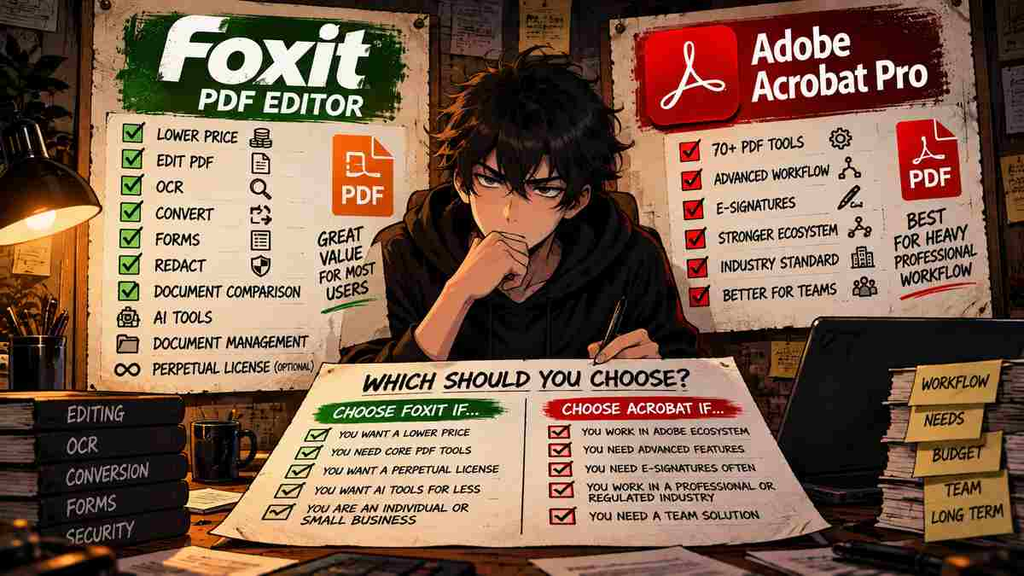
The Upgrade Test
Ask yourself:
What repeated PDF problem does this solve every week?
Good answers:
- I edit client PDFs every day.
- I OCR scanned documents every week.
- I compare contract revisions regularly.
- My team needs standardized document workflows.
- PDF work is part of my paid work.
Weak answers:
- Everyone uses Acrobat.
- Foxit is cheaper.
- AI sounds useful.
- It is on sale.
- I might need it someday.
Then use the simplest test available:
Try Foxit for 14 days with your real documents.
If it handles your actual workflow without friction, you have a strong reason to question the Acrobat premium.
If something important breaks, takes longer, or does not fit your team’s workflow, you have learned exactly what the extra Acrobat money is buying.
That is a better purchasing test than a feature table.
Final Verdict
Adobe Acrobat Pro is still the safer choice for users deeply embedded in professional Adobe workflows.
It is mature, familiar, and loaded with advanced tools.
But Foxit PDF Editor is no longer an easy-to-dismiss alternative.
At current US list pricing, standard Foxit costs $129.99/year versus $239.88/year for Acrobat Pro.
Foxit includes OCR, document comparison, security tools, forms, DMS, and 300 monthly AI credits. It also offers a perpetual license and a 14-day no-card trial. 福昕阅读器
That makes the buying decision surprisingly simple.
If you depend on Adobe’s workflow:
Acrobat Pro can justify the premium.
If you mainly need a powerful PDF editor:
Test Foxit before paying Adobe another $110 every year.
And if you only touch PDFs occasionally:
Skip both paid plans.
Upgrade or Skip Verdict
Adobe Acrobat Pro
Upgrade only if: professional PDF workflows, Adobe integration, and organizational consistency justify the premium.
Foxit PDF Editor
Upgrade if: you regularly edit PDFs and want most professional tools at a lower annual cost.
Casual PDF Users
Stay Free.
A good product can still be a bad purchase.
FAQ
Is Foxit PDF Editor cheaper than Adobe Acrobat Pro in 2026?
Yes, at current individual US list prices. Foxit PDF Editor is $129.99/year, while Adobe Acrobat Pro is $19.99/month on an annual commitment, or $239.88/year. 福昕阅读器
Can Foxit replace Adobe Acrobat Pro?
For many individual and small-business workflows, Foxit covers the major requirements: editing, OCR, conversion, forms, comparison, redaction, and security. Whether it can replace Acrobat in a specific company depends on integrations and workflow requirements.
Does Foxit have a perpetual license?
Yes. Foxit currently lists PDF Editor 14 as a one-time $209.99 perpetual license. Foxit notes that perpetual versions do not include the current AI Assistant. 福昕阅读器
Does Foxit have a free trial?
Yes. Foxit offers a 14-day PDF Editor+ trial without requiring a credit card. 福昕阅读器
Does Foxit include AI?
Yes. Foxit accounts currently receive 300 AI credits per month. A paid AI Assistant plan provides 2,000 credits per month for $49.99/year. 福昕阅读器
Does Adobe Acrobat have AI?
Yes. Adobe’s current Acrobat AI tools can summarize documents, answer questions, generate insights, and perform certain editing actions through AI Assistant. Access depends on the Adobe product and plan. Adobe 帮助中心
Is Foxit PDF Editor good for small businesses?
Its current feature set includes editing, OCR, conversion, document comparison, security, forms, DMS, and business licensing options, making it relevant to small-business workflows. The better purchase depends on whether those features are used frequently enough to justify the subscription.
Should I buy Foxit if I only edit PDFs occasionally?
Probably not. Foxit provides a free Reader and free online tools for lighter tasks. Try those first before adding another subscription. 福昕阅读器
Sources
- Foxit PDF Editor Pricing & Plan Comparison
- Foxit PDF Editor Official Product Page
- Foxit PDF Editor Free Trial
- Foxit AI Assistant
- Foxit AI Pricing & Credit Limits
- Adobe Acrobat Plan Comparison
- Adobe Acrobat Generative AI Overview
- G2 Foxit PDF Editor Reviews
Pricing, plan features, AI limits, trials, and review counts can change. Information checked September 2026.
Next Up
Smallpdf Pro Review 2026: Is It Worth Paying For?
Upgrade smarter. Skip louder.