
Welcome back to Upgrade or Skip.
Adobe Acrobat has been around long enough that “PDF” and “Acrobat” can sometimes feel like the same category.
They are not.
You can read PDFs for free. You can convert PDFs online for free. And there are now plenty of cheaper PDF editors that cover jobs people once automatically turned to Acrobat for.
That means Acrobat Pro has more to prove in 2026 than simply being the familiar option.
In this review, we are looking at what Acrobat Pro actually includes, how it differs from Acrobat Reader and Acrobat Standard, what its subscription really costs, where its advanced PDF tools matter, and which users can reasonably use something cheaper.
Quick Verdict
Adobe Acrobat Pro is a comprehensive PDF editor built for users who regularly edit, convert, OCR, redact, compare, protect, sign, and manage professional PDF documents.
Its biggest strength is not one spectacular feature. It is having a large collection of mature PDF tools inside one desktop, web, and mobile workflow.
The problem is price.
Acrobat Pro currently costs $19.99 per month on an annual commitment billed monthly, or $239.88 per year when prepaid annually. The flexible month-to-month plan costs $29.99 per month.
That is difficult to justify if your PDF routine mostly consists of opening files, signing an occasional document, converting a PDF twice a month, or making minor edits.
Review verdict: Acrobat Pro remains a strong professional PDF package, but casual PDF users should start with Reader, Acrobat’s free tools, or a cheaper editor before committing to Pro.
Key Numbers at a Glance
| Item | Current Details | So What? |
|---|---|---|
| Acrobat Reader | Free | Enough for basic viewing, printing, sharing, and commenting |
| Acrobat Standard | $14.99/month, annual commitment billed monthly | Covers common editing and conversion |
| Acrobat Pro | $19.99/month, annual commitment billed monthly | Adds advanced PDF tools |
| Acrobat Pro Annual Prepaid | $239.88/year | Same $19.99/month equivalent, paid upfront |
| Acrobat Pro Monthly | $29.99/month | More expensive, but flexible |
| Acrobat Studio | $24.99/month, annual commitment billed monthly | Adds AI Assistant and Adobe Express Premium |
| Advanced Pro Tools | 70+ | Includes OCR, redaction, web forms, comparison, and more |
| Pro Cloud Storage | 100 GB | Useful for multi-device document workflows |
Adobe currently describes Pro as including more than 70 advanced PDF tools, while an Acrobat Pro subscription includes 100 GB of Adobe cloud storage.
So what?
The important comparison is not Reader versus Pro.
For many buyers, it is Standard versus Pro.
That $5 monthly difference becomes $60 per year. If you do not use the advanced Pro tools, there is no reason to donate the difference to Adobe.
Acrobat Pro in 10 Seconds
| If You… | Start Here |
|---|---|
| Mostly read, print, comment on, and sign PDFs | Reader / free tools |
| Regularly edit and convert PDFs | Compare Standard and Pro |
| Regularly work with scanned documents | Pro |
| Need permanent redaction | Pro |
| Compare document versions | Pro |
| Only edit PDFs occasionally | Check cheaper alternatives |
| Need Acrobat for one short project | Consider the monthly plan |
| Mainly want Adobe’s AI tools | Compare Pro with Studio / AI Assistant |
What We Checked
This is a research-based review.
We checked Adobe’s current US pricing and subscription terms, Reader versus Standard versus Pro differences, PDF editing and conversion, OCR, document comparison, redaction, forms and e-signature functionality, cloud storage, and Adobe’s current AI product structure.
We also compared Acrobat Pro with PDF products already covered on Upgrade or Skip.
We are not presenting research as hands-on testing.
What Is Adobe Acrobat Pro?
Adobe Acrobat Pro is Adobe’s advanced PDF editing and document-management product.
It goes considerably further than Acrobat Reader.
Reader handles the basic job: opening, viewing, printing, sharing, and commenting on PDF files.
Acrobat Pro adds the tools required to actually work on the document: editing text and images, exporting and converting files, organizing pages, collecting signatures, protecting PDFs, redacting information, creating web forms, working with scans, and comparing document versions.
Adobe currently advertises 70+ advanced PDF features in Pro.
That breadth remains Acrobat Pro’s main advantage.
Acrobat Reader vs Standard vs Pro
| Feature | Reader | Standard | Pro |
|---|---|---|---|
| View and print PDFs | ✓ | ✓ | ✓ |
| Comment and basic PDF interaction | ✓ | ✓ | ✓ |
| Edit PDF text and images | — | ✓ | ✓ |
| Convert / export PDFs | Limited | ✓ | ✓ |
| Organize PDF pages | Limited | ✓ | ✓ |
| Password protection | Limited | ✓ | ✓ |
| Collect e-signatures | Limited | ✓ | ✓ |
| Turn scans into editable PDFs | — | — | ✓ |
| Redact sensitive content | — | — | ✓ |
| Create web forms | — | — | ✓ |
| Advanced document comparison | — | — | ✓ |
Adobe’s current plan comparison positions Standard as the basic editing/conversion package and Pro as the advanced PDF and e-signature package. Pro specifically adds tools such as scan-to-editable-PDF, redaction, web forms, document comparison, and the broader 70+ feature set.
This exposes the most important purchasing question:
Do you actually need the Pro-only tools?
If not, Standard deserves serious consideration.
Adobe Acrobat Pro Pricing in 2026
Annual Commitment, Billed Monthly
Acrobat Pro currently costs:
$19.99 per month
Annual cost:
$19.99 × 12 = $239.88
There is an important catch.
“Billed monthly” does not mean “month-to-month.”
This is an annual commitment.
Annual Prepaid
The current prepaid annual price is:
$239.88 per year
You pay the full annual amount upfront.
Flexible Monthly Plan
The actual month-to-month Acrobat Pro subscription currently costs:
$29.99 per month
If you kept it for 12 months:
$29.99 × 12 = $359.88
That is exactly $120 more than the annual pricing over a full year.
But the monthly plan is currently listed as cancel-anytime with no cancellation fee.
The Cancellation Terms Matter
This is one of the most important details on Acrobat’s pricing page.
Adobe’s annual plan billed monthly is still a yearly contract.
For US subscribers, Adobe states that cancelling after the first 14 days can result in an early termination fee equal to 50% of the remaining contract balance.
For example, imagine seeing:
$19.99/month
and assuming you can subscribe for three months and walk away.
That is not necessarily the contract you bought.
The true flexible monthly plan is the more expensive $29.99 option.
Check the billing type before checkout, not after you decide to cancel.
PDF Editing
Editing is one of Acrobat Pro’s core jobs.
Instead of returning to the original Word, PowerPoint, or design document every time something changes, Acrobat lets you modify text and images inside existing PDFs.
Common tasks include:
- Correcting text
- Editing fonts and formatting
- Adding text
- Replacing or resizing images
- Reordering pages
- Deleting pages
- Organizing document content
For frequent document work, that is useful.
But editing itself is not a strong reason to choose Pro specifically, because Standard also includes PDF editing.
The Pro argument begins when you need the advanced tools layered on top.
PDF Conversion
Acrobat can create PDFs and export PDF content into formats including Word, Excel, and PowerPoint.
This becomes useful when the PDF is not actually the end of the workflow.
A PDF table may need to return to Excel.
A document may need to become editable in Word.
A presentation may arrive only as a PDF.
But basic conversion is no longer unusual.
There are free online converters and cheaper PDF editors everywhere.
So if conversion is your primary requirement, compare alternatives before paying $239.88 a year.
OCR: One of the Strongest Reasons to Choose Pro
OCR — optical character recognition — is where the Pro upgrade becomes more interesting.
A scanned PDF may visually contain text while technically containing only images.
Without OCR, that text cannot be properly searched, selected, copied, or edited.
Acrobat Pro can turn scans into editable PDFs. Adobe lists this capability among Pro’s advanced features.
This matters for:
- Scanned contracts
- Paper forms
- Receipts
- Archived records
- Printed documents
- Old business files
If scanned documents appear in your workflow every week, OCR is a real purchase criterion.
If you use it twice a year, it is a checkbox.
Redaction
Redaction is another Pro feature with a clear professional use case.
Putting a black rectangle over sensitive information is not the same as securely removing that information from a PDF.
Acrobat Pro’s Redact tool can permanently remove selected text and images, and Adobe also provides an option to sanitize the document and remove hidden information.
That matters for documents containing:
- Personal information
- Financial data
- Legal information
- Employee records
- Client information
- Confidential business material
For legal, financial, HR, compliance, and similar workflows, proper redaction can be considerably more important than another fancy editing feature.
Compare Documents
Acrobat Pro can compare two versions of a PDF and identify differences.
Adobe’s Compare Files tool analyzes the documents and produces a report showing the changes. It can compare text as well as graphical differences, and Adobe provides specialized comparison options for scanned documents and other document types.
This sounds boring.
It is.
It can also save a ridiculous amount of time when the alternative is manually checking two 80-page contracts.
Document comparison is particularly useful for:
- Contracts
- Legal documents
- Policy revisions
- Reports
- Specifications
- Client revisions
Again, this is exactly the kind of feature that makes Pro valuable to one user and almost worthless to another.
Forms and E-Signatures
Acrobat’s paid plans include form and signature tools.
Adobe currently lists the ability to create, fill, sign, and send forms as part of Acrobat, while Pro adds web-form creation to its advanced toolset.
This can be useful if documents regularly move from editing to approval to signature.
But if your entire requirement is:
“I need to sign a PDF sometimes.”
you do not need a $239.88 professional PDF suite just to accomplish that.
PDF Security and Protection
Paid Acrobat plans include password protection, while Pro adds advanced functions such as proper redaction.
The distinction matters.
A casual user may only need to password-protect a document.
A professional handling confidential information may need to remove sensitive content permanently before sharing the file.
As the document becomes more important, Acrobat Pro’s deeper toolset becomes easier to justify.
What About Acrobat AI Assistant?
Adobe’s current AI packaging is easy to misunderstand.
Do not assume that a normal Acrobat Pro subscription automatically includes unlimited full AI Assistant access.
Adobe says some Acrobat users may receive a limited number of complimentary AI Assistant requests. Continued full access requires an AI-enabled subscription such as AI Assistant for Acrobat or Acrobat Studio.
Adobe currently advertises the AI Assistant add-on at $1.99/month or $19.99/year on eligible Acrobat plans.
Acrobat Studio currently costs:
$24.99/month on an annual commitment billed monthly
and includes:
- Acrobat Pro
- Acrobat AI Assistant
- PDF Spaces
- Adobe Express Premium
So AI should be treated as a separate purchasing decision.
Acrobat Standard vs Pro vs Studio
| Plan | Annual, Billed Monthly | Main Purpose |
|---|---|---|
| Acrobat Standard | $14.99/month | Core PDF editing and conversion |
| Acrobat Pro | $19.99/month | Advanced PDF workflow |
| Acrobat Studio | $24.99/month | Pro + AI Assistant + expanded productivity tools |
Notice the staircase.
Standard → Pro: +$5/month
Pro → Studio: +$5/month
Very useful. Very monthly.
The question at every step should be:
What repeated task does the extra $60 per year solve?
Cloud Storage and Multi-Device Use
An Acrobat Pro subscription currently includes 100 GB of Adobe cloud storage.
That can be useful when documents regularly move between:
- Office PC
- Laptop
- Phone
- Tablet
- Browser
For users who primarily work on one computer and keep documents locally, the cloud component matters much less.
Useful infrastructure is still only valuable when you use it.
Where Acrobat Pro Makes the Most Sense
Imagine a weekly workflow like this:
- Receive a scanned contract.
- Run OCR.
- Correct information inside the PDF.
- Compare it against an earlier version.
- Redact confidential information.
- Password-protect the finished document.
- Send it for signature.
- Access it later from another device.
Now Acrobat Pro starts to make sense.
Several advanced tools are solving real problems inside the same workflow.
Now imagine this:
- Open PDF.
- Read PDF.
- Close PDF.
You probably just found a cheaper plan.
Acrobat Pro vs PDFelement
PDFelement is one of the more obvious Acrobat competitors for people who still need a serious PDF editor.
There is substantial overlap around:
- PDF editing
- Conversion
- OCR
- Forms
- Page organization
- Document tools
The important question is whether you specifically benefit from Adobe’s ecosystem and Acrobat’s complete workflow enough to justify the subscription structure.
If you mainly need a capable PDF editor rather than specifically needing Adobe, read our PDFelement Review before subscribing.
Acrobat Pro vs Smallpdf Pro
Smallpdf takes a lighter approach.
Its appeal is stronger for users whose PDF work revolves around jobs such as:
- Compression
- Conversion
- Merging
- Signing
- Basic editing
- Quick browser-based tasks
Acrobat Pro is considerably more comprehensive.
But comprehensive and necessary are two different words.
A toolbox with 70+ tools is impressive.
Less impressive when you repeatedly use four.
See our Smallpdf Pro Review if your PDF workflow is lighter.
Who Should Stay With Reader or Free Tools?
You probably do not need Acrobat Pro if you mainly:
- Read PDFs
- Print PDFs
- Add occasional comments
- Fill basic documents
- Sign documents occasionally
- Perform simple conversions
- Merge or compress PDFs occasionally
Start free.
Wait until a repeated limitation appears before buying your way out of it.
Who Should Consider Acrobat Standard?
Standard is easy to overlook because Pro gets most of the attention.
But the current annual-plan difference is:
Standard: $14.99/month
Pro: $19.99/month
Difference:
$5 × 12 = $60 per year
If you regularly edit and convert PDFs but do not need OCR, redaction, document comparison, web forms, or other advanced Pro tools, Standard may be the more rational plan.
Who Should Upgrade to Acrobat Pro?
Pro is better suited to users who regularly:
- Work with scanned PDFs
- Need OCR
- Redact confidential information
- Compare document versions
- Create advanced forms
- Manage professional PDF workflows
- Work with legal, financial, administrative, or client documents
- Need several advanced PDF tools inside one application
The important word is:
Regularly.
Pros
- Comprehensive professional PDF toolset
- Strong editing and conversion functionality
- OCR for scanned documents
- Proper redaction tools
- Document comparison
- Forms and e-signature workflow
- Desktop, web, and mobile availability
- 100 GB cloud storage with Pro
- 70+ advanced PDF features
- Mature Adobe document ecosystem
Cons
- $239.88 annual cost at current Pro annual pricing
- Many casual users will never use most Pro features
- “Annual, billed monthly” is still an annual commitment
- Early termination fees can apply
- True month-to-month Pro pricing is $29.99
- Full AI Assistant access is a separate consideration
- Standard already covers many common PDF jobs
- Cheaper PDF editors overlap with many core features
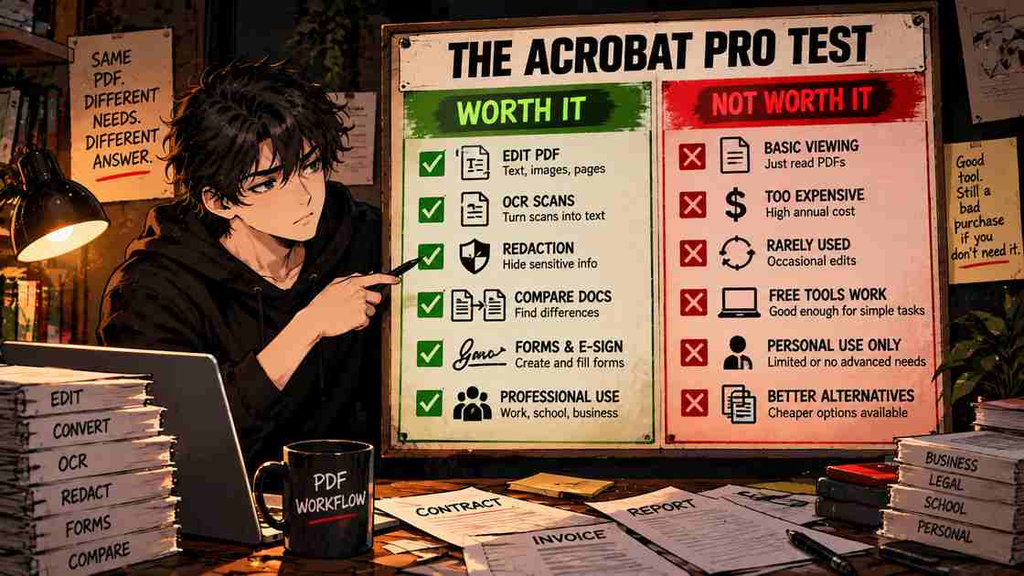
The Upgrade Test
| Question | If Yes | If No |
|---|---|---|
| Do I edit PDFs every week? | Keep evaluating paid Acrobat | Start free |
| Do I regularly OCR scanned documents? | Pro becomes more useful | Standard may be enough |
| Do I need secure redaction? | Pro has a clear use case | Ignore this feature |
| Do I compare long document revisions? | Pro may save meaningful time | Do not pay for the checkbox |
| Would Standard cover my workflow? | Save $60/year | Continue evaluating Pro |
| Do I only need Acrobat for a short project? | Check the flexible monthly plan | Compare annual pricing |
| Will I use the AI tools every week? | Compare Studio / AI Assistant | Stay with ordinary Acrobat |
Final Review
Adobe Acrobat Pro remains one of the most comprehensive PDF packages available in 2026.
Its strongest features are not the basic things every PDF editor now advertises.
Editing and conversion matter, but the stronger Pro argument comes from workflows involving OCR, permanent redaction, document comparison, forms, document security, e-signatures, and repeated professional PDF management.
The weakness is equally clear.
At $19.99 per month on an annual commitment, Acrobat Pro costs $239.88 per year.
That is substantial for software many people use only occasionally.
Acrobat Pro therefore makes the most sense when PDFs are part of your actual work rather than simply a file format you encounter sometimes.
Upgrade or Skip Verdict
STAY FREE if you mostly read, print, sign, or occasionally convert PDFs.
CONSIDER STANDARD if you regularly edit and convert PDFs but do not need the advanced Pro tools.
UPGRADE TO PRO if OCR, redaction, document comparison, advanced forms, or professional PDF workflows solve repeated problems for you.
SKIP PRO if you would be paying for a large advanced toolkit while repeatedly using only basic PDF features.
FAQ
How much is Adobe Acrobat Pro in 2026?
Adobe currently lists Acrobat Pro for individuals at $19.99 per month with an annual commitment billed monthly, $239.88 for an annual prepaid subscription, or $29.99 per month for the flexible monthly plan. Pricing can change.
Is Adobe Acrobat Reader free?
Yes. Adobe currently offers Acrobat Reader free for core PDF viewing, printing, sharing, and commenting.
What is the difference between Acrobat Standard and Pro?
Standard focuses on common PDF editing and conversion. Pro adds advanced capabilities including scanned-document editing/OCR, redaction, web forms, document comparison, and a broader collection of 70+ advanced PDF tools.
Does Acrobat Pro include OCR?
Yes. Adobe lists the ability to turn scans into editable PDFs among Acrobat Pro’s advanced features.
Does Acrobat Pro include AI Assistant?
Full ongoing AI Assistant access should not be assumed to be included with ordinary Pro. Adobe currently provides limited complimentary AI requests in some cases and offers full access through AI-enabled subscriptions such as AI Assistant for Acrobat or Acrobat Studio.
Can I cancel Acrobat Pro anytime?
It depends on the billing plan. Adobe’s flexible monthly plan is currently cancel-anytime. The cheaper annual plan billed monthly is an annual commitment; for US customers, cancelling after 14 days can result in a fee equal to 50% of the remaining contract balance.
Do I need Acrobat Pro just to edit PDFs?
No. Acrobat Standard also includes PDF editing. Pro becomes more relevant when you need advanced tools such as OCR, redaction, document comparison, and web forms.
Is PDFelement an alternative to Acrobat Pro?
Yes. PDFelement overlaps with Acrobat in areas including editing, conversion, OCR, forms, and other PDF tools. If you do not specifically need Adobe’s workflow, compare both before committing to an Acrobat subscription.
Sources
- Adobe Acrobat — Plans and Pricing
- Adobe Acrobat — Standard vs Pro Plan Comparison
- Adobe Acrobat — Compare PDF Files
- Adobe Acrobat Help — Redact Sensitive Content
- Adobe Acrobat Help — Subscription and Cancellation Terms
- Adobe Acrobat Help — Generative AI Usage Policy
- Adobe Acrobat Help — Cloud Storage Limits
Pricing, plan features, AI limits, and cancellation terms may change. Check Adobe’s current pricing and checkout terms before purchasing.
Next Up
Adobe Acrobat Pro vs PDFelement 2026: Which PDF Editor Should You Choose?
Upgrade smarter. Skip louder.