

Welcome back to Upgrade or Skip.
In the last post, we talked about future-proofing.
Or more accurately:
How people turn a perfectly reasonable PC build into a financial incident by adding “just in case” to every part.
Very efficient.
Very expensive.
Today we need to do something important.
We need to admit something the internet sometimes forgets:
Sometimes the answer really is yes.
Upgrade.
Buy the thing.
Replace the part.
Because Upgrade or Skip is not anti-upgrade.
That would be stupid.
Technology improves. Games get heavier. Software evolves. Hardware ages. Your needs change.
The real skill is not avoiding upgrades forever.
It is knowing when one is actually justified.
Not Every Upgrade Is A Scam
This site spends a lot of time criticizing upgrade panic.
That is because upgrade panic deserves it.
The internet has a habit of turning every small issue into a shopping cart decision.
A game stutters once: new GPU.
Chrome feels heavy: more RAM.
One benchmark looks worse: new CPU.
PC makes a noise: motherboard is “dying.”
That is not diagnosis.
That is emotional shopping.
You see this everywhere online. A normal PC build gets posted, one bad frame drop appears, and suddenly the comment section has diagnosed a dying GPU, weak CPU, bad airflow, insufficient RAM, and possibly a cursed power supply.
Very fast.
Very expensive advice.
But the opposite mistake is just as common:
Refusing to upgrade even when your hardware is clearly struggling.
That is not discipline.
That is just suffering with better branding.
The Goal Is Not To Avoid Upgrades Forever
A good upgrade should solve a real problem.
At least one of these:
- fix an actual performance issue
- improve your daily experience
- unlock a workload you already do
- reduce frustration or waiting time
- extend system usability
- improve stability or reliability
- make work or gaming meaningfully better
If none of these happen, you are not upgrading.
You are just rearranging money into RGB shapes.
The Best Upgrade Starts With A Real Problem
Do not start with:
“What should I upgrade?”
Start with:
“What is actually wrong?”
That sounds simple, but most bad upgrades start there.
Because vague questions lead to expensive answers.
If your issue is:
- stutter in crowded areas: could be CPU, GPU, RAM, or bad optimization
- VRAM maxing out: possible GPU memory limit
- slow loading: storage bottleneck
- system crashing: power, thermals, RAM, drivers, or failing hardware
- general slowness: needs diagnosis, not guessing
And if your issue is:
“My friend has a better PC.”
That is not a bottleneck.
That is comparison anxiety.
Upgrade When Problems Are Repeatable
One bad game does not justify a new build.
One broken PC port does not mean your CPU is obsolete.
Real upgrade signals are consistent:
- multiple games show similar issues
- VRAM limits appear across workloads
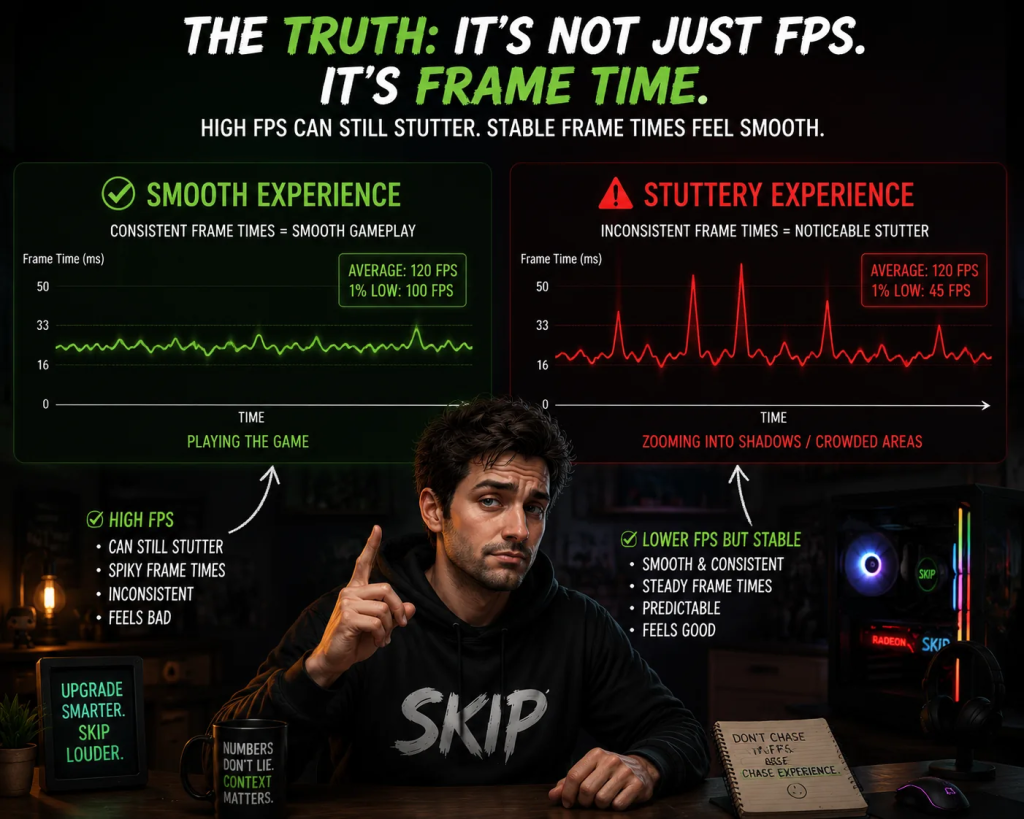
- CPU-heavy games consistently have bad 1% lows
- storage bottlenecks affect multiple tasks
- system memory is constantly maxed out
- crashes or instability happen under repeatable conditions
Patterns matter.
Isolated incidents usually do not.
Upgrade When Settings Stop Helping
Settings fixes are powerful.
We already know that.
Lowering Ultra to High often solves more problems than people expect.
But settings are not infinite solutions.
If:
- High still stutters
- frame pacing remains unstable
- GPU is fully loaded but cannot reach your target FPS
- CPU limits high-refresh performance
- memory or storage is saturated
- the same issue survives driver updates and basic fixes
Then yes — hardware becomes the conversation.
Not because the internet said so.
Because adjustments stopped working.
At that point, you are no longer tuning. You are compensating.
And if you have already lowered settings, disabled ray tracing, updated drivers, checked temperatures, and the game still feels like it is dragging a piano uphill, then pretending settings will fix it is just denial with extra steps.
Upgrade When You Know The Outcome
Good upgrades are defined by outcomes, not parts.
Not:
“I want a better GPU.”
But:
“I want stable 1440p at around 100 FPS.”
Not:
“I need more RAM.”
But:
“I want editing to stop stuttering.”
Not:
“I should future-proof.”
But:
“I want this system to last several years under my actual usage.”
Clarity prevents waste.
Upgrade When The Part Is Actually The Bottleneck
This is where most mistakes happen.
A GPU will not fix CPU limitations.
More RAM will not fix VRAM pressure.
A CPU upgrade will not fix storage issues.
A faster SSD will not increase FPS.
A better PSU will not make your system faster — unless the old one was unstable.
Diagnosis first.
Purchase second.
Check:
- GPU usage
- CPU per-core load
- VRAM usage
- RAM usage
- temperatures
- storage health
- frame-time behavior
- driver issues
- whether the problem appears across multiple games or workloads
Then decide.
Not before.
Upgrade When Reliability Matters
Performance is not the only reason to upgrade.
Sometimes stability matters more.
A failing PSU is not “wait and see.”
A dying SSD is not something to ignore.
Overheating hardware is not “normal behavior.”
Random crashes under load are not “probably fine.”
Some upgrades are not about performance.
They are about preventing failure.
Upgrade When Time Matters
Not all upgrades are about gaming.
Sometimes they are about time.
- faster rendering
- shorter exports
- smoother editing
- quicker loading
- fewer workflow slowdowns
- less waiting in daily tasks
If an upgrade gives you back hours of your week, it is not cosmetic.
It is functional.
This is where creator workloads, local AI tools, video editing, and heavy multitasking change the equation.
A part that makes no sense for gaming alone might make perfect sense for work.
Context matters.
Annoying, but important.
Upgrade When It Is Actually Worth The Price
Price matters.
A good upgrade at a bad price is still a bad decision.
A moderate upgrade at a fair price can be excellent.
Hardware markets are unstable.
Pricing shifts constantly.
“Future-proof deals” are often just marketing dressed as urgency.
So the rule is simple:
Know the problem.
Know the benefit.
Know the price.
Then decide.

Upgrade If:
- Your system consistently fails at what you actually do.
- The problem is clearly identified.
- Basic troubleshooting did not help.
- You are changing workload, resolution, or refresh target.
- The hardware is clearly the limiting factor.
- Reliability is at risk.
- The upgrade improves real experience, not just numbers.
- The price makes sense for the gain.
Skip If:
- You cannot clearly define the problem.
- Your system already feels fine.
- You are reacting to benchmarks or hype.
- You have not done basic troubleshooting.
- The upgrade improves numbers more than experience.
- The issue is isolated to one poorly optimized game.
- The part is not actually the bottleneck.
- The cost is high and the benefit is unclear.
The Upgrade or Skip Take
A good upgrade solves a real problem.
A bad upgrade solves anxiety.
The difference is clarity.
If your system works, keep your money.
If it doesn’t, stop negotiating with reality.
Upgrade smarter.
Not louder.
Next up:
Because the industry is very good at making you feel behind, even when you are not.
Upgrade smarter. Skip louder.