
Welcome back to Upgrade or Skip.
In the last post, we talked about why most gamers do not need a new CPU.
Because apparently every stutter, every frame drop, every weird PC port, and every bad day your computer has is now called a bottleneck.
Very convenient.
Today we move to something even more expensive:
Ultra settings.
The magical word.
The sacred checkbox.
The setting that makes people spend $600 so puddles can reflect emotionally.
If you spend enough time in Reddit build threads, Quora questions, YouTube benchmark comments, and PC performance discussions, you will see the same pattern over and over:
Someone says their PC is struggling.
Someone asks what settings they are using.
They say:
Ultra.
Of course.
Because High is apparently illegal now.
Ultra Is Not A Personality Trait
Let’s get one thing out of the way.
Ultra settings are not bad.
Sometimes Ultra looks great.
Sometimes it adds better shadows, sharper textures, more detailed reflections, improved lighting, better draw distance, or nicer post-processing.
If your PC can handle it comfortably, enjoy it.
That is what the hardware is for.
But here is the part people do not like saying out loud:
Ultra is often the worst value setting in the entire menu.
Not because it never looks better.
But because it often costs a lot more performance than it gives back in visible improvement.
High settings are usually where the game already looks good.
Ultra is often where the game starts charging a luxury tax.
The Performance Cost Is Real
The difference between Medium and High can be huge.
Better textures.
Better lighting.
Better shadows.
Cleaner image quality.
That upgrade is usually visible.
The difference between High and Ultra?
Sometimes obvious.
Often subtle.
Occasionally microscopic unless you stop playing the game, walk up to a wall, zoom into a shadow, and begin your new career as a pixel inspector.
Meanwhile, the performance cost can be brutal.
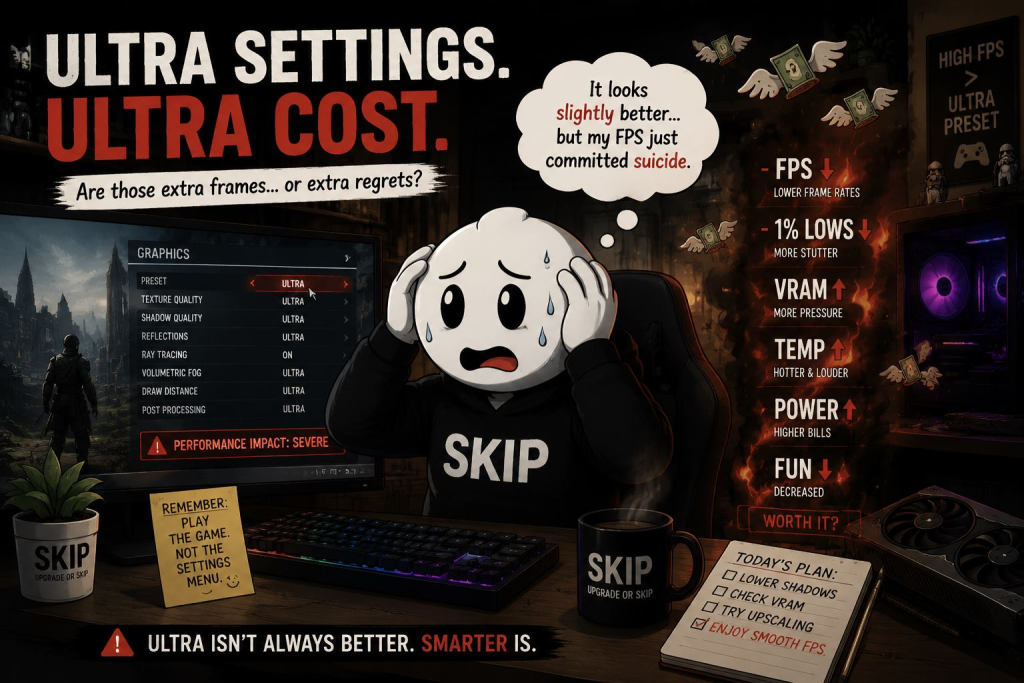
Ultra can mean:
- lower average FPS
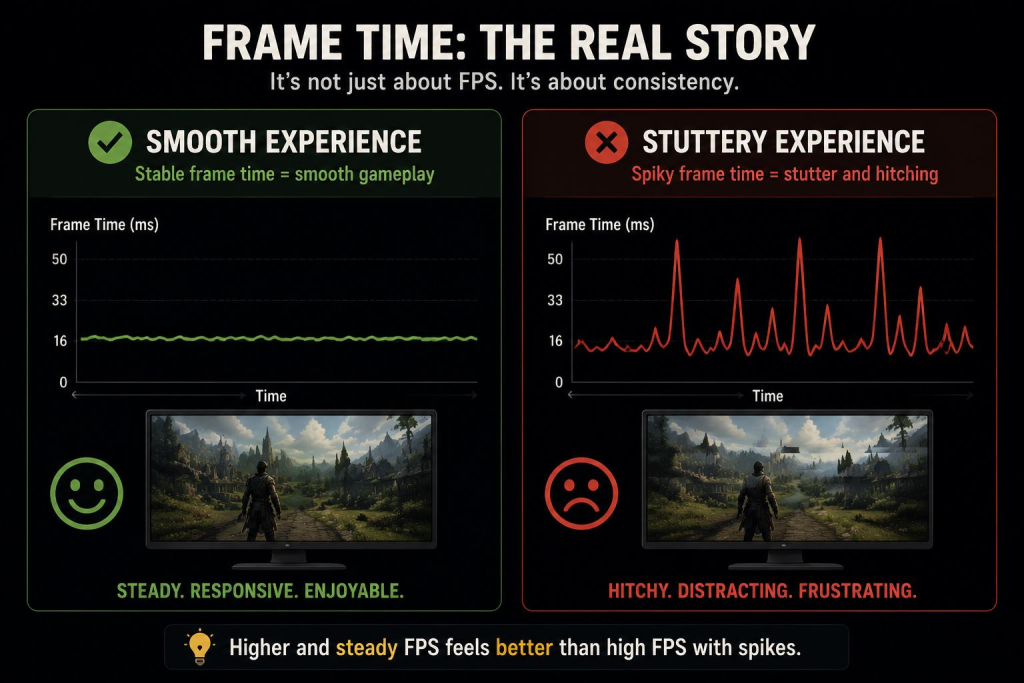
- worse 1% lows
- more VRAM pressure
- higher GPU temperature
- louder fans
- more power draw
- more stutter
- worse frame pacing
- more reliance on upscaling or frame generation
And then people look at the result and say:
“My GPU is getting old.”
Maybe.
Or maybe your GPU is being asked to render a visual difference you only notice when you are not actually playing.
Very normal behavior.
The Real Problem Is Not Ultra. It Is Automatic Thinking.
The problem is not choosing Ultra.
The problem is choosing Ultra automatically.
A lot of gamers open a new game and immediately do this:
Preset: Ultra.
Resolution: Native.
Ray tracing: On.
Texture quality: Highest.
Shadows: Maximum.
Upscaling: Off, because pride.
Then the game runs badly.
Then the upgrade panic begins.
Suddenly the GPU is outdated.
The CPU is bottlenecking.
The RAM is suspicious.
The SSD is not spiritually aligned.
And somehow the first solution is not:
“Maybe I should lower shadows from Ultra to High.”
No.
Too simple.
Better spend several hundred dollars.
The Settings Menu Is Not A Moral Test
Somewhere along the way, PC gaming turned settings into status.
Low means poor.
Medium means embarrassing.
High means acceptable.
Ultra means you are a serious gamer with a clean conscience and possibly too many RGB fans.
This is stupid.
Settings are tools.
Not moral grades.
If lowering a few settings gives you smoother gameplay, better responsiveness, quieter fans, and no meaningful loss in what you actually notice, that is not “settling.”
That is using the PC properly.
A game running at High settings and 100 FPS is often better than the same game crawling at Ultra because you wanted bragging rights in a menu nobody else can see.
You are not playing the settings screen.
You are playing the game.
Some Settings Are Expensive For Almost No Reason
Not all settings are equal.
Some are worth keeping high.
Some are performance traps wearing fancy names.
The usual suspects:
- shadows
- volumetric fog
- screen-space reflections
- ray tracing
- path tracing
- hair and fur simulation
- crowd density
- draw distance
- ambient occlusion
- water quality
- ultra texture packs
Some of these genuinely improve visuals.
Some mostly exist to punish your GPU for having ambition.
Shadows are a classic example.
Going from Low to Medium or High can change the whole look of a scene.
Going from High to Ultra can sometimes cost a shocking amount of performance so a shadow edge looks slightly less rude.
Congratulations.
Your tree shadow now has a graduate degree.
Ray Tracing Is The Biggest “Are You Sure?” Button
Ray tracing is not fake.
It can look excellent.
Better lighting, more realistic reflections, improved global illumination, more convincing scenes.
When implemented well, it genuinely improves image quality.
But ray tracing is also one of the fastest ways to turn a normal settings menu into a financial incident.
And path tracing?
That is not a setting.
That is a GPU stress test with artistic intentions.
Heavy ray tracing and path tracing can look fantastic, but the performance cost is enormous, often requiring upscaling, frame generation, or very expensive hardware to stay smooth.
That does not mean ray tracing is bad.
It means you should treat it like an optional luxury feature, not a default requirement.
Ultra Textures Are Different
Texture quality is one setting where I am more careful.
If you have enough VRAM, higher textures can improve image quality without destroying performance as badly as some other settings.
But if you do not have enough VRAM, ultra textures can become a stutter machine.
This is where VRAM panic actually comes from.
High textures may look excellent.
Ultra textures may look slightly better.
But if Ultra pushes your system into VRAM pressure, the game can feel worse even if the screenshot looks nicer.
That is the trap:
A better still image.
A worse game.
Lovely.
Optimized Settings Are Not Giving Up
This is where performance guides, Reddit tuning posts, YouTube breakdowns, and forum discussions are actually useful.
Not the comment saying:
“Just buy a new GPU.”
Very helpful. Thank you.
I mean the people who test settings one by one and figure out what actually matters.
Optimized settings usually mean:
Keep the visible stuff high.
Lower the expensive nonsense.
Use upscaling when it looks good.
Turn off features that destroy frame pacing.
Get most of the image quality with much better performance.
That is not cheating.
That is literally the advantage of PC gaming.
The Community Pattern Is Always The Same
One group says:
Ultra or nothing.
The other group says:
Try High, lower shadows, check VRAM usage, use DLSS/FSR/XeSS if it looks good, and stop treating presets like religion.
The second group sounds boring.
The second group is usually saving people money.
The Hidden Costs Go Beyond FPS
Ultra settings do not just cost performance.
They also affect the whole system:
- higher temperatures
- louder fans
- more power draw
- more stutter
- worse responsiveness
- heavier upscaling requirements
- earlier upgrade anxiety
That last one matters.
Because this is how upgrade cycles start.
You choose Ultra.
The game runs worse.
You blame hardware.
You upgrade hardware.
Next game repeats the cycle.
What I Would Lower First
Before buying anything, test this:
- shadows: Ultra → High
- volumetric fog: Ultra → High or Medium
- ray tracing: off or reduced
- reflections: one step down
- crowd density: reduce if CPU limited
- draw distance: slight reduction
- motion blur: off
- textures: only lower if VRAM is the issue
- upscaling: Quality mode if it looks clean
DLSS, FSR, XeSS are not magic, but they are practical tools.
If Quality mode looks good and improves performance, use it.
There is no award for native rendering suffering.
When Ultra Actually Makes Sense
Use Ultra if:
- your PC handles it smoothly
- frame pacing is stable
- you care about visuals more than FPS
- the game shows a clear visual upgrade
- you have enough VRAM
- your system stays quiet and stable
- you are doing screenshots or visual comparisons
That is fine.
Just do not confuse:
“I can run Ultra”
with
“everyone should run Ultra.”
Upgrade If:
- You already optimized settings and performance is still bad.
- Your GPU cannot reach your target FPS even at reasonable settings.
- You want higher refresh gaming and your current hardware cannot deliver.
- Ray tracing or path tracing is a priority for you.
- VRAM limits are causing stutter in real gameplay.
- You are upgrading for actual experience improvement, not just a preset label.
Skip If:
- The game feels smooth after small setting changes.
- Your only issue is not being able to use Ultra.
- High settings look almost identical in motion.
- You mostly play fast-paced games where clarity matters more than static detail.
- The upgrade is mostly for shadows, reflections, or bragging rights.
- You have not tested optimized settings yet.
- You are reacting to benchmark charts instead of gameplay.
The Upgrade or Skip Take
Ultra settings are not evil.
They are just expensive.
Sometimes they are worth it.
Often they are not.
The mistake is treating Ultra as the default and everything else as failure.
That is how playable systems turn into unnecessary upgrade cycles.
If High settings give you smooth performance, stable frame pacing, good image quality, and a quiet system, that is not a compromise.
That is a win.
The internet may not clap for you.
Your wallet will.
Next up:
Stop Buying “Future-Proof” PCs Without Knowing What Future You Mean.
Because apparently the future is always one more expensive part away.
Upgrade smarter. Skip louder.